# Signal Data
> Signal data components: sg-table, sg-pagination, sg-stat, sg-meter, sg-bar-chart, sg-sparkline, sg-list, sg-timeline, sg-badge, sg-avatar, sg-code and sg-kbd.
Source: https://sendbroadcast.net/docs/signal-data
> Coming in Broadcast 3.0. Until then, this page applies only to the Upcoming (edge) build.
These components show information.
## sg-table
A table with sorting, a loading state and an empty state.

```html
```
```javascript
const table = document.getElementById("polls");
table.columns = [
{ key: "name", label: "Poll", sortable: true },
{ key: "answers", label: "Answers", align: "right", sortable: true },
];
table.rows = [
{ name: "Launch poll", answers: 318 },
{ name: "Pricing poll", answers: 92 },
];
```
| Attribute | Default | Meaning |
|---|---|---|
| `columns`, `rows` | | The same as the properties, as JSON |
| `empty-title` | `Nothing here yet` | The title when there are no rows |
| `empty-text` | | The line under it |
| `clickable` | | Rows react to a click |
| Property | Meaning |
|---|---|
| `columns` | Live. A list of column objects |
| `rows` | Live. A list of objects. `null` shows the loading state, and `[]` shows the empty state |
| Column field | Meaning |
|---|---|
| `key` | The field of the row to show, and to sort by |
| `label` | The heading |
| `align` | `right` for numbers |
| `sortable` | `true` makes the heading a sort button |
| `render` | A function: `(row) => text or element` |
| Event | `detail` | When |
|---|---|---|
| `sg-row-click` | `{ row }` | A person clicked a row of a `clickable` table |
A `render` function can return any element:
```javascript
{
key: "status",
label: "Status",
render: (row) => {
const badge = document.createElement("sg-badge");
badge.textContent = row.status;
return badge;
},
}
```
An empty table looks like this:

**Common mistakes.**
- Never setting `rows`. The table shows grey bars forever. Set `rows = []` when a call fails too.
- Changing the list in place with `push`. Nothing redraws. Assign a new list: `table.rows = [...rows, item]`.
- Sorting a `render` column by what it shows. Sorting uses `row[key]`, so keep a sortable value in the row.
- Sorting only sorts the rows the table has, so it does not reach other pages.
- A button in a `clickable` row: its click also counts as a row click. Call `event.stopPropagation()`.
- Forgetting `flush` on the card: the table sits inside extra padding.
## sg-pagination
**Page 1 of 3**, with Previous and Next.

```html
```
```javascript
const pagination = document.getElementById("pagination");
pagination.addEventListener("sg-page", (event) => {
showPage(event.detail.page);
});
```
| Attribute | Default | Meaning |
|---|---|---|
| `page` | `1` | The current page |
| `pages` | `1` | The number of pages |
| Method | Meaning |
|---|---|
| `draw()` | Draws again after you change an attribute |
| Event | `detail` | When |
|---|---|---|
| `sg-page` | `{ page }` | A person clicked Previous or Next |
**Common mistake.** Changing `pages` and not calling `draw()`. See [the table recipe](https://sendbroadcast.net/docs/signal-recipes#a-table-with-search-and-pagination).
## sg-stat
One big number with a label.
```html
```
| Attribute | Meaning |
|---|---|
| `label` | The small text above |
| `value` | The big number |
| `change` | Small text below. Green, or red if it starts with `-` |
| Property | Meaning |
|---|---|
| `value` | Live. Read or set it |
Extra children go below the stat.
```javascript
document.getElementById("total").value = String(data.total);
```
**Common mistake.** Calling `setAttribute("value", ...)` after it draws. Nothing happens. Set the property.
## sg-meter
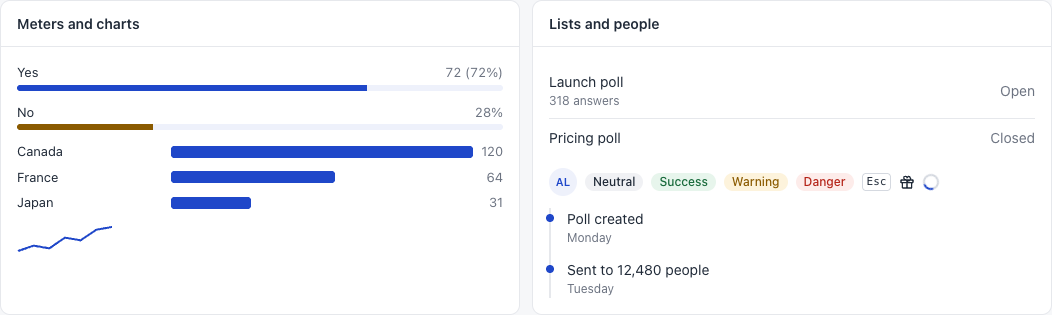
A progress bar with a label.
```html
```
| Attribute | Default | Meaning |
|---|---|---|
| `label` | | The text on the left |
| `value` | `0` | The current amount |
| `max` | `100` | The full amount |
| `detail` | The percent | The text on the right |
| `tone` | Blue | `success`, `warning` or `danger` |
| Property | Meaning |
|---|---|
| `value` | Live. Read or set a number |
| `detail` | Live, set only. The text on the right |
The other attributes are read when it draws.
## sg-bar-chart
Simple horizontal bars.
```html
```
| Attribute or property | Meaning |
|---|---|
| `data` | A list of `{ label, value }`. As a property it is live |
**Common mistake.** Hand-written JSON needs double quotes inside, so use single quotes around it. From code, set the property.
## sg-sparkline
A tiny trend line.
```html
```
| Attribute or property | Meaning |
|---|---|
| `data` | A list of numbers. As a property it is live. It needs two or more |
| `label` | The attribute: a name for screen readers |
## sg-list
Rows with a title, a description and a detail on the right.
```html
```
| Attribute or property | Meaning |
|---|---|
| `items` | A list of `{ title, description, meta }`. Only `title` is required. As a property it is live |
Without `items`, it shows its children as they are.
## sg-timeline
Events in order.
```html
```
| Attribute or property | Meaning |
|---|---|
| `items` | A list of `{ title, time }`. As a property it is live |
## sg-badge
A small colored label.
```html
Open
```
| Attribute | Values |
|---|---|
| `tone` | `success`, `warning`, `danger` or `info`. Leave it out for grey |
**Common mistake.** Giving every row a colored badge. Color means something: use grey for normal states.
## sg-avatar
Initials in a circle.
```html
```
| Attribute | Meaning |
|---|---|
| `name` | A name or an email. The first two parts give the initials |
## sg-code
A box of code or other fixed text.
```html
```
| Attribute or property | Meaning |
|---|---|
| `value` | The text. As a property it is live |
Text between the tags also works, but HTML there is read as HTML. Use `value`.
## sg-kbd
A keyboard key.
```html
Press Esc to close.
```
It has no attributes.