# Signal
> Signal is the UI kit for Broadcast plugin pages: 44 ready-made web components that make a plugin look like part of Broadcast, with no build step.
Source: https://sendbroadcast.net/docs/signal
> Coming in Broadcast 3.0. Until then, this page applies only to the Upcoming (edge) build.
Signal is the UI kit for plugin pages. It gives you 44 ready-made components, such as cards, forms, tables and dialogs. You write a few tags, and your page looks like part of Broadcast.
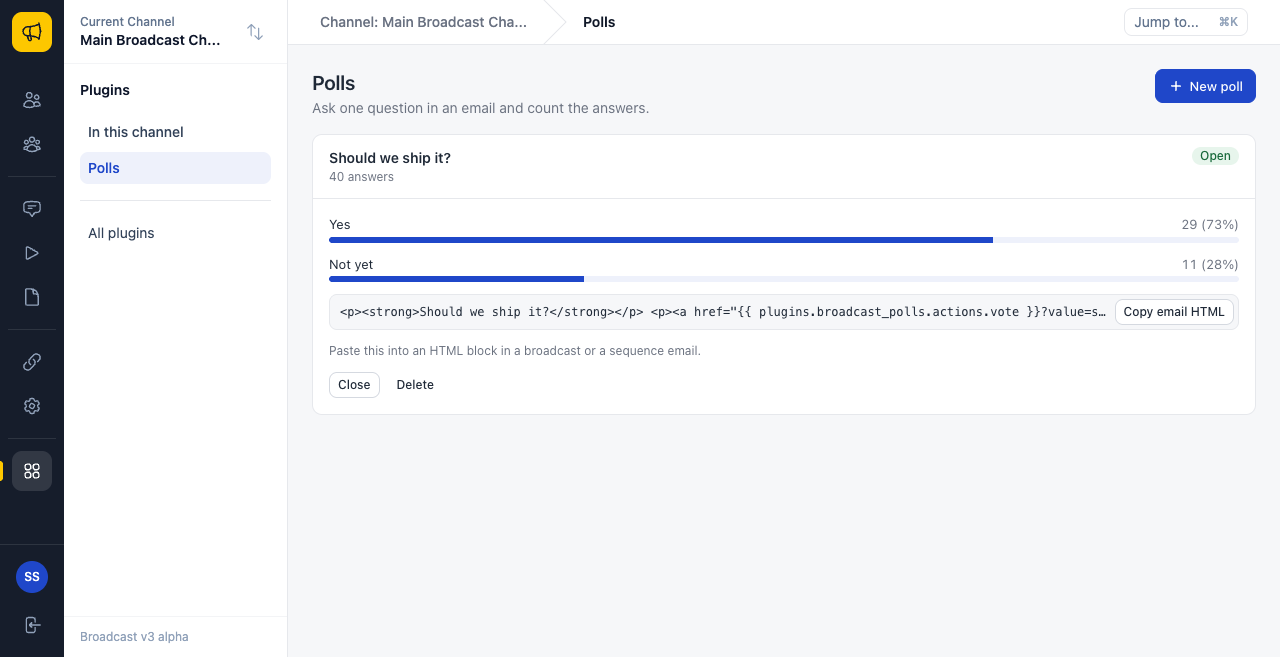
The picture shows the official Polls plugin. Everything to the right of the sidebar is a plugin page, built only from Signal.
## Why Signal exists
Without a kit, each plugin author must solve the same problems:
- Each page looks different from Broadcast, and from every other plugin.
- The sandbox blocks inline styles and scripts, and a junior developer learns that the hard way.
- Talking to Broadcast needs `postMessage` code that is easy to get wrong.
- Forms, tables, empty states and dialogs take days to get right, and more days to make accessible.
Signal solves all four. There is nothing to install and no build step.
## The two lines that load it
Put these lines in the `` of each page:
```html
```
Then put your own script after them, and write tags in the body:
```html
```
```html
This is a card.
Save
```
Your server serves these two files, so you never copy them into your plugin. [Signal Quick Start](https://sendbroadcast.net/docs/signal-quick-start) builds a full page, step by step.
To see every component live, open `/plugin-kit/v1/gallery.html` on your Broadcast server.
## The design language
Signal has opinions. If you follow them, your page feels at home in Broadcast.
**One accent.** Blue (`--sg-accent`) means "this is the thing to act on". Do not add other brand colors. Green, amber and red are for meaning only: success, warning and danger.
**Surfaces.** The page is light grey. Content sits on white cards with a thin border. Use a card to group one topic. Do not put a card in a card.
**One radius.** Controls have 8px corners, and cards have 10px. This comes with the components, so do not change it.
**One primary action on each page.** A page has one main thing to do, and only that button is blue. Everything else is a default or ghost button. If two buttons are blue, nothing stands out.
**Plain words.** Write "Delete poll", not "Confirm" or "Proceed". A button says what it does. An error says what went wrong and what to do next.
## Page anatomy
Most full pages have the same shape:
```text
+----------------------------------------------------------+
| Title [Primary action] | sg-page
| One line that says what this page is for |
| |
| +-----------------------------------------------------+ |
| | Card title [Small act] | | sg-card
| |-----------------------------------------------------| |
| | Content: a form, a table, a list or some stats | |
| +-----------------------------------------------------+ |
| |
| +-----------------------------------------------------+ |
| | The next topic | |
| +-----------------------------------------------------+ |
+----------------------------------------------------------+
```
## Three states for each screen
Each screen that shows data has three states. Plan all three:
| State | Use |
|---|---|
| Loading | `sg-skeleton`. A table with no rows yet shows one for you |
| Empty | `sg-empty` or the table's `empty-title`. Say what will appear here, and offer the first step |
| Failed | `sg.toast` with `tone: "danger"`, or a `sg-banner`. Say what happened |
An empty state is not an error. It is the first thing a new user sees, so make it helpful. "No polls yet. Create a poll, then paste it into an email." tells the reader what to do.
## Six rules for all components
Read these once. They prevent most mistakes.
**1. A component draws once, when it joins the page.** Changing an attribute later does nothing, in most components. Only properties listed as live on each page update the screen, such as `rows` on a table, or `value` on a field or a stat.
**2. Build first, then add to the page.** A card takes its children when it first draws. If you add a child to a card that is already on the page, the child lands outside the card's padding. So make the card, add its children, and then add the card:
```javascript
const card = document.createElement("sg-card");
card.setAttribute("title", "Results");
card.append(makeMeter());
document.getElementById("list").append(card);
```
**3. Load your script after kit.js.** `sg` and all the components come from `kit.js`. If `app.js` runs first, `sg` is `undefined`.
**4. Text is always text.** Attributes and table cells never run as HTML. So `**` shows as those characters, and this keeps your page safe. **5. A true attribute is present.** `disabled` means yes. `disabled="false"` also means no, but it is clearer to leave it out. **6. Bad JSON fails with no error.** An attribute such as `rows` or `items` that holds bad JSON is ignored. If nothing shows, check for typos. ## Find a component | Family | Components | |---|---| | [Signal Layout](https://sendbroadcast.net/docs/signal-layout) | `sg-page`, `sg-section`, `sg-card`, `sg-stack`, `sg-grid`, `sg-divider` | | [Signal Actions](https://sendbroadcast.net/docs/signal-actions) | `sg-button`, `sg-button-group`, `sg-link`, `sg-icon`, `sg-copy`, `sg-menu`, `sg-tooltip`, `sg-dialog` | | [Signal Forms](https://sendbroadcast.net/docs/signal-forms) | `sg-form`, `sg-input`, `sg-date-input`, `sg-textarea`, `sg-select`, `sg-search`, `sg-checkbox`, `sg-switch`, `sg-radio-group`, `sg-tag-input` | | [Signal Data](https://sendbroadcast.net/docs/signal-data) | `sg-table`, `sg-pagination`, `sg-stat`, `sg-meter`, `sg-bar-chart`, `sg-sparkline`, `sg-list`, `sg-timeline`, `sg-badge`, `sg-avatar`, `sg-code`, `sg-kbd` | | [Signal Navigation](https://sendbroadcast.net/docs/signal-navigation) | `sg-tabs`, `sg-accordion` | | [Signal Feedback](https://sendbroadcast.net/docs/signal-feedback) | `sg-banner`, `sg-empty`, `sg-spinner`, `sg-skeleton` | | [Signal Small Frames](https://sendbroadcast.net/docs/signal-small-frames) | `sg-widget`, `sg-panel` | [The sg API](https://sendbroadcast.net/docs/signal-sg-api) covers talking to Broadcast. [Signal Recipes](https://sendbroadcast.net/docs/signal-recipes) has complete examples.**