Lesson 5 9 min read Completed
List hygiene and list-unsubscribe
Keep a list healthy with a sunset policy for inactive readers, make unsubscribing easy with one-click headers, and repair messy data in Broadcast.
A clean list beats a big list. Readers who never open, addresses with typos from signup, and people who cannot find the unsubscribe link all drag your reputation down. In this lesson you build a sunset policy, make leaving easy, and clean up messy data.
Why quiet readers hurt you
Mailbox providers watch engagement. When a large share of your list deletes your mail unread, or never opens it, providers learn that your mail is not wanted, and more of it goes to spam, also for the readers who do want it.
Old addresses carry another risk. Some mailbox providers turn long-abandoned addresses into spam traps. Mail to those tells providers you do not clean your list.
So removing people who stopped reading is not a loss. It protects your reach to everyone else.
Build a sunset policy
A sunset policy decides when you stop mailing someone. A simple one in Broadcast:
- Find the quiet readers. Open Segments, click New Segment, and start from the Inactive (90 days) template: people who have not opened anything in 90 days. Pick a window that fits how often you send.
- Try once to win them back. Build a short sequence, two or three emails, that asks plainly whether they still want your mail. Use the segment as the sequence’s Segment trigger, so people enroll as they match.
- Branch on the answer. Add a condition, such as “any email clicked” with a delay of a week. People who click stay. On the other branch, add a Make subscriber inactive in this channel step. It stops all email to them in the channel.
- Keep them out of campaigns in the meantime. On your broadcasts, add the inactive segment under Exclude.
Segment trigger: Inactive (90 days)
Send two or three emails that ask if they still want your mail
After a week: any email clicked?
Clicked
- They stay on the list
Not clicked
- Make subscriber inactive in this channel
Remember that opens are not exact. Apple Mail Privacy Protection records opens nobody made, and some clients block the pixel. A rule based on clicks is stricter. A rule based on opens is gentler. Both are better than no rule.
Make leaving easy
It sounds backwards, but an easy unsubscribe protects you. A reader who cannot find the way out clicks “Report spam” instead, and a complaint costs you far more than an unsubscribe.
Two headers make leaving easy:
List-Unsubscribegives mail apps a URL for unsubscribing. Gmail, Yahoo, Apple Mail and Outlook use it to show an Unsubscribe button next to your name.List-Unsubscribe-Post: List-Unsubscribe=One-Clickmakes that button work in one click, defined in RFC 8058. The mail app sends a POST to the URL, and the person is unsubscribed without opening a page.
- Reader clicks Unsubscribe Next to your name in the mail app
- Mail app sends a POST To the unique, signed URL
- Unsubscribed
Since 2024, Gmail and Yahoo require one-click unsubscribe on bulk marketing mail, a visible unsubscribe link in the body as well, and opt-outs processed within two days.
How Broadcast handles unsubscribes
Broadcast adds both headers by default on each email server, with a unique, signed URL per subscriber. Check it on each server under Settings → Email Servers: Include unsubscribe header should be on for any server that sends marketing. Turn it off only on a server dedicated to transactional mail.
The channel’s email footer adds the visible link to every broadcast and sequence email. Set it under Sender Details with {{ unsubscribe_url }}, next to your physical address.
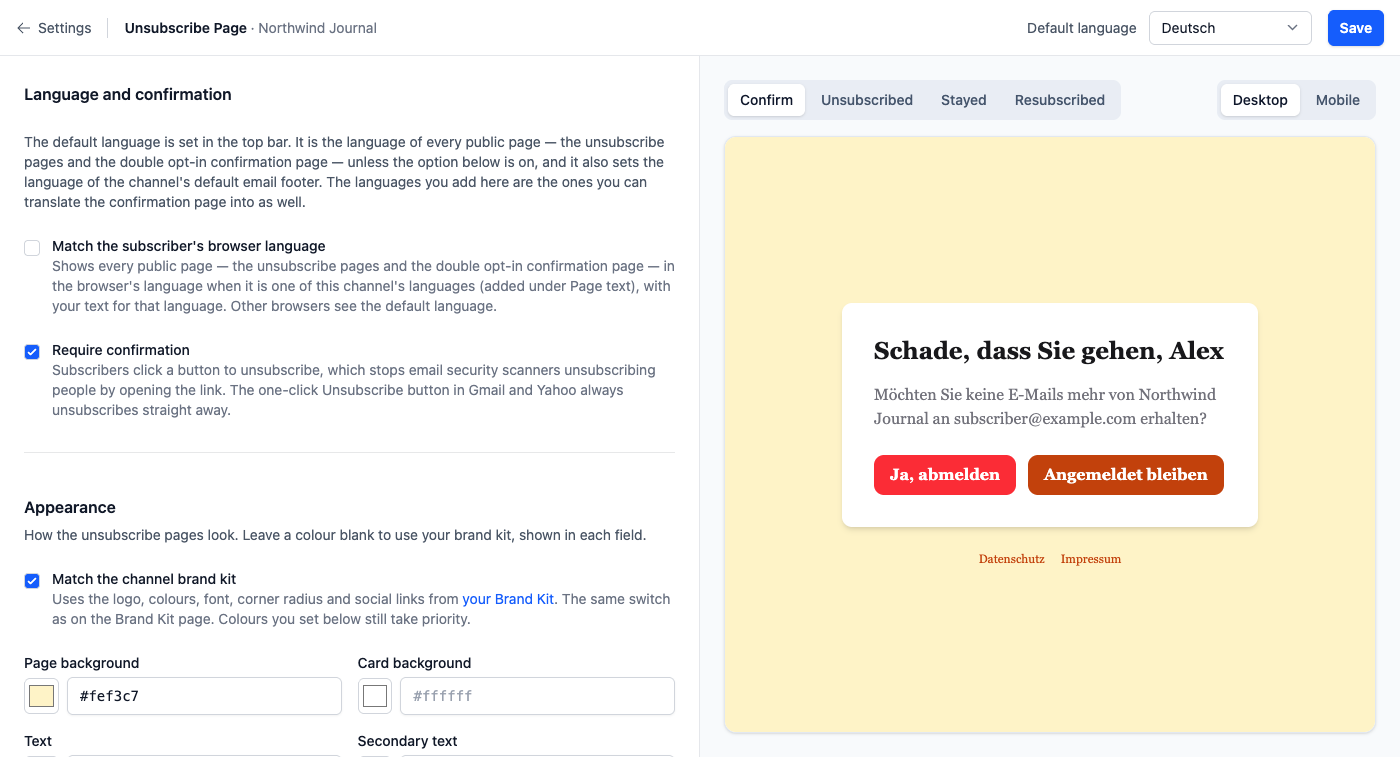
Require confirmation, under Settings → Unsubscribe Page, solves a modern problem. Some email security tools open every link in an email to scan it. Without confirmation, those scanners would unsubscribe people who never clicked. With it on, the link in the body shows a Yes, unsubscribe page first. The one-click button in Gmail and Yahoo still unsubscribes at once, because it is the reader’s own request and scanners do not press it.
Give people a softer exit too. With topics, the unsubscribe link on a topic email turns off only that topic, and the preference page at {{ preferences_url }} lets readers choose what they get. Many people want less email, not none.
Warning
An unsubscribe must stick. If a later import or API sync subscribes the person again, complaints follow. Broadcast’s suppressions survive a reactivation, but an API create for an existing address does resubscribe it, so check your sync code.
Clean up messy data
Lists collect damage over the years: addresses with stray spaces or capitals, duplicates, dates in the wrong format. Open Settings → Maintenance. Each task scans the whole channel first, shows what would change, and changes nothing until you click apply.
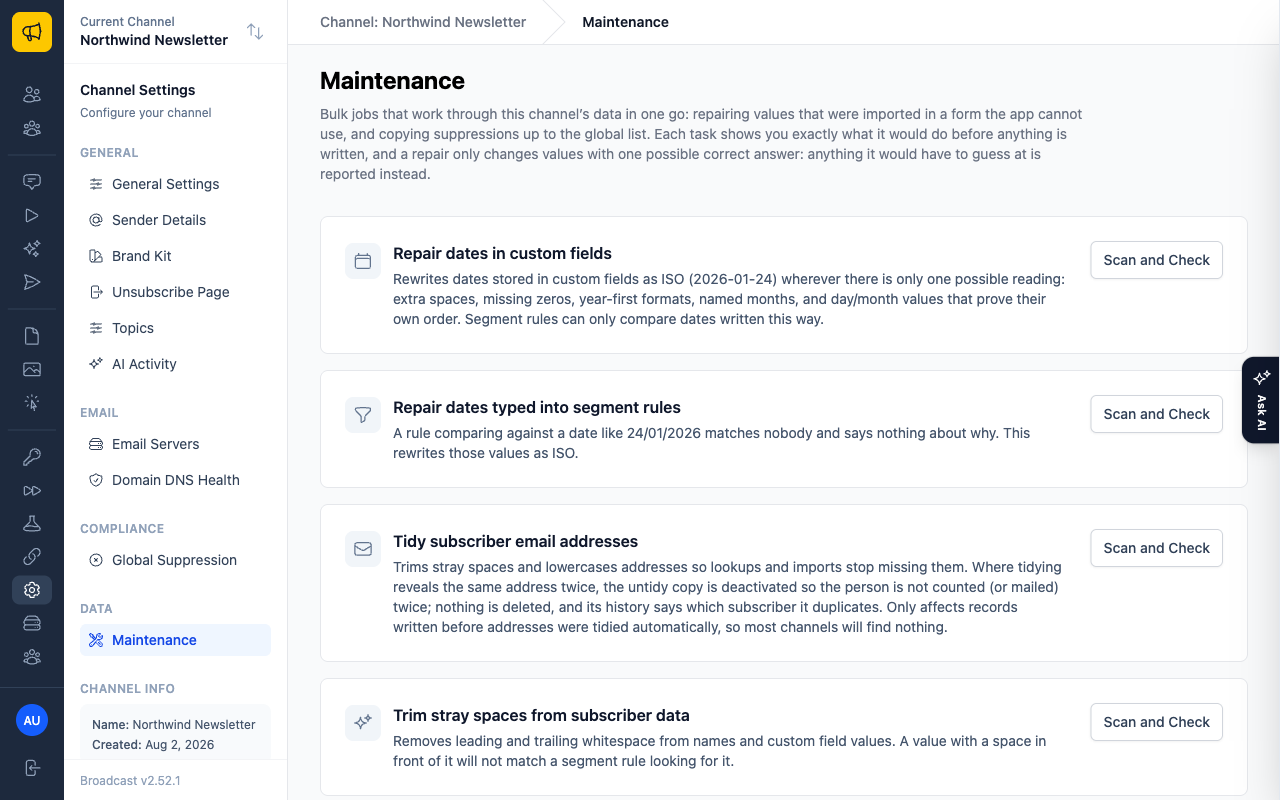
- Tidy subscriber email addresses trims spaces and lowercases addresses. When two records turn out to be one person, the extra copy is deactivated, so that person stops getting your mail twice.
- Trim stray spaces from subscriber data fixes names and custom fields, so segment rules match.
An apply cannot be undone, so read the scan first.
To remove a known set of addresses, such as a list of bad addresses from a validation service, use Deactivate subscribers in the menu next to Add subscriber. Upload a plain text file, one address per line, up to 5,000 per file.
A routine that works
- After every send: check Bounce and Spam on the broadcasts list.
- Every month: review the inactive segment and run the re-engagement sequence.
- Every quarter: run the maintenance scans.
- Every send Check Bounce and Spam
- Every month Review the inactive segment, run the re-engagement sequence
- Every quarter Run the maintenance scans
See the List-Unsubscribe header and Unsubscribe settings.
What you learned
- Readers who never engage hurt delivery to everyone else. Sunset them.
- Use the Inactive segment, a re-engagement sequence and the Make subscriber inactive in this channel step.
- One-click unsubscribe headers are on by default in Broadcast and required by Gmail and Yahoo.
- Require confirmation protects you from link scanners, and Settings → Maintenance repairs messy data.
Go deeper in the docs
Check what you learned
PassedAnswer all 3 questions correctly to complete this lesson.