Lesson 2 9 min read Completed
SPF, DKIM, DMARC alignment
Understand what SPF, DKIM and DMARC each check, why a record can pass and DMARC still fail, and how to reach aligned authentication with Broadcast.
Most senders know they need SPF, DKIM and DMARC. Fewer know why all three can be “set up” and mail still fails. The answer is alignment. In this lesson you learn what each record checks, how DMARC ties them to your From address, and how to reach a setup that passes for the right reason.
Three checks, three different domains
An email carries more than one domain, and each check looks at a different one.
- The From domain is what the reader sees, such as
news@example.com. DMARC protects this one. - The envelope sender, also called the Return-Path or bounce domain, is where bounces go. Readers never see it. SPF checks this domain: is the sending server listed in its SPF record?
- The DKIM signing domain is the
d=value in the DKIM signature. DKIM checks that the signature is valid for this domain.
Here is the catch. When you send through a provider, the envelope sender and the DKIM domain can both belong to the provider, not to you. SPF passes, DKIM passes, and yet neither says anything about example.com.
From
news@example.com
- The reader sees this
- DMARC protects it
Envelope sender
Belongs to the provider
- Readers never see it
- SPF checks it
DKIM d=
Belongs to the provider
- In the signature
- DKIM checks it
What alignment means
DMARC closes that gap. A message passes DMARC when at least one of these is true:
- SPF passes, and the envelope sender domain aligns with the From domain.
- DKIM passes, and the
d=domain aligns with the From domain.
Aligned means the same domain. In relaxed mode, which is the default, the same organizational domain is enough: a signature from mail.example.com aligns with a From of example.com. In strict mode the names must match exactly. Start relaxed.
So a pass for the provider’s domain is not enough. You need a pass for your domain.
DMARC fails
- SPF passes for the provider’s domain
- DKIM passes for the provider’s domain
- Neither aligns with
example.com
DMARC passes
- SPF passes for the provider’s domain
- DKIM passes with
d=mail.example.com - One aligned pass is enough
example.com.How to get DKIM aligned
DKIM alignment is the one to get right first, because it survives forwarding better than SPF does.
- Verify your sending domain at your provider, not only a single address.
- Publish the DKIM records the provider gives you. Amazon SES gives you three CNAMEs. Postmark and others give you one record with a selector.
- Check that the provider now signs with
d=set to your domain. Send yourself a test and look at the headers, or check the DMARC reports.
When you use Guided Setup in Broadcast, the wizard reads the domains your provider has verified. For a domain to count as verified for a sender identity, Broadcast needs the provider to report both DKIM and SPF as verified.
How to get SPF aligned
For SPF to align, the envelope sender must be on your domain. Providers call this a custom Return-Path or custom MAIL FROM. You set a subdomain, such as bounce.example.com, at the provider and publish the records it gives you there.
Remember the SPF rules while you do this. A domain has one SPF record. If you send through two services, merge them into a single record. Two SPF records is a failure, not a backup. SPF also allows at most 10 DNS lookups, so a record with many include: entries can break without warning.
How Broadcast shows this
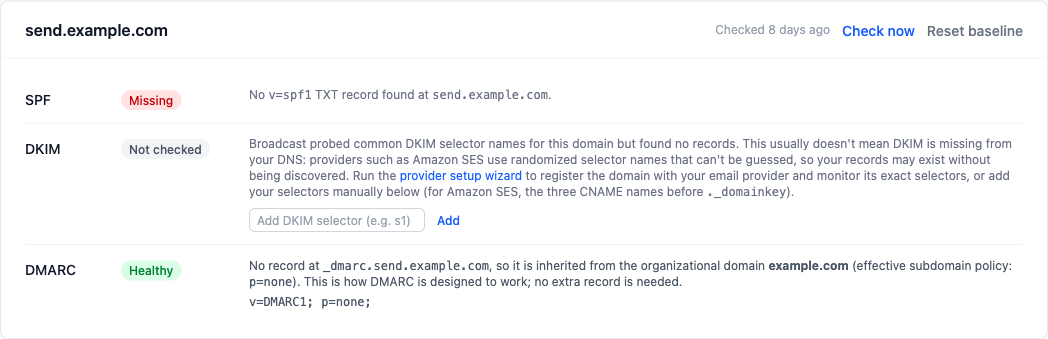
Open Settings → Email → Domain DNS Health. Each sending domain has a row for SPF, DKIM and DMARC.
With a custom Return-Path, SPF is checked at the bounce domain, not your From domain. So when your provider has verified the domain, Broadcast shows SPF as Covered by provider instead of a red Missing. The same goes for DKIM when the provider uses random selector names that Broadcast cannot guess.
DKIM present is not the same as DKIM aligned. If DKIM shows Healthy but DMARC reports still show failures, check the d= domain. The DKIM alignment guide walks through it.
Roll out DMARC in steps
A DMARC record lives at _dmarc.example.com. When a domain has none, Broadcast suggests one:
v=DMARC1; p=none; rua=mailto:dmarc-reports@example.com
The p= value is the policy for mail that fails:
p=none: deliver it, but send reports. Start here.p=quarantine: put failing mail in spam.p=reject: refuse failing mail.
The rua= address receives daily aggregate reports from receivers. Read them for a few weeks. They list every service that sends as your domain, including ones you forgot, such as a help desk or a billing tool. Fix each one, then move to quarantine, then to reject.
p=noneDeliver it and send reportsp=quarantinePut failing mail in spamp=rejectRefuse failing mail. This is the goal
Warning
Never start at p=reject on a domain you have not observed. A forgotten service that sends your invoices would have its mail refused.
One record covers subdomains. If you send from news.example.com and there is no record at _dmarc.news.example.com, receivers use the record at example.com. Broadcast reads it the same way and shows the inherited policy. Do not add copies per subdomain: they can drift from your main policy.
When a record breaks later
DNS changes. A registrar move or a colleague editing SPF can break alignment months after you set it up. Broadcast checks every 6 hours and raises an alert after 2 failed checks in a row. If you changed a record on purpose, click Reset baseline. See fix DNS authentication.
What you learned
- SPF checks the envelope sender, DKIM checks the
d=domain, DMARC protects the From domain. - DMARC passes when SPF or DKIM passes for a domain that aligns with the From domain.
- Align DKIM by verifying your domain, and SPF with a custom Return-Path.
- Roll DMARC out from
p=nonetoquarantinetoreject, guided by the reports.
Go deeper in the docs
Check what you learned
PassedAnswer all 3 questions correctly to complete this lesson.