Lesson 4 9 min read Completed
Bounces, complaints, and suppression lists
Tell hard bounces from soft bounces, learn why complaints matter most, and see how Broadcast's suppression lists stop you mailing addresses that hurt you.
Every bounce and every spam complaint is a vote against your reputation. Mailbox providers notice when you keep mailing addresses that do not exist, or people who said no. In this lesson you learn to read bounces and complaints, and how Broadcast’s suppression lists protect you from mailing the same bad addresses twice.
Hard bounces and soft bounces
A bounce is an email the receiving server refused. There are two kinds, and they need opposite responses.
A hard bounce is permanent. The reply has a 5xx code, most often 550 5.1.1: the mailbox does not exist. Other causes are a domain with no mail server, or a permanent block. Every later email to that address is wasted, and providers read repeated attempts as a sign that you do not clean your list. Suppress it at once.
A soft bounce is temporary. The reply has a 4xx code: a full mailbox, a server that is down, greylisting, or throttling. The sending service retries, and most get through. An address that soft bounces send after send, such as a mailbox full for months, should be treated as hard.
A sudden wave of soft bounces from one provider, such as many 421 replies from Gmail or Microsoft, is usually not about the addresses. That provider is slowing you down. Send more slowly and check your authentication and complaint rate.
Hard bounce
Permanent, 5xx
- Often
550 5.1.1 - The mailbox does not exist
- Suppress it at once
Soft bounce
Temporary, 4xx
- Full mailbox, server down, greylisting
- The sending service retries
- Most get through
Complaints matter most
A complaint is a reader who clicked “Report spam”. It is the strongest negative signal you can get, and a rising complaint rate needs a review of your list and your consent, not a technical fix.
Keep these limits in mind:
- Bounces: under 2% is healthy for a list you mail regularly.
- Complaints: Gmail asks bulk senders to stay under 0.1% and never reach 0.3%.
- Amazon SES reviews an account at a 5% bounce rate or a 0.1% complaint rate, and can pause sending at 10% bounces or 0.5% complaints.
Check both on the broadcasts list after every send, in the Bounce and Spam columns.
How Broadcast learns about them
Your email provider reports bounces and complaints through ESP webhooks. When one arrives, Broadcast does three things:
- Marks that email as bounced or complained.
- Deactivates the subscriber, with a history entry such as “Bounced (Unsubscribed) [Webhook]”.
- Adds the address to the channel suppression list, with the provider’s reason.
Broadcast also catches one kind of hard bounce without webhooks. When an SMTP server refuses an address at send time because it does not exist, Broadcast records it the same way, with “[Send]” in the history. Bounces reported later, and every complaint, still need webhooks. Without them, your activity looks better than it is and you keep mailing dead addresses.
On Amazon SES, Suppression List Sync on the email server imports SES’s own account-level list, including bounces from before you connected Broadcast.
What each suppression blocks
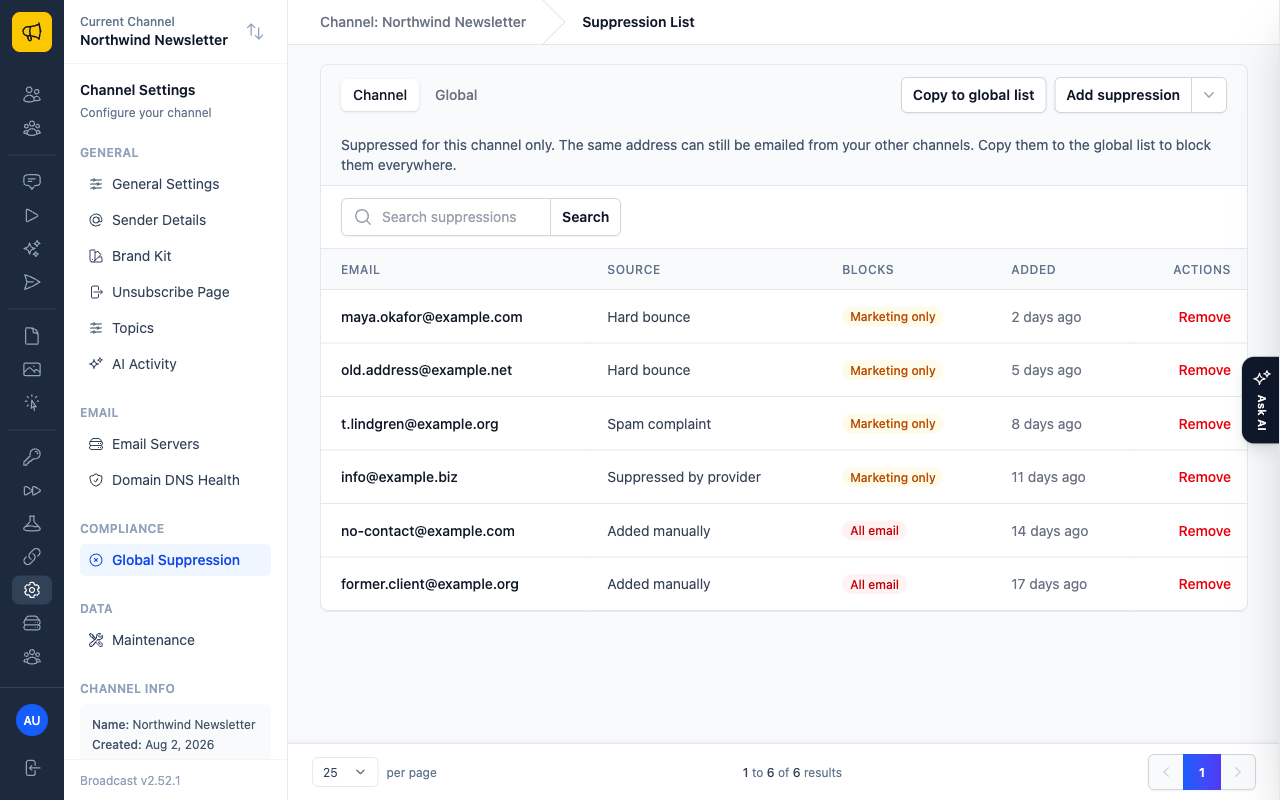
Open Settings → Global Suppression. There are two tabs, Channel and Global. Each entry shows its source and what it blocks.
- Added manually, Imported or API, the entries you add yourself: block all email, including transactional.
- Hard bounce, spam complaint, or suppressed by provider: blocks marketing only, so broadcasts and sequences. Transactional mail still goes, because a complaint about a newsletter should not stop a password reset.
One exception: in Settings → General Channel Settings, Hard bounces also block transactional email makes hard bounces block transactional mail too.
When an address has several sources, the strongest wins. Adding an address yourself upgrades a provider suppression to block all email.
Entries you add
Blocks all email
- Added manually
- Imported
- API
Entries from your provider
Blocks marketing only
- Hard bounce
- Spam complaint
- Suppressed by provider
Warning
Reactivating a subscriber, by import, API or resubscribe, does not remove their suppression. It keeps blocking email until you remove it by hand. Remove a suppression only when you are sure.
Channel or global
Automatic suppressions are always channel suppressions. Nothing is ever added to the Global tab on its own. If a bounced address seems missing, look at the Channel tab first.
That matters when you run several channels. A hard bounce in one channel is a dead address in every channel. To share what one channel learned, click Copy to global on the Channel tab. Broadcast shows how many addresses it would copy before it writes anything, and running it again adds nothing new.
Bring your old suppressions with you
Moving from another platform? Export its hard bounces and complaints before you import subscribers, and upload them under Settings → Global Suppression: open the menu next to Add suppression and choose Upload email list. The file is plain text, one address per line. Imports then skip those addresses.
When a broadcast bounces a lot
Open the broadcast’s Recent Activity and use the Bounced filter. The reason under each bounce is the diagnosis. Hard bounces from a fresh import mean the list was old. Blocks or rejections mean a reputation or authentication problem, so start with lesson 2. See bounces and delivery failures.
What you learned
- Hard bounces (5xx) are permanent: suppress them. Soft bounces (4xx) are temporary.
- Complaints matter most. Keep them under 0.1%.
- ESP webhooks drive auto-suppression into the channel’s list. Nothing goes to Global by itself.
- Your own suppressions block all email. Provider suppressions block marketing only.
Go deeper in the docs
Check what you learned
PassedAnswer all 3 questions correctly to complete this lesson.