Lesson 4 9 min read Completed
Domain names and DNS authentication
Learn the two domains Broadcast uses, the SPF, DKIM and DMARC records your sending domain needs, and how Domain DNS Health watches them.
DNS is where most new senders lose a day. In this lesson you learn which domains Broadcast uses, which DNS records each one needs, and how Broadcast tells you when a record breaks. You fix the records once and then let Broadcast watch them.
Two kinds of domain
Broadcast uses domains for two different jobs. Keep them apart in your head.
The link domain. This is where your dashboard lives, set during the install, such as broadcast.example.com. Broadcast builds every link in your emails on it: unsubscribe links, tracking pixels, click tracking, opt-in form URLs and file links. It needs an A record that points at your server, which you added in lesson 3.
The sending domain. This is the domain in your From address, such as news@example.com. Mailbox providers check it to decide whether the email is really from you. It needs SPF, DKIM and DMARC records, and your email provider tells you their values.
Link domain
Example: broadcast.example.com
- Where your dashboard lives
- Used in every link in your emails
- Needs an A record
Sending domain
Example: news@example.com
- The domain in your From address
- Checked by mailbox providers
- Needs SPF, DKIM and DMARC
A custom link domain per channel
If you run several brands, each channel can use its own link domain. Open Channel Settings → Sender Details, choose the Domain tab, enter the domain under Domain Override and click Update domain. Then point that domain at your server with an A record, or a CNAME to your installation domain.

Without an override, the channel uses the installation domain. Nothing else is needed. After you set one, send a test email and check that the links use the new domain. See Domain names.
The three authentication records
Each record answers a different question for the receiving server.
- SPF lists the services that may send mail for your domain. You get one SPF record per domain. If you send through two services, merge them into one record. Two separate SPF records is a failure, not a backup.
- DKIM puts a signature on each email. The receiving server checks it against a public key in your DNS. Your provider gives you the record, often as one or more CNAMEs with a selector name.
- DMARC tells receivers what to do when SPF or DKIM fails for your domain, and where to send reports. Start with
p=none, read the reports, and move toquarantineorrejectlater.
Warning
Do not start DMARC at p=reject on a domain you have not observed. That is how legitimate mail gets thrown away.
You publish these at your DNS provider. The setup wizards for Postmark, Amazon SES, SendGrid and Mailgun find the domains your provider has verified, and the provider’s own pages give you the exact records. Lesson 5 covers the wizards. The deliverability course explains alignment in depth.
Use a subdomain for sending
The docs recommend a sending subdomain, such as news.example.com, instead of your main domain. A complaint-heavy campaign then hurts the subdomain’s reputation, not the domain your team uses for daily email.
You do not need a separate DMARC record for each subdomain. DMARC on example.com covers its subdomains, and Broadcast reads it that way. When there is no record at _dmarc.news.example.com, Broadcast looks up _dmarc.example.com and shows the inherited policy.
Domain DNS Health watches the records
DNS lives outside Broadcast, so anyone with access to your DNS provider can change it. A registrar move, a CDN that rewrites records, or a colleague who replaces your SPF record can break sending without warning.
Open Settings → Email → Domain DNS Health in a channel. You see one card per sending domain, with a row each for SPF, DKIM and DMARC. Each row has a status:
- Healthy: present and matching the known-good baseline.
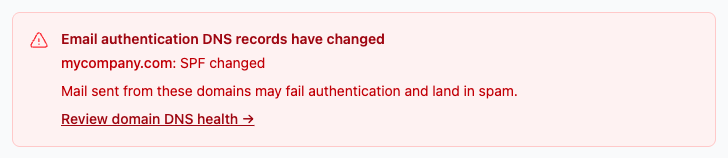
- Missing or Changed: something moved. If it stays that way for 2 checks in a row, Broadcast raises an alert.
- Unverifiable: the DNS lookup failed. This never raises an alert. Check again before you change anything.
- Not checked: no check yet, or no DKIM selectors to look up.
- Covered by provider: your provider verified the domain itself, so a missing SPF record at the From domain or an unknown DKIM selector is not a problem.
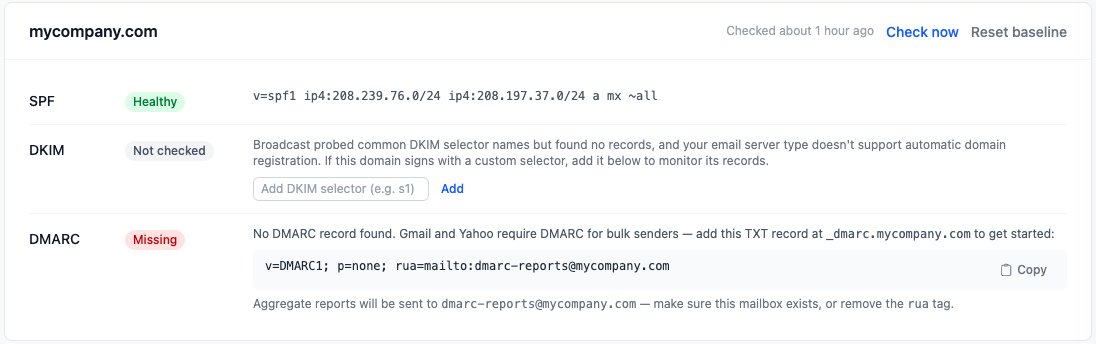
Checks run every 6 hours. Check all now runs them on demand. An alert shows as a red banner on the dashboard and an entry in Error Logs. No email is sent, so look at the dashboard after any DNS work.
When you change a record on purpose
Broadcast saves a baseline the first time it sees a healthy record. If you rotate a DKIM key or edit SPF, the new value reads Changed. Check that the new record is the one you meant, then click Reset baseline on the domain card.
If DKIM stays Not checked, Broadcast does not know your selector. Providers such as Amazon SES use random selector names. Run the provider’s setup wizard, or add the selector by hand in the Add DKIM selector field. Enter only the part before ._domainkey. The DNS authentication guide covers each status and its fix.
What you learned
- The link domain needs an A record. The sending domain needs SPF, DKIM and DMARC.
- One SPF record per domain. Start DMARC at
p=none. - A channel can use its own link domain through Domain Override.
- Domain DNS Health checks every 6 hours. Use Reset baseline after an intended change.
Go deeper in the docs
Check what you learned
PassedAnswer all 3 questions correctly to complete this lesson.