Domain DNS Health
Domain DNS Health automatically monitors the DNS email-authentication records ( SPF, DKIM, and DMARC) of every sending domain in a channel, and alerts when a record goes missing or changes. Because these records live outside Broadcast, in your DNS provider, they can be edited or accidentally removed without warning; this feature catches that drift before it hurts deliverability.
Viewing DNS health
Open Settings → Email → Domain DNS Health within a channel. Viewing the page requires email-server read permission; using the action buttons ( resetting a baseline or managing DKIM selectors) requires email-server write permission.
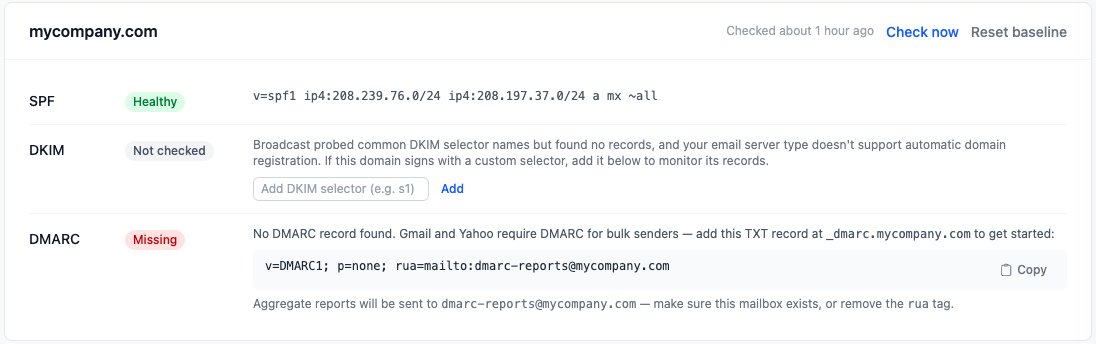
The page monitors the channel’s sender email domain plus any verified domains on active email servers, with one card per domain. Each card shows three rows (SPF, DKIM, and DMARC) with a status badge and the observed DNS record text for each.
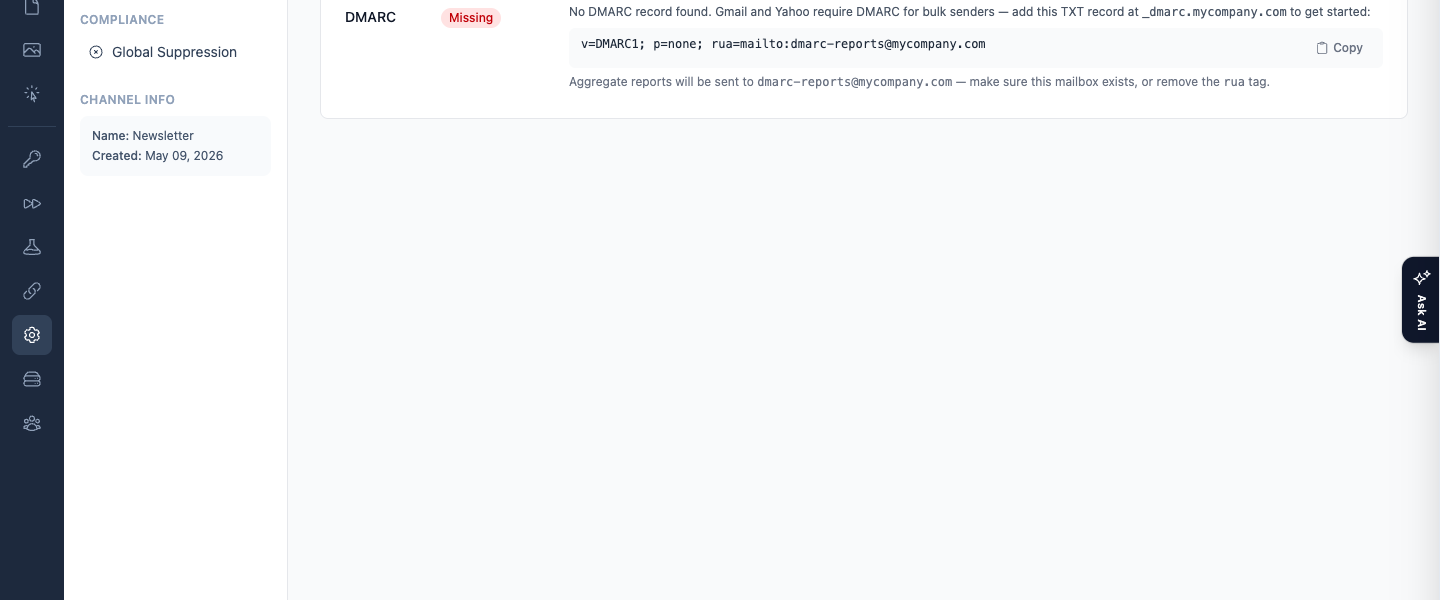
A compact version of this summary also appears on each email server’s detail page, with a View details link through to the full page.
Status meanings
| Status | Badge color | Meaning |
|---|---|---|
| Healthy | Green | The record is present and matches the known-good baseline. |
| Missing | Red | No record was found in DNS. If the record was previously healthy this counts as drift and can raise an alert; a record that was never seen shows setup guidance instead. |
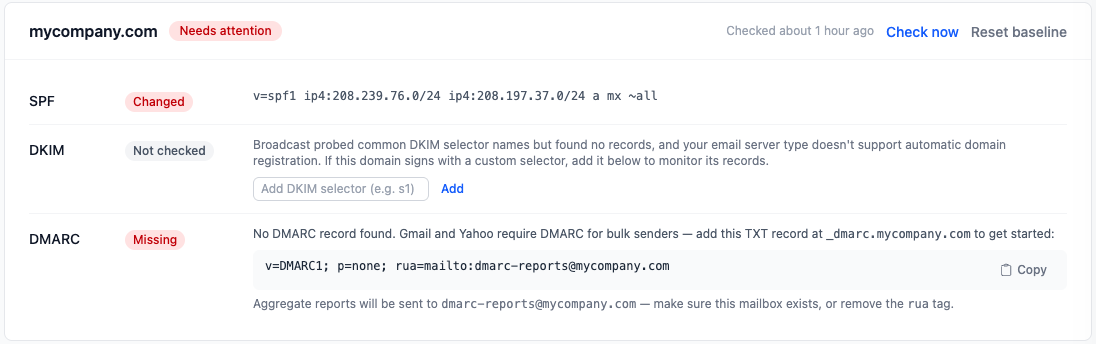
| Changed | Red | The record differs from the known-good baseline. |
| Unverifiable | Gray | The DNS lookup failed or timed out. This never triggers an alert. |
| Not checked | Gray | No check has run yet; or, for DKIM, Broadcast has no selectors to monitor for this domain yet. |
| Covered by provider | Blue | Shown instead of Missing (SPF) or Not checked (DKIM) when your email provider has verified the domain itself. See below. |
Covered by provider
When an active email server’s provider (SES, Postmark, Mailgun and so on) reports that it has verified a domain, Broadcast trusts that verdict on the DNS Health card:
- SPF: with a custom Return-Path (bounce domain), SPF is checked against the bounce domain, not your From domain. A missing
v=spf1record at the From domain is therefore not a problem when the provider has verified the domain or its Return-Path, and the row shows Covered by provider with an explanation instead of a red Missing. - DKIM: providers often sign with randomized selector names Broadcast cannot guess. If the provider confirms DKIM, the row shows Covered by provider instead of Not checked.
This only changes what the card shows. Broadcast still records what DNS actually returned, so baselines and drift alerts work as before, and a domain no active provider has verified still shows an honest red badge.
How and when checks run
Broadcast does direct DNS lookups on a schedule and on demand:
- Automatic checks run every 6 hours.
- Check all now, in the page header, checks every monitored domain at once and runs in the background.
- Check now, on an individual card, checks just that domain.
For SPF and DMARC, Broadcast captures a known-good baseline the first time it sees a healthy record and compares future checks against it. For DKIM, it uses the selector registered during provider setup or, if that isn’t available, probes a set of well-known selector names.
For help setting up SPF, DKIM, and DMARC records in the first place, see Domain Names.
When a record changes
If a record stays drifted (missing or changed) for 2 consecutive checks, Broadcast raises an alert:
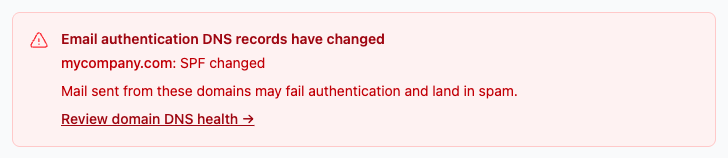
- A red banner appears on the main Dashboard reading “Email authentication DNS records have changed,” listing the affected domains.
- The affected domain’s card shows a red Needs attention pill.
- An entry is raised in the Error Logs: critical severity for SPF or DKIM, warning severity for DMARC. See Monitoring and Logs for how to review and acknowledge those entries.
The alert resolves automatically once the record is healthy again. No email notification is sent for these alerts.
Resetting the baseline
If you intentionally change a DNS record (rotating a DKIM key, adjusting your SPF include list, and so on) the new record will be flagged as Changed until Broadcast learns it’s expected. Click Reset baseline on that domain’s card to re-accept the current DNS as the new known-good baseline, so the change stops being flagged. You’ll be asked to confirm before the reset takes effect.
Setting up DMARC
Subdomains inherit DMARC
DMARC is designed so that one record on your main domain covers its subdomains. If you send from send.example.com and there is no record at _dmarc.send.example.com, Broadcast looks up the organizational domain’s record at _dmarc.example.com instead. The DMARC row then reads Healthy and explains that the policy is inherited from example.com, with the effective policy for subdomains (sp= if the record sets one, otherwise p=).
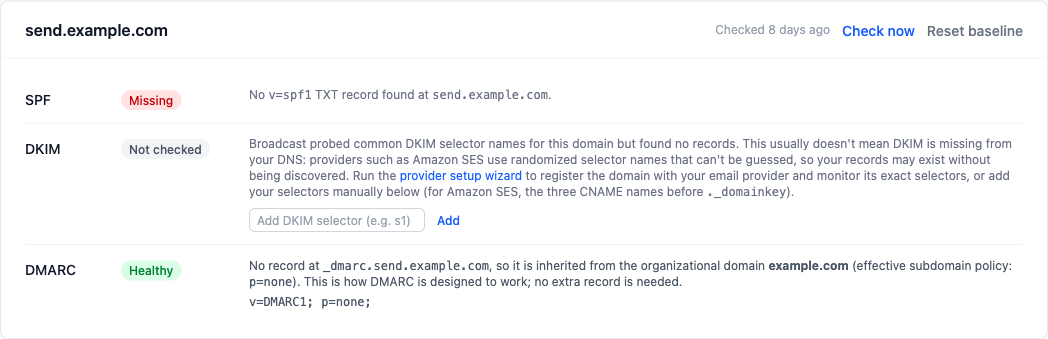
You do not need to publish a separate record for each sending subdomain. Doing so only creates copies that can silently drift from your main policy. Inherited records are baselined like any other, so a change to the main domain’s policy still raises an alert.
When there is no record
If no DMARC record has ever been seen for a domain, or for its organizational domain, its card shows a recommendation rather than an alert, since there’s nothing to compare against yet. The recommendation includes a copy-to-clipboard suggested record:
v=DMARC1; p=none; rua=mailto:dmarc-reports@<your-domain>

Publishing a DMARC record is increasingly expected by mailbox providers ( Gmail and Yahoo’s bulk-sender requirements are the main driver) so domains without one are worth addressing even before any alert would fire.
Manual DKIM selectors
If a domain signs its mail with a custom DKIM selector that Broadcast can’t auto-discover, typically because the email server type doesn’t support automatic domain registration, add the selector manually. On the DKIM row, use the Add DKIM selector (e.g. s1) field, which accepts letters, numbers, and hyphens; each added selector appears as a removable chip.

Note: A manual selector that has never been seen healthy still shows its status on the card, but it doesn’t trigger alerts. This keeps a typo in a selector name from generating a false alarm.
Troubleshooting
“That is not a valid DKIM selector”
That is not a valid DKIM selector. Use letters, numbers and hyphens (e.g. "s1" or "google").
Cause: the selector contains a character Broadcast does not accept, or it starts or ends with a hyphen. The usual mistake is to paste the whole DNS name, such as s1._domainkey.example.com. The underscore in _domainkey is not allowed.
Fix: enter only the part before ._domainkey. For s1._domainkey.example.com, enter s1. For Amazon SES, add each of the three CNAME names one at a time, each without ._domainkey and the domain.
DKIM stays “Not checked”
The DKIM row says Broadcast probed common selector names but found no records.
Cause: Broadcast cannot list DNS records. It can only look up names it knows, and providers such as Amazon SES use randomized selector names. Your DKIM records may exist and work.
Fix: run the provider setup wizard for the domain, so Broadcast learns the exact selectors, or add the selectors by hand as described in Manual DKIM selectors. If your provider has already verified DKIM for the domain, the row shows Covered by provider instead.
“DNS check failed”
DNS check failed for example.com. Please try again.
Cause: the check stopped with an error before it could record a result. Broadcast writes the reason to the application log, in a line that starts with [Settings::DnsChecksController] Check failed for.
Fix: click Check now again. If it keeps failing, search Application Logs for that line. See Monitoring and Logs.
A record shows “Changed” after you edited it on purpose
Cause: Broadcast compares each record with the baseline it saved when the record was last healthy. It cannot tell an intended edit from an accident.
Fix: check that the new record is the one you meant to publish, then click Reset baseline on the domain’s card. See Resetting the baseline.
A record shows “Unverifiable”
Cause: the DNS lookup failed or timed out. This status never raises an alert.
Fix: wait for the next automatic check, which runs every 6 hours, or click Check now. If it stays unverifiable, look up the record yourself with dig TXT example.com from another machine to see whether your DNS provider answers.
