SPF, DKIM, or DMARC is failing
Broadcast checks the DNS records for each sending domain automatically every six hours, and on demand with Check all now. Start at the Domain DNS Health page rather than at your DNS provider, because it tells you what Broadcast actually sees.
What each status means
| Status | Meaning |
|---|---|
| Healthy | Present and matching the known-good baseline. |
| Missing | No record found. If it was previously healthy, this is drift and can raise an alert. |
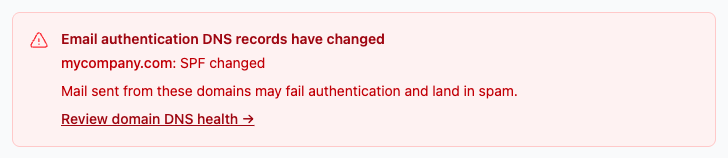
| Changed | The record differs from the known-good baseline. |
| Unverifiable | The DNS lookup failed or timed out. Never triggers an alert. |
| Not checked | No check has run yet, or for DKIM, no selectors are being monitored yet. |
The full documentation covers each of these in detail.
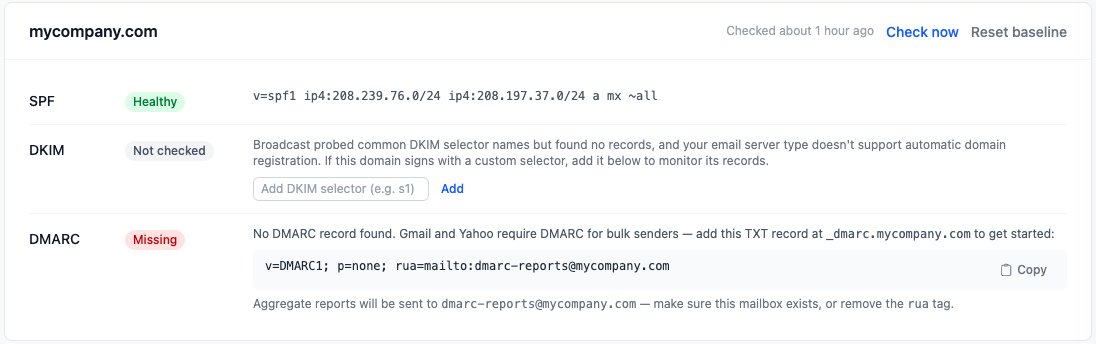
Missing or Changed
Something was edited at your DNS provider. Common causes: a registrar migration, a CDN or mail provider rewriting records, or someone replacing an SPF record instead of merging into it.
- Compare the observed record shown on the domain card against what your provider expects.
- Fix it at your DNS host.
- Re-run the check. DNS propagation means this is not always instant.
- If the new value is correct and intentional, reset the baseline so Broadcast stops flagging it as drift.
A note on SPF: you get one SPF record per domain. If you send through more than one service, they merge into a single record. Two separate SPF records is a failure, not a redundancy. The SPF record generator helps build a correct one.
Unverifiable
The lookup itself failed. This is usually your DNS provider being slow or briefly unreachable, not a record problem. Re-check before changing anything.
DKIM shows Not checked
Broadcast has no selectors to monitor for that domain yet. The documentation covers adding manual DKIM selectors when your provider’s selectors are not discovered automatically.
DKIM being present is not the same as DKIM being aligned. If DKIM passes but DMARC still fails, read DKIM signature alignment.
DMARC
If DMARC is missing, the documentation has a setup section. Start at p=none and
watch the reports before moving to quarantine or reject. Going straight to p=reject
on a domain you have not observed is how legitimate mail gets thrown away. The
DMARC record generator and
DMARC checker help.
After it is green
Authentication being correct does not retroactively fix reputation damage. If mail was landing in spam while records were broken, see emails going to spam.
Send us what the page shows if the fix is not obvious.
