Email Marketing Software Your AI Agent Can Actually Drive
Something shifted in how I work this past year, and I don’t think I’m alone. A large part of my day now runs through a coding agent. I describe what I want, it reads the code, runs the commands, and reports back. The terminal became the interface for more and more of the software I touch.
Email marketing was a gap in that workflow. Almost every tool in the category is built for a human sitting in front of a dashboard: click into a list, drag a segment, fill a form, press send. Hand that to an agent and it stalls. It can’t see the screen. Scraping the UI is fragile and usually against the terms of service. The dashboard is a dead end.
Broadcast 2.0 added a surface built for the other side of that wall. Because Broadcast is self-hosted and already exposes a real REST API, an agent holding a token can operate the whole thing: read your list, draft a campaign, check that the channel is ready to send, and send it. This is a tour of what shipped and why each piece is there.
A dashboard is the wrong interface for a machine
An agent does not want pixels. It wants to ask three questions and get structured answers: what am I holding, what can I do with it, and is the system in a state where doing it will work. A human learns those answers by looking around the UI for a few minutes. An agent needs them handed over as JSON.
So the first thing we shipped in 2.0 was a set of discovery endpoints whose only job is to answer those questions. They sit alongside the fifty-plus API endpoints that were already there for subscribers, broadcasts, sequences, templates, and segments. All of them take a bearer token:
Authorization: Bearer YOUR_ACCESS_TOKEN
whoami, status, prime, skill: four endpoints that orient an agent
There are four of them, and each maps to one of the questions above.
GET /api/v1/whoami answers “what am I holding.” It returns the token’s label, type, and the exact permission map it was granted (subscribers_read, broadcasts_write, webhook_endpoints_read, and so on), plus the channel it’s scoped to. Notably, it never returns the token value itself, only a redacted version like 8779••••••••c8b9. An agent can call this the moment it connects and know precisely what it is and is not allowed to do, before it tries anything.
GET /api/v1/status answers “will this work right now.” It reports the channel’s sender identity, subscriber counts (total and active), and a readiness block that says whether broadcasts, sequences, and transactional email are actually configured well enough to send. It deliberately omits secrets: no API keys, no SMTP passwords. An agent checks status before a send instead of firing an email into a channel that has no email server attached.
GET /api/v1/prime answers “what can I do.” It’s the one call that returns a full capabilities manifest: platform version and host, the token’s permissions, channel status, and the available endpoints grouped by resource, each with method and path. It also includes the current rate limit and a short list of usage tips (things like “look up a subscriber by email before creating a duplicate”). One useful detail: the manifest only lists resources the token can actually reach. Give an agent a read-only subscribers token and it simply will not see broadcast or sequence endpoints in its own capabilities list, so it won’t try to call them.
GET /api/v1/skill answers “how should I behave.” It returns a plain-text Markdown document that teaches an agent the common workflows, safety rules, and error handling for Broadcast. There’s a generic public version at /agents/skill (no auth) and a personalized one at /api/v1/skill that fills in your channel name, subscriber count, and permissions. If you’ve used Claude Code skills or similar, the shape will be familiar: it’s a briefing the agent reads once and then follows.
Put together, an agent can go from a bare token to a complete, accurate mental model of your instance in four requests, without a human describing anything.
Setup links, so you don’t paste a raw token into a chat
Handing an agent credentials is the awkward step. The blunt version is pasting an API token into a chat window, which then lives in that transcript forever.
Setup links are the safer path. From the Agents dashboard you generate a time-limited URL like https://your-instance.com/agents/setup/abc123.... You share the link, the agent fetches it, and it receives a Markdown document with the instance URL, the associated token, its permissions, and quick-start commands, enough to self-configure. The link expires after one hour, can be fetched at most three times, and returns a 404 after that. The slug is 256-bit random. It inherits the permissions of whatever token you attached, so you scope the token narrowly and the link can never do more than the token could.
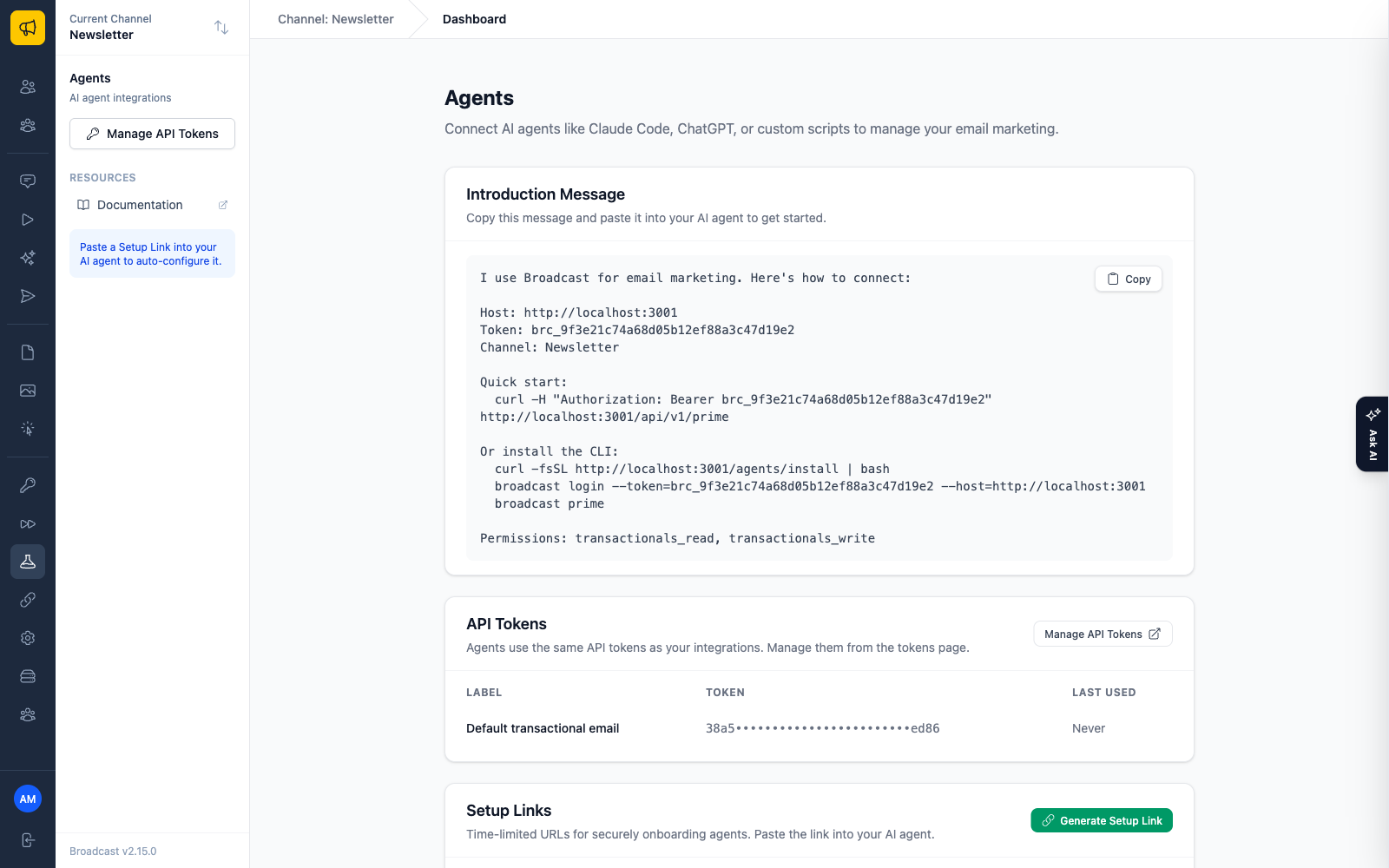
In practice you paste something like this to Claude Code and walk away:
Please configure yourself to manage my Broadcast email marketing.
Here's the setup link: https://your-instance.com/agents/setup/abc123...
The bash CLI is the fast path
Discovery endpoints are the protocol. The CLI is the ergonomics.
broadcast is a single bash script that wraps the REST API, with no dependencies beyond curl and optionally jq. An agent that can run shell commands installs it in one line:
curl -fsSL https://your-instance.com/agents/install | bash
That drops the script into ~/.local/bin. Then it authenticates once, and the credentials are stored at ~/.config/broadcast/config with chmod 600:
broadcast login --token=YOUR_API_TOKEN --host=https://your-instance.com
From there the commands read the way an agent would reason about the task. Orient first:
broadcast status
broadcast prime
Then do the work. Here’s the loop I actually watch an agent run when I ask it to send a newsletter:
broadcast subscribers --format=table
broadcast broadcasts create --subject="Weekly Update" --body="<h1>This Week</h1>..."
broadcast broadcasts send 42
Output is JSON (which is what an agent wants to parse), pretty-printed when jq or Python is available. Exit codes are meaningful too: 1 for auth errors, 2 for not found, 3 for validation, 4 for server errors, so an agent can branch on the result instead of guessing from stdout. There are commands for subscribers (list, find, create, tag), broadcasts (list, show, create, send, stats), and sequences, covering most of a marketing workflow.
An MCP server for native Claude Code tools
Correction, September 2026: an earlier version of this post described an npm package,
@broadcast/mcp-server, and showed a configuration that runs it withnpx. That package was never published, so the configuration does not work, and you should not run a package by that name. Broadcast now has an MCP server built into the app instead, from version 2.35.0. The section below describes it.
If you’d rather the agent not shell out at all, Broadcast has a Model Context Protocol server built in at /api/mcp. Every API operation your token allows becomes a tool with a name and input schema the agent understands directly: status_show, subscribers_find, broadcasts_create, broadcasts_send_broadcast, and so on. Because the tools are generated from the API, they always match the version you run.
There is nothing to install. In Claude Code, you add it with one command:
claude mcp add --transport http broadcast https://your-instance.com/api/mcp \
  --header "Authorization: Bearer your-api-token"
Same token, two front doors. Use the CLI for agents that live in a terminal, the MCP server for deeper Claude Code integration. See the MCP Server docs for other clients and the details.
Rate limits tuned for machine traffic
There’s a practical problem with letting an agent drive an API: agents are chatty. An agent checking status and polling a send makes far more requests than a person clicking around. Human-scale rate limits choke it immediately.
Broadcast 2.0 added API rate limiting (built on rack-attack) so a runaway loop can’t hammer an instance. But the default was tuned for people, and an agent working through a list of subscribers is not a person. So in 2.1.1 we raised the self-hosted default to 1,200 requests per minute, while the hosted SaaS tier stays at 120. It’s your server; you set the ceiling. If 1,200 isn’t right for your workload, the API_RATE_LIMIT environment variable moves it.
That gap, 1,200 versus 120, is not an accident. On your own hardware, machine traffic is a setting. On someone else’s, it’s a cost they have to price in.
A token on your own server is a different trust model
This is the part that only works because Broadcast is self-hosted, and it’s worth being explicit about.
Giving a bot your login to a hosted SaaS means giving it your identity: full account access, every setting, billing included, with the vendor’s UI as the only boundary. There’s no clean way to say “this agent may add subscribers and draft campaigns but may never touch email server config or send without me.”
An API token on your own instance is a different thing entirely. You mint a token with exactly the permissions the task needs and nothing more. whoami lets the agent confirm its own scope before acting. status refuses to leak your SMTP password even to a fully authorized caller. Setup links expire and self-destruct. Version 2.1.0 even added webhook endpoint permissions to the token form, so the scoping stays granular as the surface grows. The agent works inside limits you set, and revoking the token is one click. That’s a safer arrangement than handing over a dashboard login, and it’s only possible because the software runs on your server. Same reasoning as selling Broadcast as a one-time license.
Where this sits
I want to be careful with the claim. I won’t tell you Broadcast is the first agent-native email platform, because I can’t verify that. What I can say is that I went looking, and I have not seen the large incumbent email tools ship anything like a discovery protocol, scoped agent tokens, a bundled CLI, and an MCP server as a coherent surface. Most of them are still betting the whole interaction happens in their dashboard.
I think that bet is aging badly. More of us are going to work through agents, and tools that assume a human is always the one clicking will start to feel broken. Broadcast 2.0 is built for the way I actually work now. The front door for agents is open.
Want the full reference? See the Agents overview and the Agents API endpoints in the docs, or read why Broadcast is self-hosted in the first place.
