Your SPF Record Will Break When You Least Expect It
Here is how deliverability actually dies. Not on the day you set up a new sending domain, when you are paying attention, running the records through three validators and watching the first test send land in the inbox. It dies six weeks later, on a Tuesday, when nobody is looking. Someone migrates DNS to a new provider and the SPF record does not survive the export. A registrar transfer flattens a TXT record. A DKIM key gets rotated on the provider side and the old selector goes dark. The DMARC record that used to be there returns NXDOMAIN because a zone file got rebuilt from a stale template.
Nothing announces any of this. Your app keeps sending. The provider keeps returning 250 OK. The only signal is a slow, invisible slide in inbox placement that you notice, if you notice at all, as “open rates feel low lately.”
I built email authentication monitoring into Broadcast because I got tired of this exact failure mode. Everyone treats SPF, DKIM, and DMARC as setup steps: you do them once, you check them once, you move on. But they are live DNS records sitting in infrastructure you do not fully control, and the gap between “correct at setup” and “correct today” only grows.
What actually breaks when authentication fails
Assume you know what these records are for. Here is what their absence does, specifically, at the receiving end.
Lose SPF and mail from that domain stops passing SPF. On its own that is often survivable, because DMARC only needs one of SPF or DKIM to align and pass. Lose DKIM and you lose the more durable half: DKIM is the signature that survives forwarding, where SPF breaks. Lose both at once and you fail authentication outright.
Now add DMARC on top. If you were diligent and published p=reject or p=quarantine back when you set things up, a broken SPF and DKIM does not merely look suspicious to the receiver. It instructs them to quarantine or reject your mail. The record you added to protect your domain becomes the thing that blocks it. A p=none policy is more forgiving, but a missing or broken DMARC record also means you lose the aggregate reports that are usually the only early warning you would have gotten.
The cruel part is the asymmetry. Setting these records up is deliberate and visible. Breaking them is a side effect of unrelated work, and the damage shows up weeks later, long after you would think to connect the two.
Broadcast watches the records instead of trusting them once
This shipped in v2.13. There is a Domain DNS Health page in Settings that lists every sending domain on each channel, with a status badge for SPF, DKIM, and DMARC on each one. That part is the easy part: a snapshot you can read at a glance.
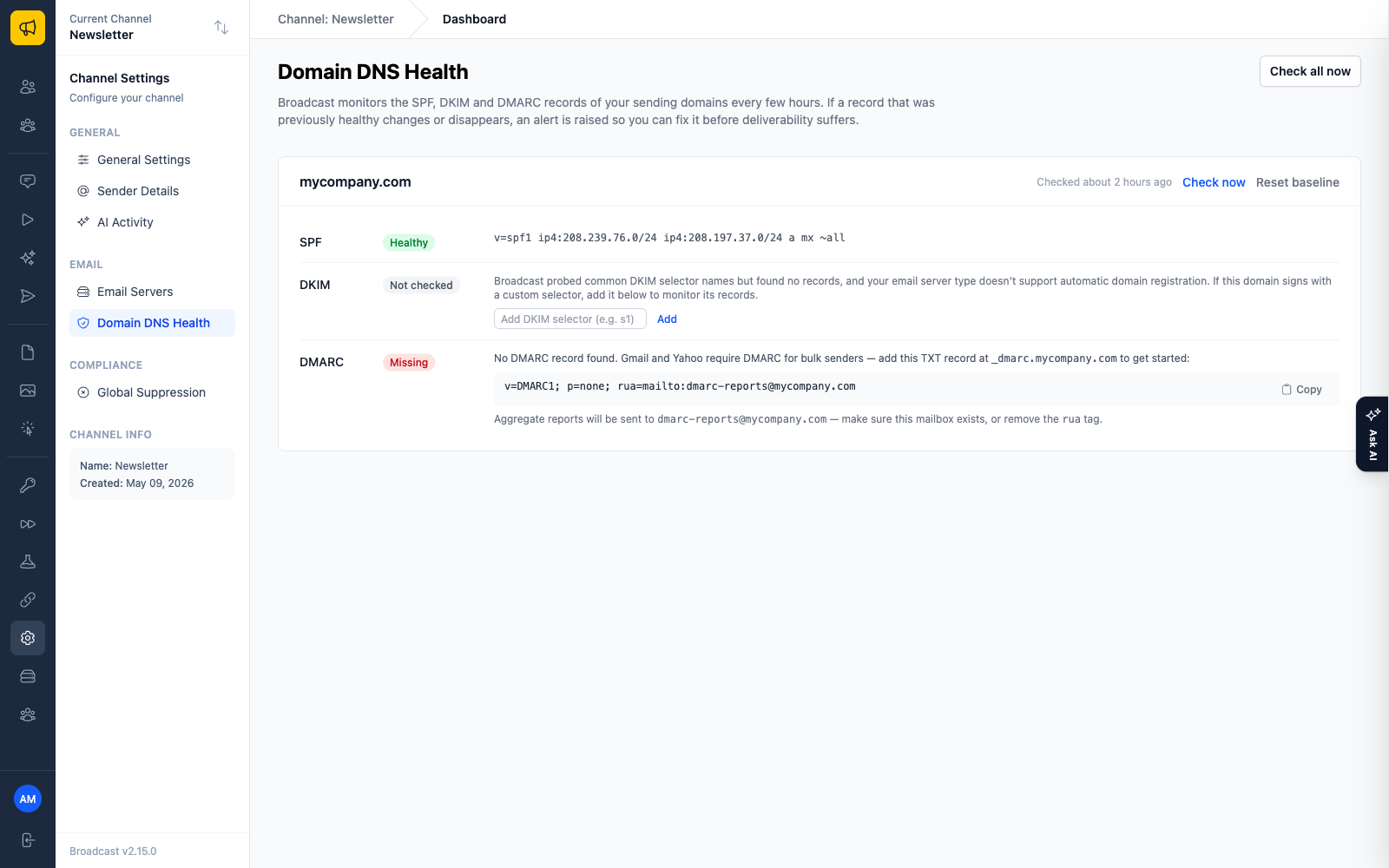
The part that matters is that Broadcast re-checks those records on its own every few hours. The first time a record looks healthy, it captures that as the known-good baseline. From then on, every check compares live DNS against that baseline. If a record that was previously healthy changes or disappears, a banner shows up on your dashboard. Not in a settings page three screens deep. On the dashboard you look at every day.
I was deliberate about one thing here: it does not cry wolf. DNS lookups fail transiently all the time. A resolver times out, a nameserver hiccups, and none of that means your records are gone. A single bad lookup gets marked unverifiable and never alerts. Broadcast waits until a drift shows up across consecutive checks before it raises anything. It also draws a hard line between a record that regressed and a record that was never there. If you never published DMARC, that is a recommendation, not an alarm. A DMARC record that used to exist and now returns nothing is drift, and that is exactly the case the dashboard banner exists for.
DKIM is the awkward one, and it works with any provider
SPF and DMARC live at predictable names, so checking them is mechanical. DKIM is the awkward one, because the record sits under a selector, and selectors are not discoverable from DNS. You cannot ask a domain what its DKIM selectors are. You have to already know them.
So Broadcast gets them three ways. When you set up a supported provider through the setup wizard, Broadcast already knows the exact records that provider told you to publish, and it checks those. For SMTP and anything the wizard does not cover, it probes a couple dozen common selectors, including the Google Workspace, Microsoft 365, SendGrid, and Mailgun defaults, and monitors whatever it finds. And if you run a custom selector that nothing could guess, you add it by hand and it gets watched like the rest. A selector you typed in yourself that has never resolved shows up in the UI as missing, but it will not trigger an alert until it has actually been seen healthy once, so a typo nags you instead of paging you at 2am.
No DMARC record? Here is a starter one
If a domain has no DMARC record at all, the page does not just flag it and leave you to go read a spec. It hands you a ready-to-copy starter record, a conservative p=none policy with a reporting address, so you can publish something today and tighten the policy later once you trust your reports. It also reminds you to make sure the reporting mailbox actually exists, because a rua address pointing at a mailbox nobody ever created is a common way to publish DMARC and get none of the value out of it.
If you want to reason about the policy before you paste it, the DMARC record generator walks through the options, and the guide to DKIM signature alignment covers the part that trips most people up.
Ask AI can read the same check data
In v2.14 I wired this into Ask AI, the in-app assistant. When you ask it a deliverability question, something like “are my emails going to spam” or “is this domain set up correctly,” it can pull the real SPF, DKIM, and DMARC check results for your domains instead of answering from general knowledge. It reads your actual DNS state and tells you what is wrong with it, rather than reciting a plausible-sounding average that may have nothing to do with your setup.
This is usually a separate subscription
Continuous DMARC and authentication monitoring is normally its own product with its own monthly bill. There is a whole category of tools that do nothing but watch these records and email you when they change, and they charge you every month to keep watching. That is a reasonable business to run. It is just not something you should have to pay for on top of the software that already sends your mail.
Broadcast is a one-time license you run on your own server, and the monitoring is part of it. No add-on tier, no per-domain fee. You bought the software once. It watches your records for as long as you run it. More on that reasoning in why we sell a one-time license.
Set your records up carefully. Then let something check that they stay that way. The day they break, you will be busy with something else.
More on keeping mail in the inbox: the complete guide to self-hosted deliverability and how to warm up a new sending domain without landing in spam.
