Emails are bouncing or being rejected
1. Find the actual reason
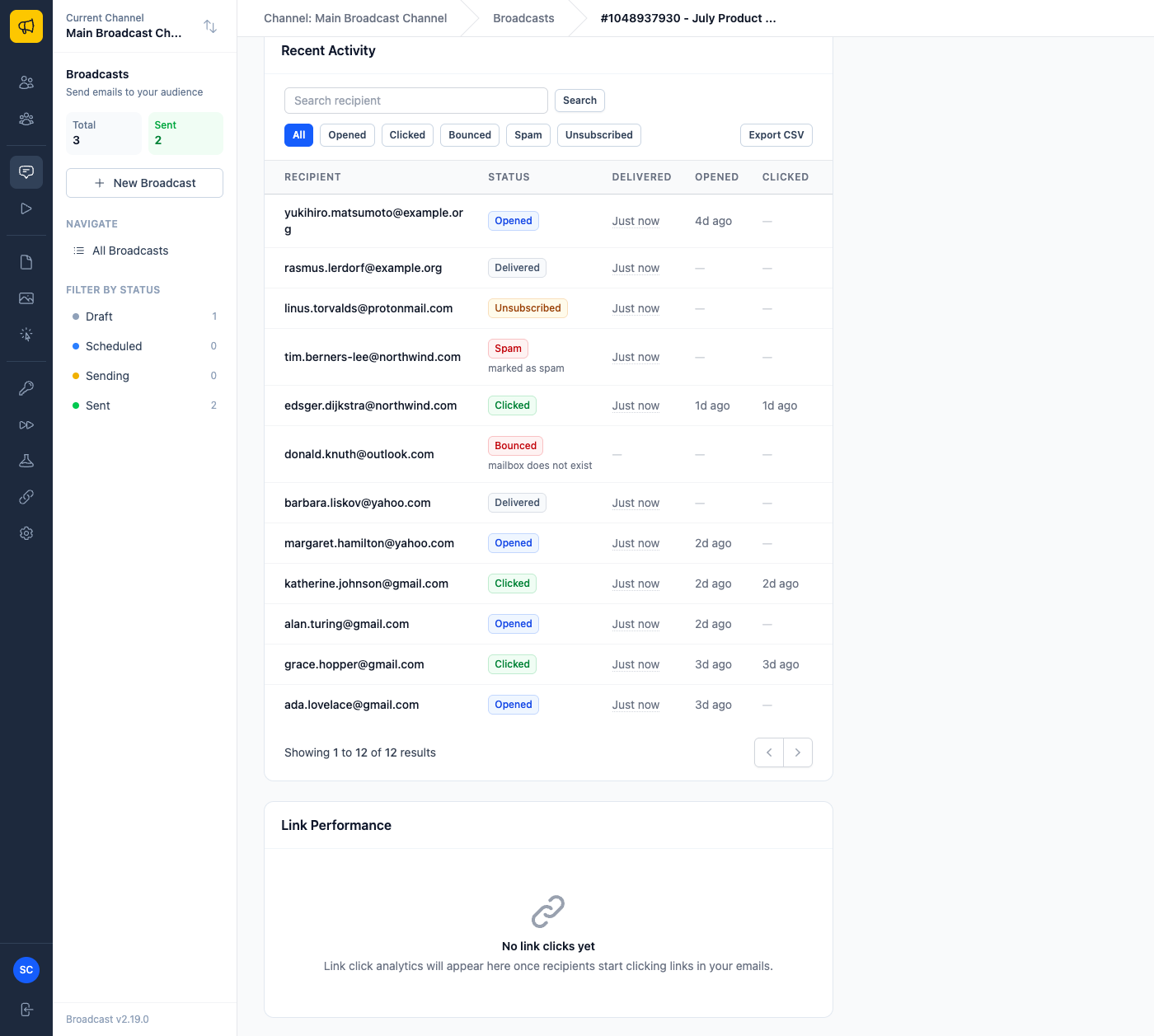
Open the broadcast and look at Recent Activity. There is one row per recipient, and the Status column shows the most significant outcome, with the bounce or complaint reason underneath. That reason is the diagnosis. Everything below is about what to do with it.
The broadcasts documentation covers the activity table, and Email Metrics covers where delivery data comes from.
2. Confirm you are receiving bounce data at all
Broadcast learns about bounces from ESP webhooks. If they are not configured, the activity table will look optimistic and you will keep mailing dead addresses, which damages your reputation over time.
Check your ESP integration and, if events are not arriving, see webhooks not firing.
3. Respond by bounce type
Hard bounces mean the address does not exist. (For the general difference, see hard bounce vs soft bounce.) These should stop being mailed permanently. Auto-suppression handles this when webhooks are working. Verify the address landed in suppressions.
Soft bounces are temporary: a full mailbox, a server that is briefly down, or throttling by the receiving provider. These usually resolve on their own. A soft bounce that repeats across sends should be treated as hard.
Complaints are someone marking the message as spam. These matter more than bounces. A rising complaint rate needs a list and consent review, not a technical fix.
Blocks and rejections by the receiving provider are a reputation or authentication signal. Start at fixing DNS authentication, then emails going to spam.

4. Check it is not your provider rejecting you
Some providers, Postmark in particular, are strict about what content and what list practices they will accept. If rejections come from your provider rather than the recipient, the message is in their dashboard. Some also enforce their own sending limits on top of the rate limit configured in Broadcast.
Suppressions are the safety net
Global suppressions apply across every channel; per-channel suppressions are narrower. Suppressions are checked automatically before sending, and the documentation covers the priority order and bulk upload, which is how you bring a suppression list over from a previous platform.
Send us a bounce reason if it is not clear what it means.
