Double Opt-In Without the Straitjacket
I keep meeting founders who treat double opt-in as a box they have to check and then resent. Their platform bolted it on, gave them one rigid flow, and that flow sends an email they cannot really edit to a confirmation page they cannot touch. It works, technically. It also feels like a tax. I wanted Broadcast to treat confirmed opt-in as something you would actually want to run, not something the software forces on you and then hides the wiring for.
Over a run of releases this spring, we rebuilt the whole confirmation flow around one idea: the platform should enforce good list hygiene, but it should never take the controls away from you. Here is what that looks like now.
What is a double opt-in email, and is it worth it?
Double opt-in means a new subscriber has to click a link in a confirmation email before they count as subscribed. You send to fewer addresses. In exchange you get three things.
The first is consent you can prove. When someone confirms, you have a timestamp and a record that this specific address asked to be on your list. That is the difference between “we imported a spreadsheet” and “this person raised their hand.” For anyone building a list under GDPR expectations, that record is the thing you want on file. (For the wider legal picture on running email out of an EU company, I wrote a longer piece on EU data sovereignty for email marketers. This post stays at the mechanical level.)
The second is deliverability. A confirmed list is a clean list. You are not mailing mistyped addresses, spam traps, or people who fat-fingered someone else’s inbox into your form. Bounces and complaints drop, and mailbox providers notice.
The third is that it filters for intent. Someone who clicks the confirmation link wants to hear from you. That single click raises the quality of everything downstream.
None of this is controversial. The friction was never the concept. It was that most tools give you one confirmation flow and no way in.
Double opt-in starts at the API
The confirmation flow is available from the first point of contact: the API.
Through the Subscribers API, you create a subscriber and pass double_opt_in: true. Broadcast creates the subscriber in an unconfirmed state and sends the confirmation email using your channel’s default confirmation template. The response hands you back a confirmation_url and the subscriber’s confirmation status, so your own system knows exactly where things stand.
If you want more control over that confirmation email, pass an object instead of true:
{
  "double_opt_in": {
    "reply_to": "support@example.com",
    "confirmation_template_id": 456,
    "include_unsubscribe_link": false
  }
}
reply_to sets the reply address on the confirmation email. confirmation_template_id picks a specific confirmation template instead of the channel default. include_unsubscribe_link lets you suppress the unsubscribe link, footer, and List-Unsubscribe header on that one email, which some senders prefer for a message whose entire job is to confirm a subscription. All three are optional. Plain true still works.
The same behavior is available in the Transactional API. Send your own transactional with double_opt_in: true and Broadcast will create the subscriber if they do not exist yet, then resolve the {{ confirmation_url }} variable in your email body to the real confirmation link. If you drive transactional emails from stored templates, a template_id parameter selects the template to send. The point is that you can graft confirmation onto an email you already send, instead of standing up a separate parallel flow.
Confirmation templates, with a default per channel
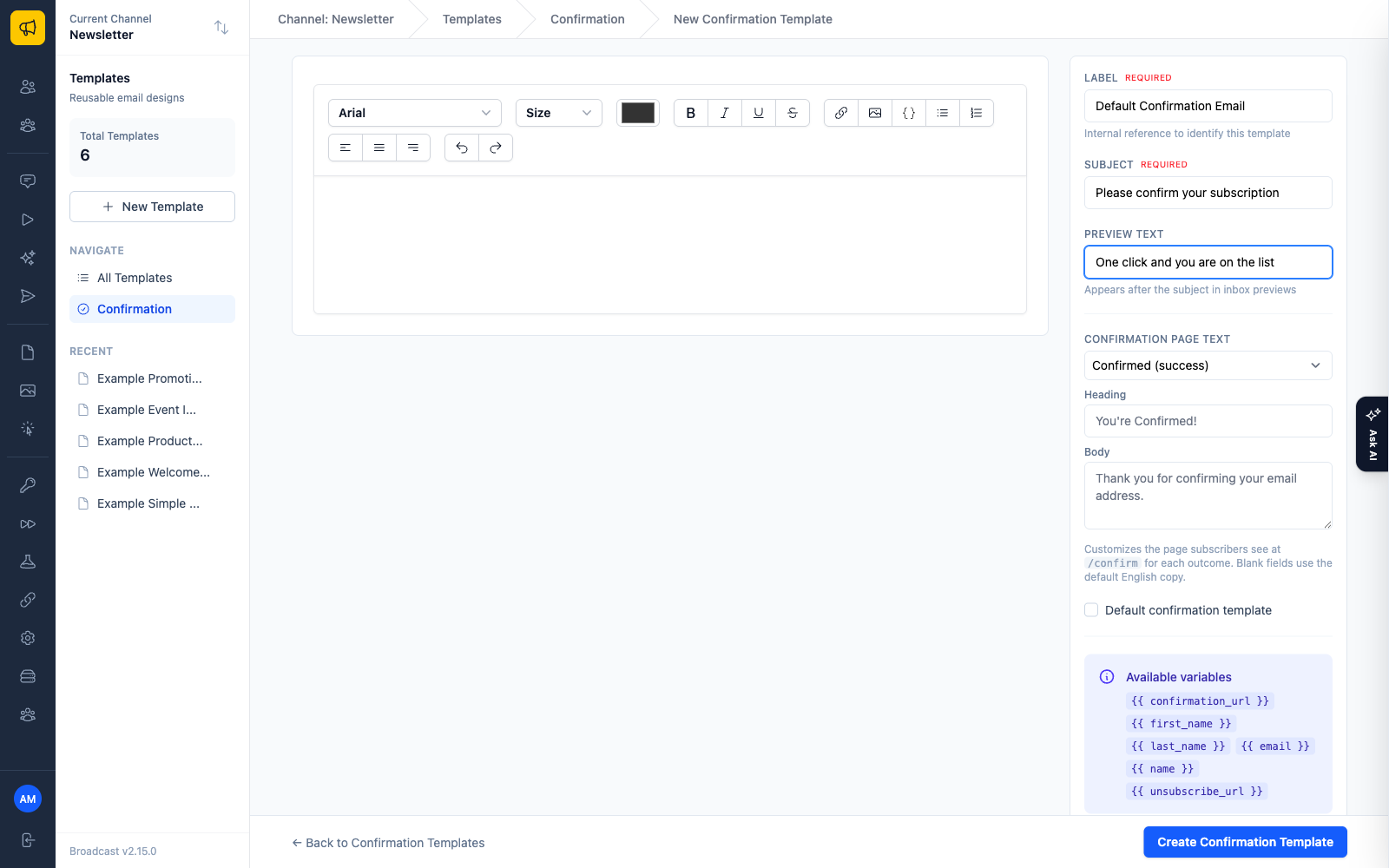
The email a subscriber receives is a confirmation template, and those live under Templates > Confirmation in the admin. You edit them like any other template, with a preview of the confirmation page alongside.
Every channel gets a default confirmation template seeded automatically, so double opt-in works on day one without you configuring anything. You are not staring at an empty state trying to figure out what a confirmation email should say. When you outgrow the default, mark any template as the channel default with a toggle, or point a specific opt-in form or API call at a specific template.
Six page states, or your own page entirely
After a subscriber clicks the link, they land somewhere. By default that is Broadcast’s confirmation page: a clean success message. Most platforms stop there, and the page is theirs, not yours.
We opened it up in two directions.
First, you can rewrite what the page says. A subscriber can arrive in any of six states, and each one has its own heading and body text you can override:
- Confirmed, the normal first click.
- Already Confirmed, when they click the same link twice.
- Link Expired, when they click after the link’s lifetime is up (24 hours by default, and configurable per channel up to never).
- Link Not Found, when the token is invalid or already gone.
- Confirmation Failed, when a server error stops the confirmation from recording.
- Generic Error, the fallback for anything else.
Blank fields fall back to sensible defaults, so you customize only the states you care about and leave the rest alone. You can preview each state without sending yourself a real email.
Second, if you would rather subscribers never see a Broadcast page at all, an opt-in form with double opt-in enabled has an “After Confirmation” URL field. Fill it in and confirmed subscribers get redirected to your own thank-you page on your own domain. The confirmation runs first, so any tags, sequences, and welcome emails all fire, and then the browser lands on your page. Invalid and expired links still show Broadcast’s error states rather than redirecting, which is the behavior you want.
And as of v2.8.1, the same things you configure in the admin for confirmation pages can be managed through the API too: per-state page text, redirect URLs, default confirmation templates, and template assignments on opt-in forms. If you manage your setup as code, the confirmation flow stops being the one part you have to click through by hand.
Knowing who confirmed
Building a confirmed list is only useful if you can act on the confirmation.
Every subscriber carries a confirmed_at timestamp and a derived confirmation_status of confirmed or unconfirmed. Both show up on subscriber API responses, and you can filter the Subscribers API directly with confirmation_status=confirmed to pull exactly the people who opted in. In the admin, a subscriber’s detail view shows a confirmation status badge and the timestamp next to it.
Inside the app there is an “Is Confirmed” segment rule. Build a segment on it and you have a reusable audience of confirmed subscribers to send to, which is usually what you want when confirmed opt-in is the whole point of your list.
Guardrails that speak up
Flexibility without guardrails is just a way to shoot yourself in the foot at scale. So the confirmation flow checks your work.
If you try to use double opt-in without a transactional email server or a confirmation template configured, the API returns a 422 up front, with a message telling you what is missing, rather than accepting the request and silently dropping the confirmation email. The opt-in form settings warn you when no transactional email server is configured, at the moment you are setting the form up, not after the fact.
And when you send or schedule a broadcast to a list that still contains unconfirmed subscribers without a segment applied, the send and schedule modals warn you. You can proceed if that is what you meant. The warning exists so that mailing unconfirmed people is a decision you make on purpose, not an accident you find later in your bounce report.
Broadcast pushes you toward a confirmed list, then gets out of the way. Every part of the flow is yours to change.
More detail in the docs: the confirmation pages guide covers the six states and redirects, and the Subscribers API reference documents the double opt-in parameters and confirmation fields.
