Dashboard Language
Every user can run the Broadcast dashboard in their own language. The choice belongs to the person, not the installation: an Italian copywriter and an English-speaking administrator can work in the same channel, each reading the interface in their own language.
Note
Available in Broadcast 2.39.0 or later. Earlier versions show the dashboard in English only.
Choosing your language
- Open My Profile from the user menu at the bottom of the sidebar.
- Pick a language from Language.
- Click Save.
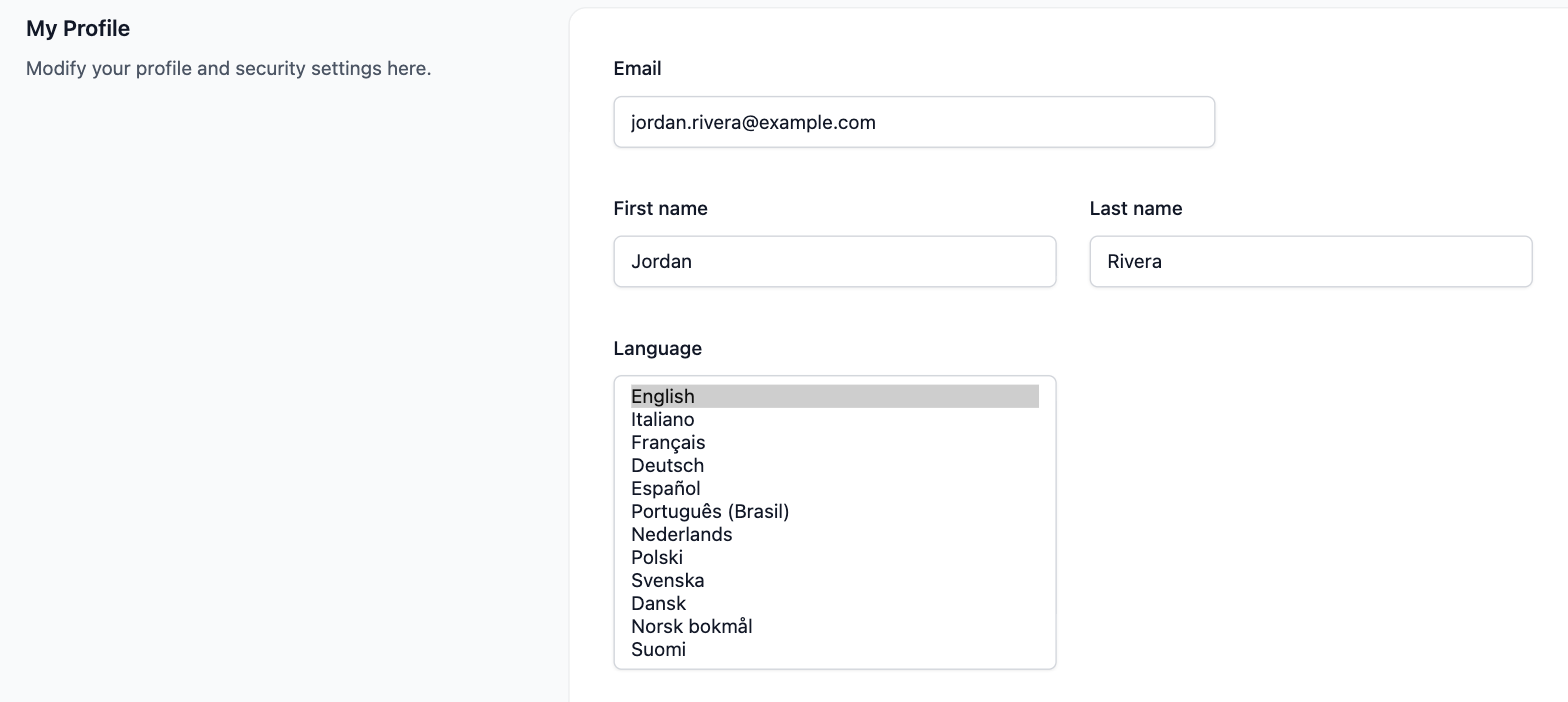
The page reloads in the new language, including the confirmation message. The setting follows your account, so it applies on every device you sign in from. New users start in English.
Languages
| Language | Shown as |
|---|---|
| English | English |
| Italian | Italiano |
| French | Français |
| German | Deutsch |
| Spanish | Español |
| Portuguese (Brazil) | Português (Brasil) |
| Dutch | Nederlands |
| Polish | Polski |
| Swedish | Svenska |
| Danish | Dansk |
| Norwegian Bokmål | Norsk bokmål |
| Finnish | Suomi |
Each language is shown in its own name, so someone who opened the menu by accident can find their way back.
What follows your language
- The dashboard: navigation, pages, buttons, form labels, validation errors, and the messages shown after you save, send, or delete something.
- Dates and times: written the way your language writes them, including chart axes and “5 minutes ago” style times.
- Live updates: progress for imports, bulk deactivations, and sending broadcasts is worded for each person watching, so two users following the same broadcast each read it in their own language.
- Emails Broadcast sends to you: the password reset email arrives in the recipient’s language.
- Maintenance results: the log of a Channel Maintenance run is written in the language of the user who started it.
What does not change
Your dashboard language never changes what your subscribers see. Subscriber-facing text follows the channel’s language, set separately:
- Unsubscribe and resubscribe pages: see Unsubscribe Settings.
- Double opt-in confirmation pages: see Confirmation Pages.
- The default email footer.
A few other things stay in English on purpose:
- The API. Error messages and field names are the same for every token, so integrations do not break when someone changes their profile.
- What’s New slides after an upgrade, which come from the release notes.
- The starting content of a new opt-in form (“Subscribe”, “Enter your email”). Your subscribers read it, so edit it into their language in the form designer.
- Text you write yourself, such as broadcast content, template names, and segment names.
Translations and corrections
The translations are published as an open source Ruby gem, broadcast-i18n, and ship inside every Broadcast release. Upgrading Broadcast brings in new and corrected translations; there is nothing to install separately.
If a word reads wrong in your language, open an issue or a pull request on that repository. The
English text in the gem’s reference folder is the source each language is translated from.
