One Bounce Should Block an Address Everywhere
A suppression in Broadcast is an address we will not email. Bounces and spam complaints add them for you, and you can add them yourself.
Until this release, an automatic suppression was recorded against the channel it happened in. That is the right default: an unsubscribe from your product newsletter should not silence your customer notifications. But it has a sharp edge that only shows up once you run more than one channel: if someone hard-bounced in Channel A and the same person later appears in Channel B, Broadcast would happily email them again.
A hard bounce is not a channel-specific fact. The mailbox is gone. Sending to it again earns another bounce, and mailbox providers keep score against your domain and your IP, not against whichever channel happened to do it.
Where this came from
A customer running several channels wrote in and described exactly that, along with the situation that made it urgent: they were migrating in from another platform. Their contacts imported cleanly. Their bounce and complaint history did not.
That is the worst version of this problem. Thousands of addresses that the old platform had already given up on arrive looking perfectly healthy (active, subscribed, no history) and the first send goes straight into them.
They asked for two things: a way to push a channel’s suppressions up to the global list, and an API so they could manage both lists from their own code. Both are in 2.23.
Copying a channel’s list to the global list
Open Settings → Suppression List. The Channel tab now says plainly what it is, because the distinction is the whole problem:
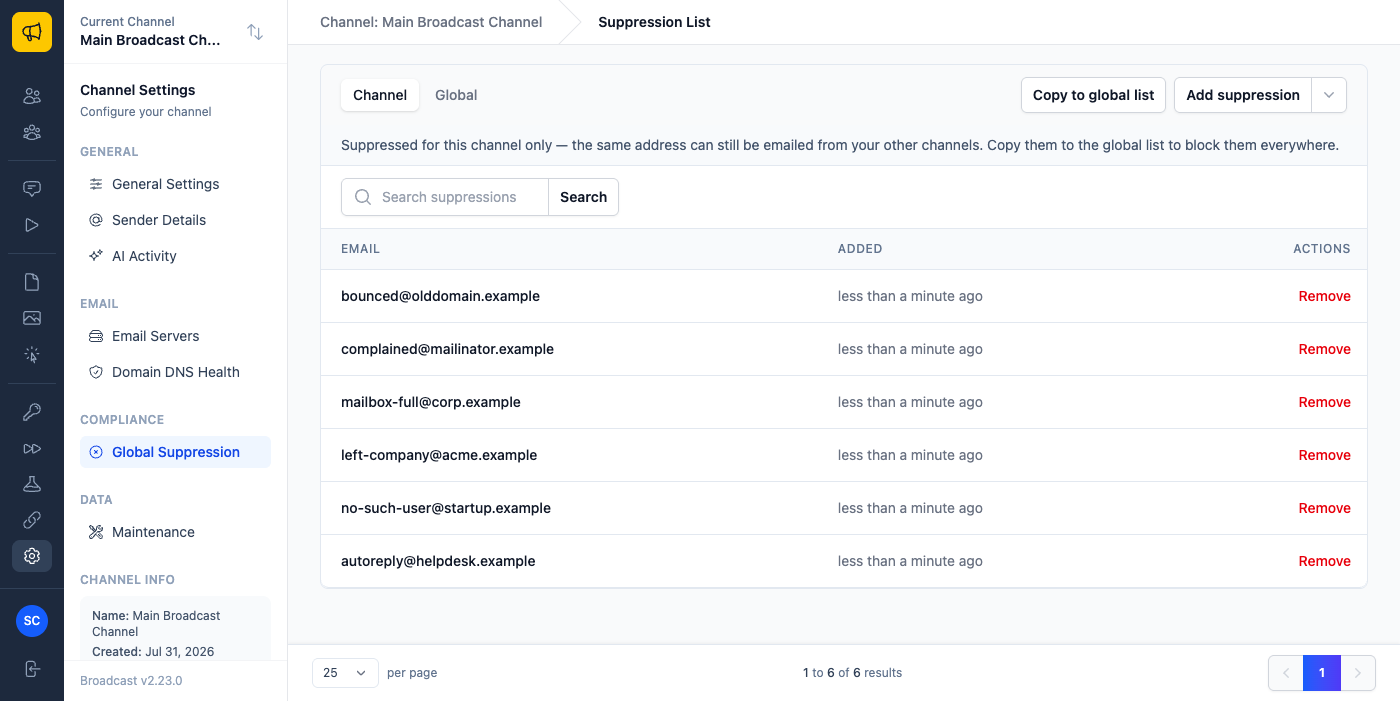
Copy to global list takes you to the task that does it. Nothing is written until you have seen what would change. It reports the count and lists the addresses first:
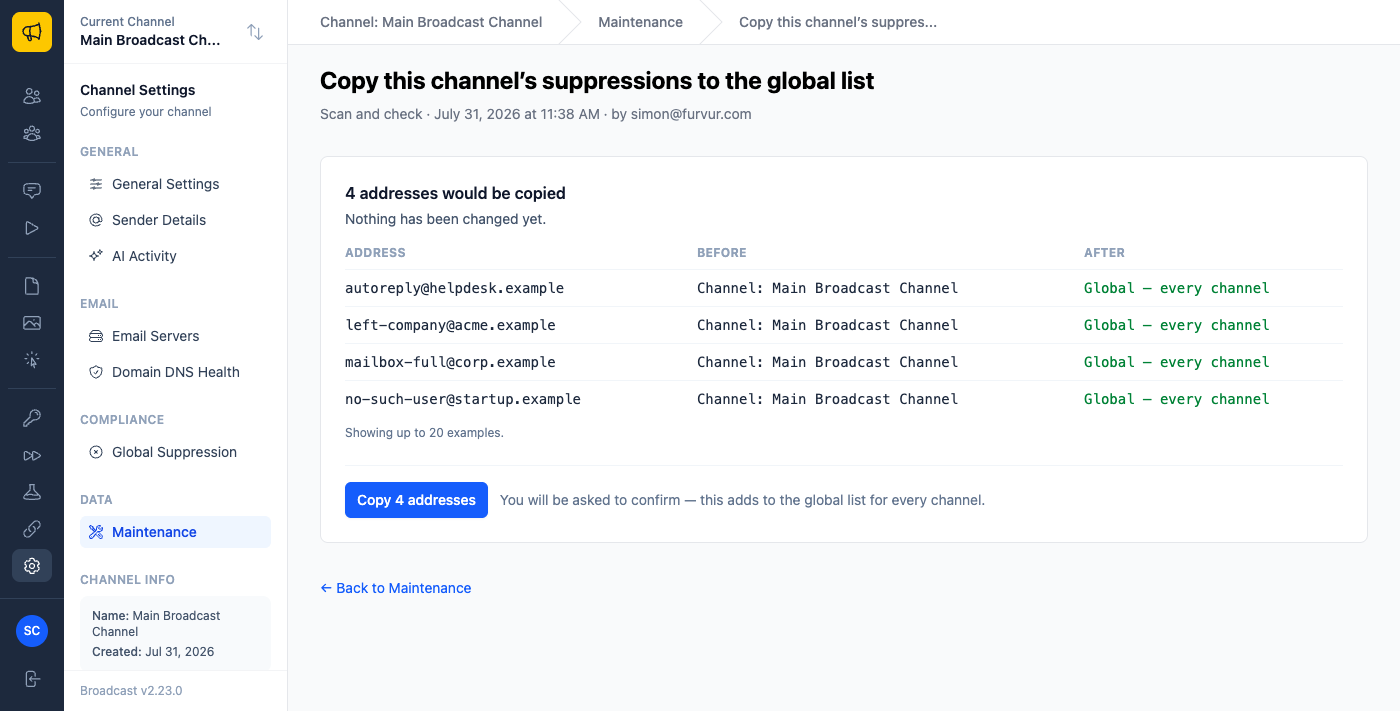
Two details worth noticing there. Addresses already on the global list are left out of the count, so a channel you have copied before reports nothing to copy rather than the same number every time. And the channel keeps its own list: nothing is deleted or overwritten, which is how you can still tell which channel a suppression originally came from when a complaint gets disputed months later.
The confirmation says what it actually does, rather than the generic warning the other maintenance tasks use:
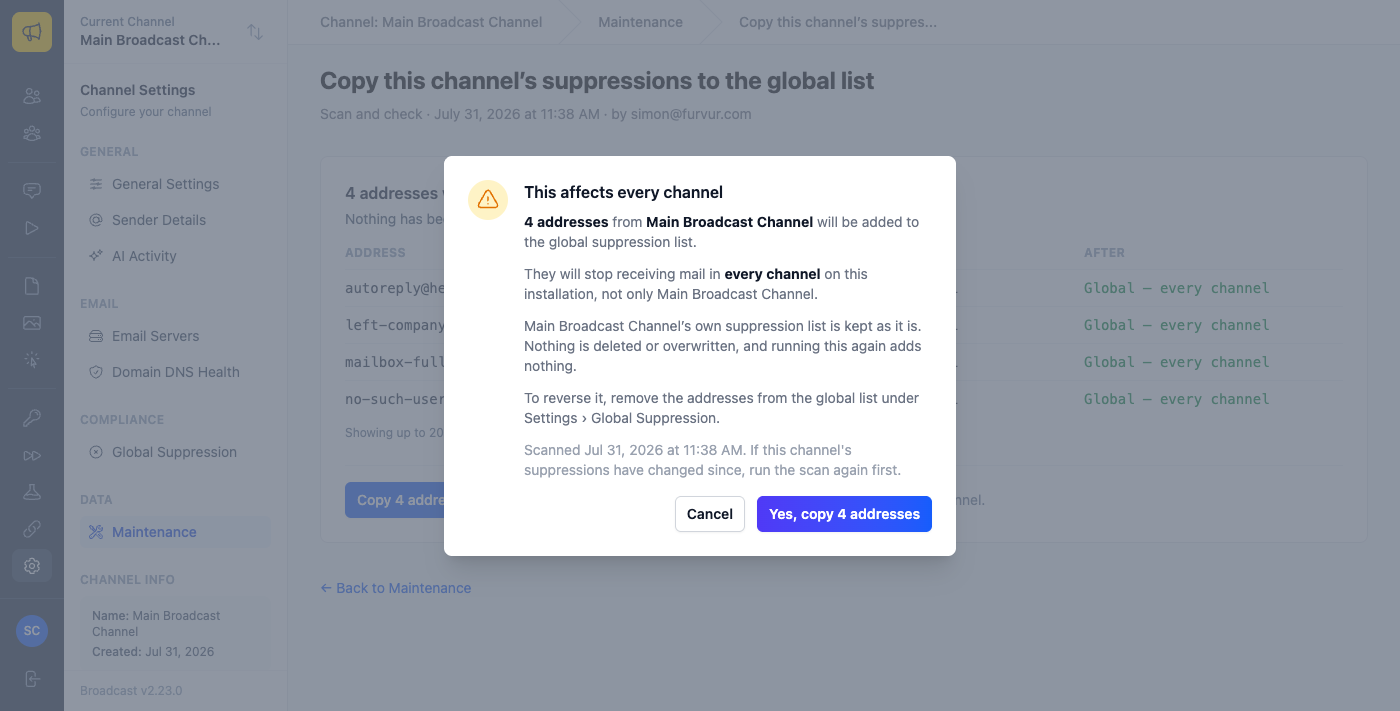
This one adds rather than rewrites, so telling you it could not be undone would have been false, and an admin told a safe action is irreversible reasonably decides not to run it. What actually deserves the warning is the reach: these addresses stop receiving mail everywhere, not just here.
The API
Both lists are now reachable from code. /api/v1/suppressions is your channel’s own list; /api/v1/global_suppressions is the installation-wide one and needs an admin token, because a channel key that could write globally would reach a long way past the channel it was issued for. Both take single addresses or batches of up to 10,000, and both can remove in bulk as well as add. Undoing a bad import should not cost you ten thousand requests.
There is one endpoint I would point at first, though. /api/v1/suppressions/check answers the question an integration actually has:
{ "email": "bob@example.com", "suppressed": true, "scope": "global" }
It checks both lists and tells you which one matched. That last field matters more than it looks: without it, someone stares at their channel’s suppression list, cannot find the address anywhere, and cannot work out why their mail is not arriving.
Three ways this gets used
Migrating in from another platform: export the bounced and complained addresses from the old system, strip them to a bare list, and POST them to the global list in batches of 10,000 before your first send. The contacts that platform had already written off never get a second chance to bounce on your domain.
Cleaning up after the fact: if a channel has been collecting bounces for a year, open its suppression list and press Copy to global list once. It is safe to repeat later as that list grows: running it again adds only what is new.
Checking before you send from your own app: call /check with the address before queuing a transactional email. One request, and it accounts for both lists rather than only the one you thought to look in.
The bug underneath
Worth mentioning because it explains why this took longer than it looks. Suppressions had a unique index on the address and channel, which reads as a guarantee of one row per address per list. It was not. In SQL two NULLs are never equal, and a global suppression is exactly a row with no channel, so that index never applied to the global list at all.
Nothing had gone wrong, because every existing path added suppressions one at a time through a check that did work. But both new features write in bulk and rely on the database to reject duplicates, which it would not have done. Copying a 10,000 address list twice would have quietly produced 20,000 rows, and suppression would have carried on working perfectly while the counts, the list page, and removal-by-address all slowly stopped making sense.
Fixed first, before either feature was built on top of it.
See suppression lists and the suppressions API in the documentation, or read about the release that came out of a week of customer feedback.
