Put a Poll in Your Email Without Touching HTML
Plugins shipped in Broadcast 3.0, and the first official one was Polls. To put a poll in an email, you made the poll on the Polls page, copied its HTML, opened your broadcast, added an HTML block and pasted it in. It worked, but it asked you to handle HTML for something that should be one click. If you write your newsletter in the rich text editor, it was worse, because the rich text editor had no HTML block at all.
Broadcast 3.1 moves that step into the editor. A plugin can now have an insert page. The email editors list it, and you pick what you want from inside the email you are writing.
Pick it where you write
In the block editor, a plugin with an insert page shows under From plugins at the end of the block list. In the rich text and HTML editors, it is under Insert from a plugin in the toolbar. This works in broadcasts, sequence emails and templates.
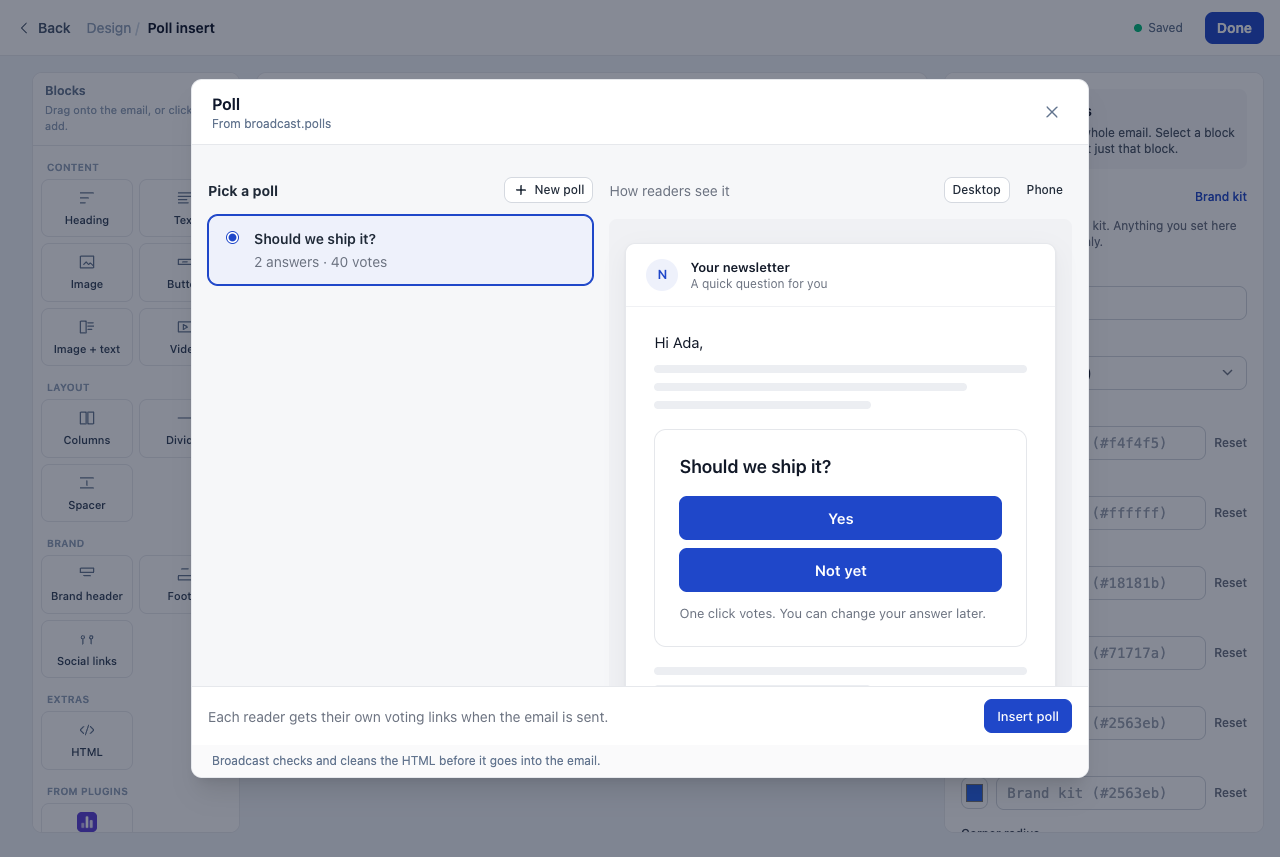
The dialog is the plugin’s own page. For Polls, you pick an open poll, or make a new one there, and see it as your readers will. Click Insert poll:
- The block editor adds an HTML block after the block you selected.
- The HTML editor puts the poll at your cursor.
- The rich text editor keeps the poll as one piece. You can move it or delete it, and you cannot break it by accident when you edit the text around it.
I drew the line at a copy. The inserted HTML is a snapshot, not a live block that the plugin can change later. An email you already sent, or a template you reuse in a year, keeps exactly the HTML you saw when you clicked Insert. Broadcast also cleans that HTML before it goes in. A plugin cannot add scripts, and it can use only its own tags, such as the poll’s voting links. It cannot read a subscriber’s email address through the insert.
Polls gets its own thank-you page
The Polls page was rebuilt with a live preview: the poll looks as it does in the email while you type the question and the answers. You can pick a button color that fits your emails. You can also write the page that a reader sees after a click. Leave the fields empty, and readers see “Thanks for your answer”.
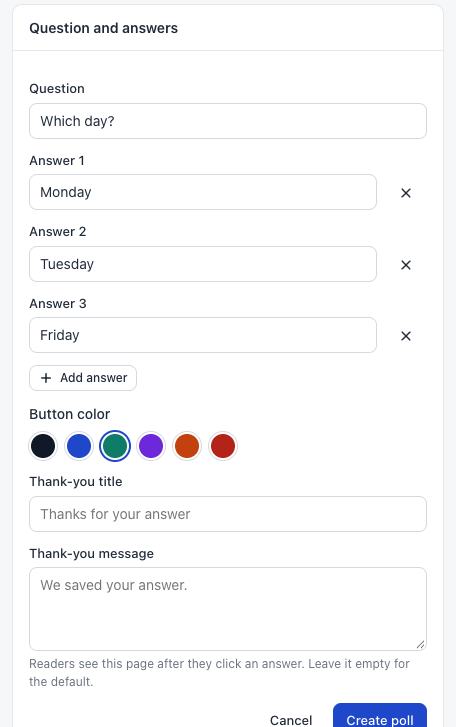
This version of Polls needs Broadcast 3.1, because Broadcast 3.0 does not know insert pages.
Three ways to use it
A monthly newsletter asks “What should next month’s issue cover?” with four topics. Write the issue in the rich text editor, put the cursor under the intro, click Insert from a plugin, pick the poll, and send. Next month, the Polls page tells you which topic won.
A welcome sequence asks new subscribers what they want from you, in the second email. Make the poll with the thank-you title “Got it, thanks” and the message “Your next email is about what you picked.” With Tag voters on, each answer becomes a tag, and the next steps of the sequence can branch on it.
A product team keeps a “Feature vote” block template. Each release email starts from it, and the person who writes it inserts this month’s poll in the block editor, under the release notes.
Test emails now show what a click does
Before 3.1, a poll button in a test email had an empty link, because a test email has no real subscriber. You clicked your own test and nothing happened, which looked like a bug. Now the link is a test link: a click opens a page that says it is a test email. Nothing is saved, so your own clicks never count as answers.
For developers: one CLI for every channel
The broadcast CLI keeps profiles now, one saved login for each server or channel. With an admin API token, it reaches every channel: broadcast channels lists them, and --channel picks one for a command. broadcast plugin runs the plugin kit from your own server, so broadcast plugin init, serve and push work without npm, with the kit that matches your server. An insert page is a few lines in a plugin: the page calls sg.insert(html), and Broadcast does the rest.
See Plugin Pages for insert pages and Agents CLI for profiles and channels, or read plugins for your own email server.