When a Sequence Email Fails
When a sequence cannot send an email, Broadcast tries again, up to five times. If the step still fails, Broadcast stops that subscriber at that step. It does this on purpose. A sequence that keeps hammering a broken SMTP login, or keeps retrying an address the provider has rejected, does more harm than one that stops and tells you.
The telling part was the problem. The sequence page showed a red banner, “26 subscribers stopped with an error and will not receive further steps”, and that was the end of it. You could not click it. You could not see which 26. A customer asked in our Discord whether they could click the banner, review the errors, and then either fix them or dismiss them. That was a fair question, and the answer was no.
In 2.51 the answer is yes.
The banner is now the way in
Click the banner and you get the sequence’s subscriber list, filtered to the ones in error, each with the step it stopped at and the last error the email server gave. The filter is in the address, so a reload or a shared link keeps it.
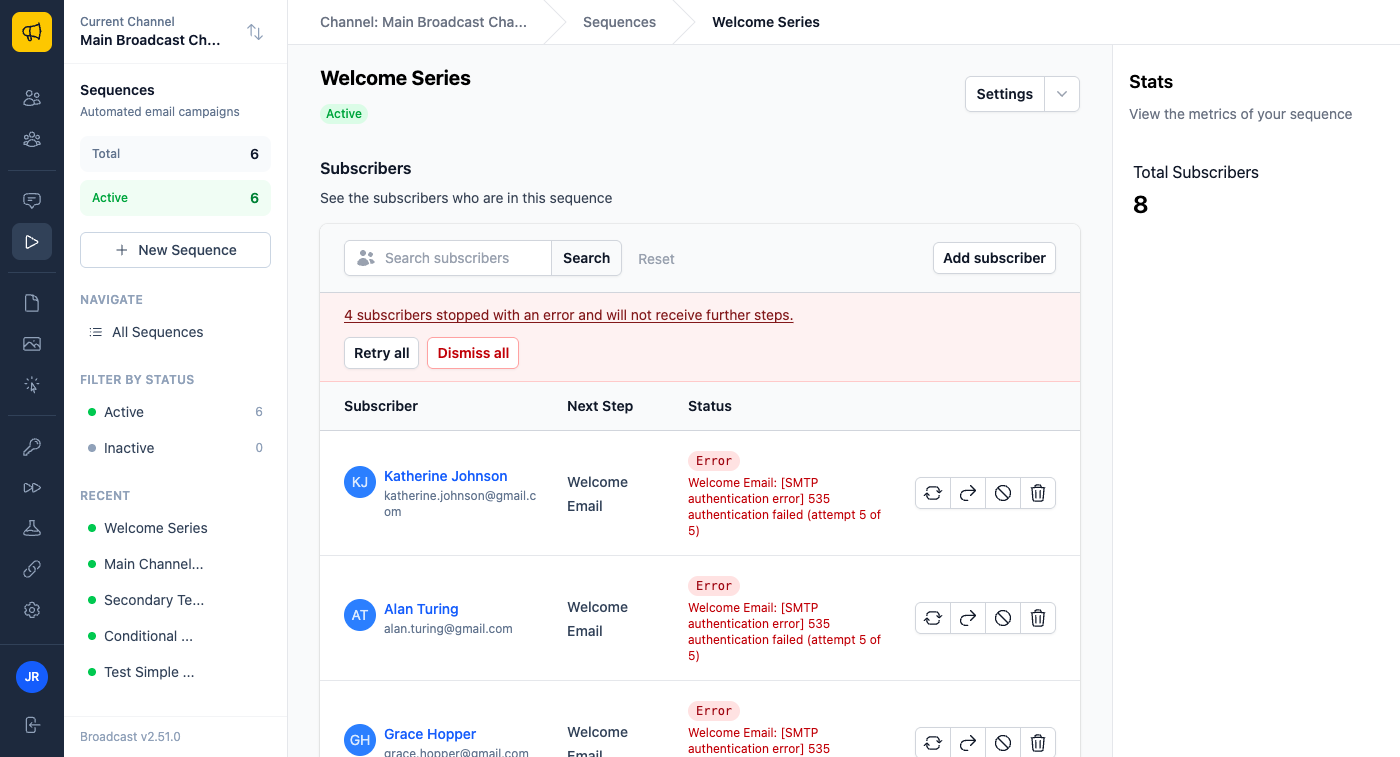
From there you have three choices.
Retry step on a row runs the failed step again for that subscriber. It does not restart the sequence. Restart sends everything from the top, which is the wrong fix when someone already got your first three emails and only the fourth one failed.
Retry all does the same for every errored subscriber it safely can, in the background.
Dismiss all takes them out of the sequence for good, with the reason recorded in each subscriber’s history.
Retrying without sending the same email twice
The hard part of a retry button is not the button. It is knowing when pressing it would send someone the same email twice.
A step can fail after the email actually went out. The provider accepts the message, and then something after that breaks. So before Broadcast retries a subscriber, it checks whether that step already has a delivery record for this run. If it does, Retry all leaves that subscriber alone and tells you so, and Retry step on that row asks you first.
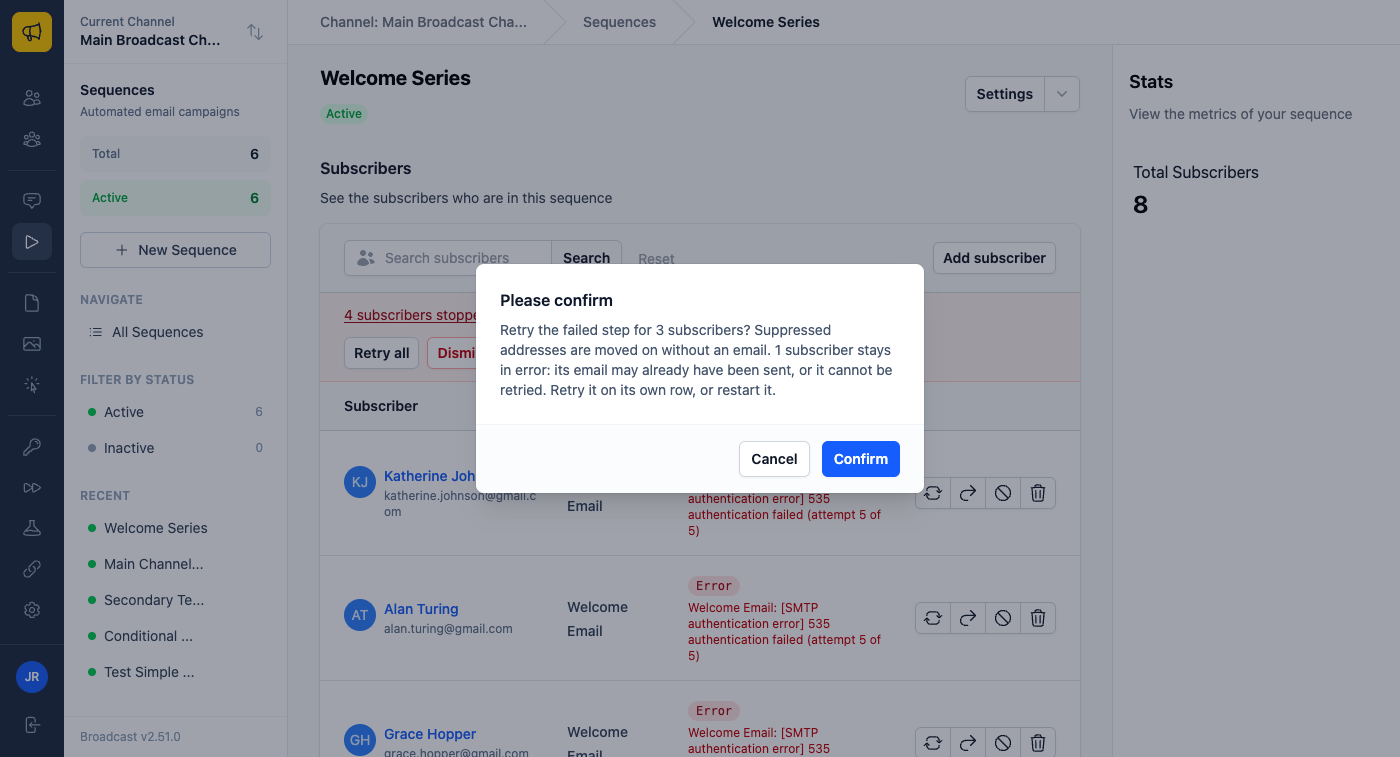
That check exposed a real bug while I built this. For SMTP servers, Broadcast wrote the delivery record when it built the message, before it tried to send it. A failed SMTP send therefore looked like a sent one, and “may already have been sent” would have shown up on almost every SMTP failure. Now the record is written only after the server accepts the message, and a failed send no longer counts in the sequence’s stats.
Where you will actually use this
You rotated your SMTP password and forgot one place. Overnight, every subscriber who reached an email step failed five times and stopped. Fix the password in the email server settings, open the banner, click Retry all, and they pick up at the email they missed. Nobody gets the earlier emails again.
Your provider had a bad hour. A rate limit or an outage stopped a few dozen subscribers in a launch sequence. Most of them are safe to retry. The few where the provider may have taken the message before it failed stay in the list, so you can decide on those one by one.
Some of them should just go. Old enrollments from an import you no longer care about, or addresses you know are dead. Dismiss all removes them, and your webhooks get sequence.subscriber_removed with the reason dismissed, so a CRM on the other end can tell a cleanup from someone leaving. A retry sends sequence.subscriber_resumed with the reason retry.
One change you will notice after upgrading
While testing Retry, I found an older bug. A subscriber whose address is on a suppression list did not get the email, which is correct. But the subscriber also never left that step, so it showed as active forever. The rest of the sequence, its tags, moves and webhooks, never ran.
From 2.51, a suppressed subscriber skips the email and continues. On the first run after the upgrade, any subscribers who were stuck this way move on. If a later step tags them, moves them to another sequence, or sends a webhook, that now happens. This is the correct behaviour, but you should know about it before you upgrade.
Only team members who can manage subscribers see the retry and dismiss buttons.
The docs now follow your version
The docs on this site now match the version of Broadcast you run. Each docs page has a Broadcast version menu at the top, and Upcoming (edge) shows what the next release adds before it ships. The section on these errors was there under Upcoming before 2.51 went out. See the docs.
See the email sequences documentation for how retry and dismiss work, or read how Broadcast resumes a failed broadcast for the same idea applied to one-off sends.
