When a Send Breaks Halfway, Pick Up Where It Stopped
Every email platform works fine when nothing goes wrong. The part I care about is the afternoon something does: a provider token gets revoked mid-send, a webhook receiver goes down during a big broadcast, or a single bad address trips over the whole list. Those afternoons are where you find out whether your tool was built for the happy path or for real life.
This release came out of one of those afternoons. A broadcast on a production install stopped dead partway through. The cause was one address Postmark had marked inactive. Postmark reported it correctly; we read the error wrong and treated one unreachable person as if the whole email server had failed. Everyone after that address got nothing, and the broadcast had no way to continue.
Fixing that one bug would have taken an hour. Instead I went through every way a send can fail halfway, and made each one stop cleanly, explain itself, and recover. That work shipped in 2.38.
One bad address is not a broken server
The distinction that matters is between a problem with one recipient and a problem with your channel.
A recipient problem is an address that does not exist, a mailbox that is full, or someone your provider has stopped delivering to. The right response is to skip that person, record why, and keep going. Broadcast now does that for Postmark’s inactive recipients and for SMTP servers that reject a single mailbox. That recipient is marked failed and the send carries on. When Postmark says it has stopped delivering to someone, the address is also suppressed so you do not keep trying it, and the reason shows up in that subscriber’s history.
A channel problem is a revoked API token, a disabled server, or a provider that refuses your sender. Every remaining recipient would fail the same way, so the right response is to stop immediately rather than burn through your list marking everyone failed. Broadcast stops the broadcast, marks it Failed, and shows you the error.
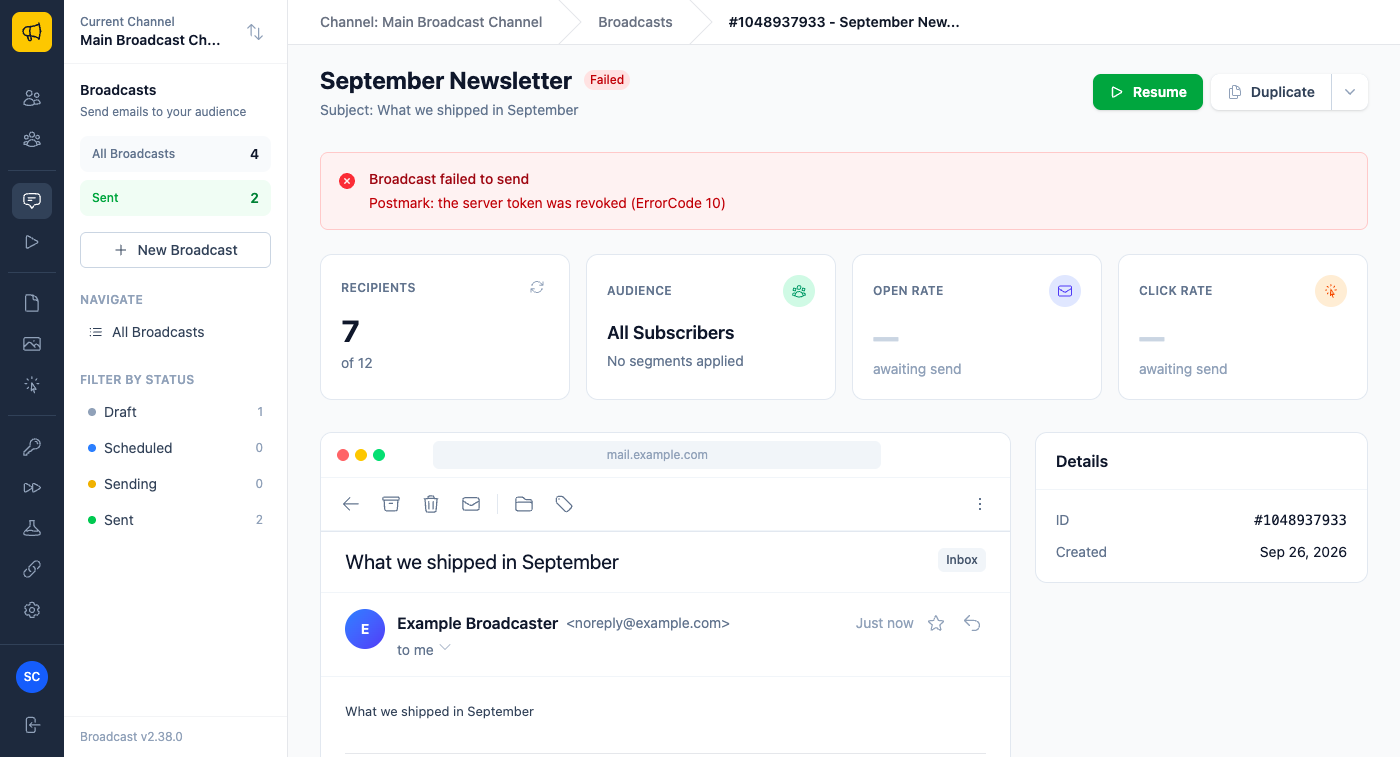
Then you fix the cause and click Resume. The send picks up exactly where it stopped. People who already got the email do not get it again, and the person the send was on when it stopped does get it. That last part took the most care: with plain SMTP servers, an earlier version could mark that one person as sent when the email never actually went out. It now sends to them properly.
Here is what that looks like in practice. You kick off the monthly newsletter to 40,000 people and go to lunch. Someone on your team rotates the Postmark token without telling you. When you get back, the broadcast says Failed, the error names the revoked token, and the recipient count shows how far it got. You paste in the new token, click Resume, and the other 28,000 go out. Nobody gets two copies.
Webhooks that wait out an outage
Webhooks had the same problem in a different shape. If your receiving endpoint went down during a send, deliveries failed, retried, failed again, and eventually ran out of retries. Worse, a webhook failure in the wrong place could stop the send itself. A downstream analytics tool going offline should never be able to stop your newsletter.
Now it cannot. A webhook failure never stops or fails a send, and never makes an API request fail. When an endpoint fails five times in a row, Broadcast marks it Delayed and holds its events instead of retrying them into the ground. Held events do not use up their retries. Broadcast checks back after a minute, then five, then fifteen, then every hour, and once the endpoint answers it sends everything it held, oldest first, at a pace that will not knock over a server that has only just come back.
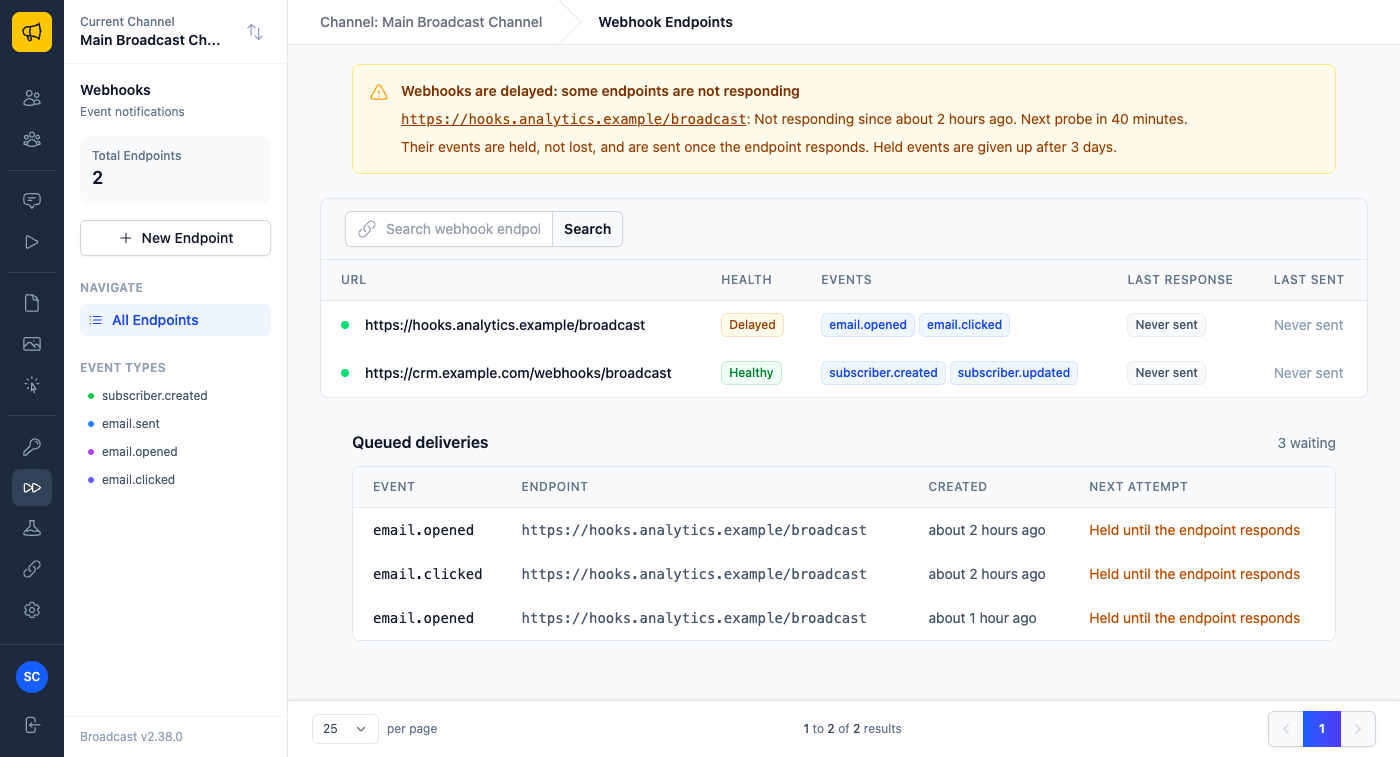
The Webhooks page shows you all of it: which endpoints are healthy, which are delayed and since when, when the next check runs, and exactly what is queued. Every webhook payload also carries a small delivery object saying whether it was held and since when, so your receiver can tell a late email.opened from a fresh one before acting on it.
Picture your CRM sync endpoint going down over a weekend while a campaign runs. On Monday you fix the server. At the next hourly check Broadcast sees it answering and starts sending the held opens and clicks, and your CRM catches up without you replaying anything by hand. If you moved the endpoint to a new URL instead, changing the URL clears the Delayed state, and the held events start going out within about a minute.
A suppression list that explains itself
The third fix is quieter, but it was quietly hurting people. Our suppression list used to be one flat list that blocked every kind of email. So when someone marked a newsletter as spam, Postmark reported the complaint, the address landed on the list, and that person could no longer receive a password reset or a receipt from you. They complained about marketing and lost access to their account.
Now every entry records where it came from, and that decides what it blocks.
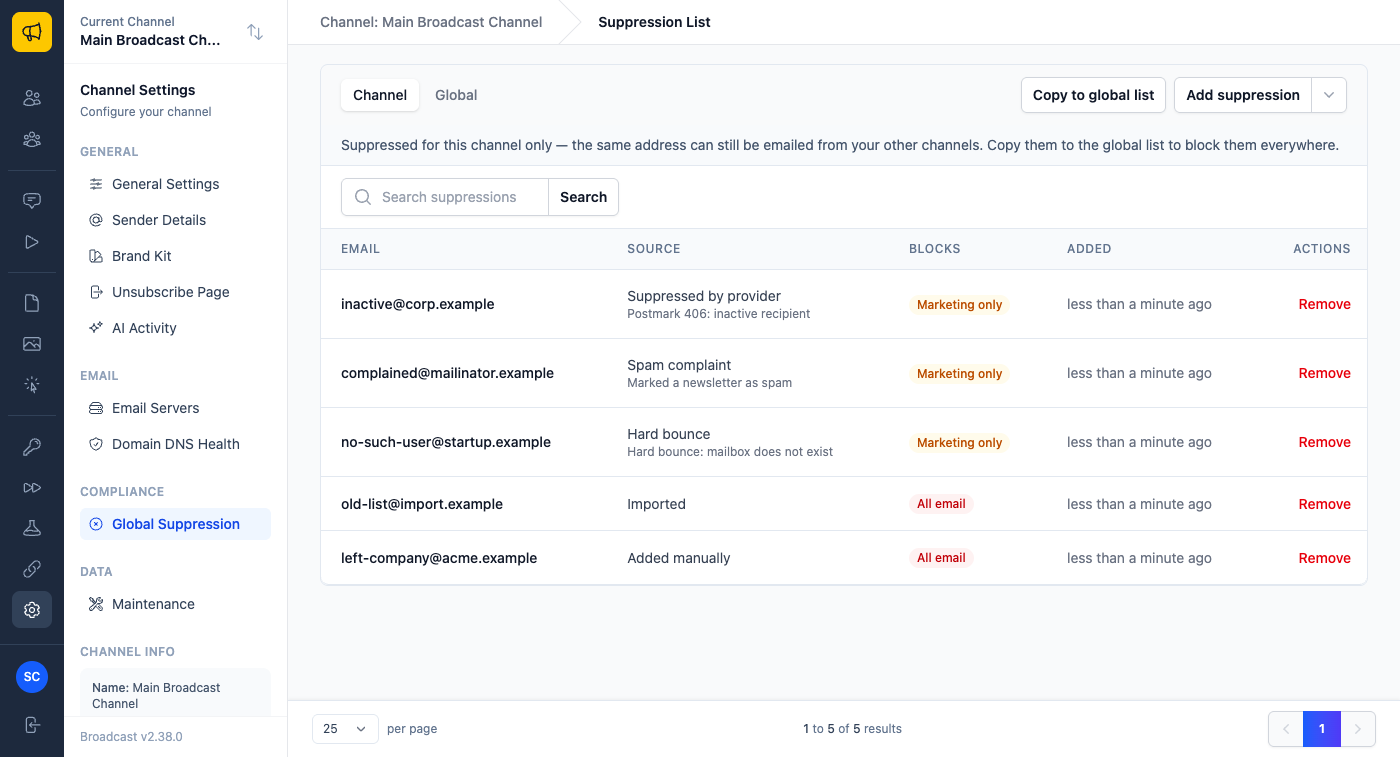
Addresses you add yourself, by hand, by upload or through the API, block all email, because you added them on purpose. Addresses your provider reported, from hard bounces, spam complaints or its own suppression list, block broadcasts and sequences only, so transactional email still goes out. If you would rather a hard bounce block everything, there is a channel setting for that. Postmark soft bounces and out-of-office replies no longer suppress anyone at all.
So when a customer who unsubscribed from your newsletter by clicking “spam” comes back to reset their password, the reset arrives. And when you look at the list to work out why someone is not getting your emails, it tells you: “Hard bounce, mailbox does not exist” is a very different conversation from “Added manually.”
The rest of 2.38
A few more fixes in the same spirit, each one a way mail could silently go wrong:
- Every new channel starts with a Test Server that captures mail and never delivers it. It used to stay on after you added a real server, so a share of real subscribers’ mail could end up in the test inbox while showing as sent. Adding a real server now switches it off, unless something is still set to use it.
- Password reset emails now go out through your channel’s email server. Before, they could fail while the page said instructions were on their way.
- Sending a broadcast to an empty audience is refused instead of being marked sent.
- New channels ask people to confirm before unsubscribing, so corporate link scanners that open every link in an email no longer unsubscribe your readers by accident.
None of this is glamorous. It is what I would want from a tool I trusted with a list I spent years building.
The broadcast emails guide covers failed broadcasts and Resume, and the webhooks guide explains Delayed endpoints and held events. For more on webhooks, see webhooks for purging a subscriber list.
