Previewing a Liquid Email When There Is No Subscriber
A customer sent us a screenshot of a broadcast preview. The email had a block per city, built with {% assign %} and {% if %}, and the preview showed all of it: every branch, every tag, as plain text. The email itself was fine. The preview just never ran Liquid, because a preview has no subscriber to run it with.
Broadcast 2.52 fixes that. Every preview (broadcasts, templates, transactional emails, sequence steps, and the Preview tab of the HTML editors) now renders the Liquid with sample data, and a Preview data panel lets you change that data. This post is about how the preview decides what that panel should contain.
![A broadcast page with a Preview data panel above the email: a first_name text field set to Alex, a custom_data.vip switch, a custom_data.code text field showing [code], a custom_data.city dropdown set to none, and a beta tag checkbox. The email below reads Hi Alex, We will post the next dates soon, with Alex highlighted](/assets/blog/liquid-preview-data-panel-8baab5fc.png)
Rendering is the easy part
Liquid will render anything you give it. The question is what to give it. Fill first_name with “Alex” and most emails look right. But take this one:
{% if custom_data.vip %}
  Your VIP code is {{ custom_data.code }}.
{% elsif custom_data.city == "Oslo" or custom_data.city == "Bergen" %}
  See you at the Norway meetup.
{% endif %}
{% if tags contains "beta" %}You are in the beta.{% endif %}
A fixed set of sample values shows one version of this email. The person reviewing it wants to see all of them. So each variable needs a control that matches how the template uses it:
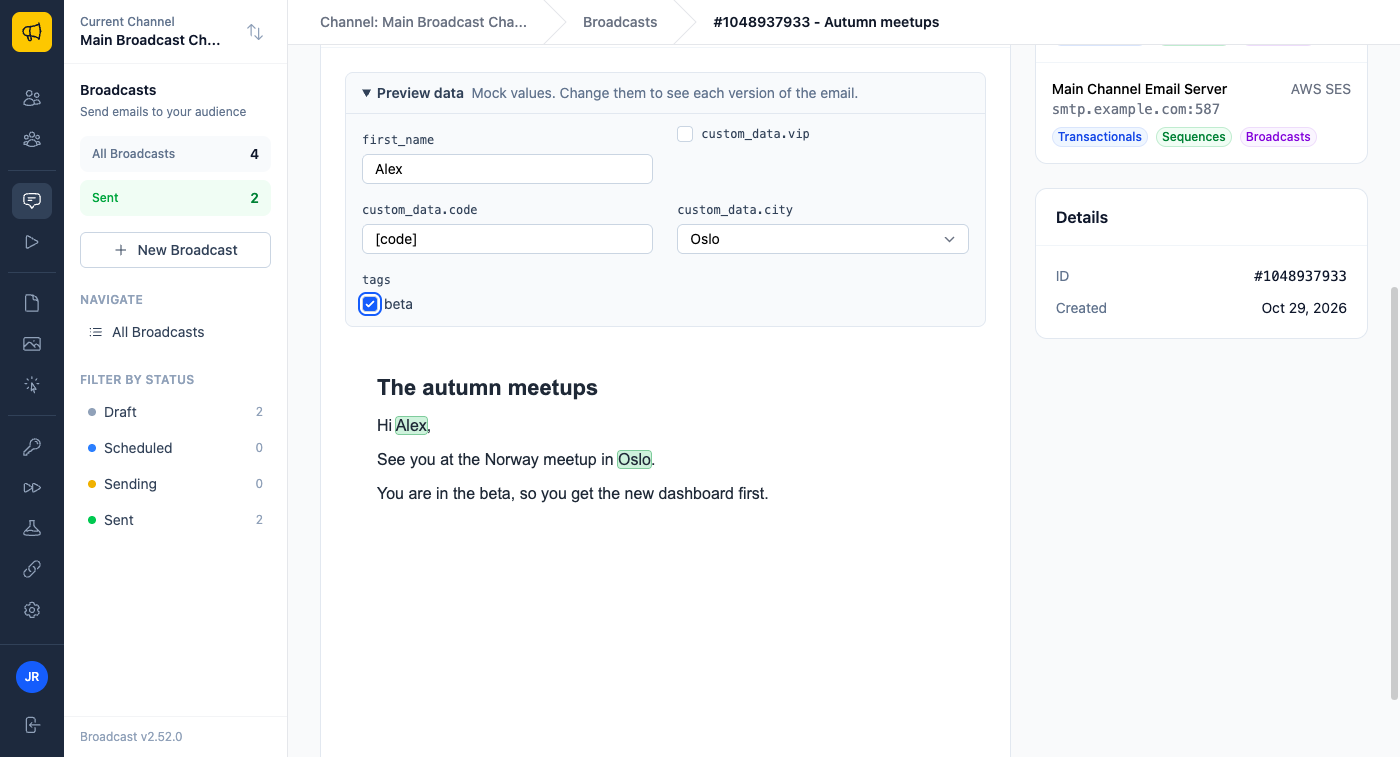
custom_data.vipis only tested as true or false, so it gets a switch.custom_data.cityis compared with “Oslo” and “Bergen”, so it gets a dropdown with those two values and a blank.custom_data.codeis printed, so it gets a text field.tagsis checked withcontains "beta", so it gets a checkbox list of the tags the template tests.
Pick “Oslo” and tick beta, and the preview shows the Norway branch and the beta line:
A regular expression over {{ }} cannot tell those apart. The template has to be read the way Liquid reads it.
Reading the template with Liquid’s own parser
Liquid ships a ParseTreeVisitor that walks a parsed template and calls you back for each node type. The preview registers a callback for the nodes that matter:
Liquid::Variableis a{{ }}output. Its variable is printed.Liquid::Conditionis one comparison inside anif,elsiforunless. It holds the left side, the operator and the right side, so the preview records the variable, the operator, and the literal it is compared with.Liquid::Assign,Liquid::CaptureandLiquid::Forcreate names that are not subscriber data.
Each use then turns into a usage: printed, tested as a condition, compared by size (>, <, >=, <=), or checked with contains. The literals go into a list per variable. When the walk is done, every variable has a set of usages and a list of compared values, and the control follows from those:
- Compared with a text or number literal: a dropdown of those literals.
- Only tested for true or false: a switch.
- Compared by size: a text field that sends a number, so
{% if age >= 21 %}compares numbers, not text. - Anything else that is printed: a text field.
One expression, one object
The first version had a bug that the release review caught. Take this body:
Hi {{ first_name }}.
{% if first_name %}Welcome back.{% endif %}
first_name is printed and tested. It should be a text field, because a switch cannot type a name. The preview showed a switch.
The cause is a detail of the Liquid parser. Identical expressions in one template parse to one shared VariableLookup object. The first version recorded the usage on the lookup, so the condition and the output wrote to the same object, and whichever came last won. Now each use is read from the node that owns it: the Variable node for a print, the Condition node for a test. The shared lookup only says which variable it is.
Names that point somewhere else
Real templates do not always say custom_data.city. They say any of these:
{{ subscriber.custom_data.city }}
{{ subscriber.data.city }}
{{ data.city }}
{% assign d = subscriber.custom_data %}{{ d.city }}
All four are the same field, and the panel must show it once. The walk records every assign whose source is a plain lookup as an alias, and every other assigned, captured or loop name as a local. Each lookup is then resolved to one canonical path: aliases are followed (a few levels deep at most), subscriber. and data. are folded into custom_data., and a local such as the loop variable in {% for item in items %} is dropped, because it is not something a subscriber has.
The canonical path also depends on what kind of email it is. A broadcast has the whole subscriber, with tags and custom data. A confirmation email has the channel name, the confirmation link and an unsubscribe link that the form decides. A transactional email has only the standard fields. The preview takes the email kind, so it offers only the variables that the send of that email fills. A variable the send leaves blank stays blank in the preview too.
Rendering it the way the send does
Once the panel has values, the body renders through the same code the send uses: the same Liquid version, the same handling of Postmark’s {{{pm:unsubscribe}}} tag, the same removal of links that render blank. The values go in raw, exactly as a subscriber’s data would. That rule came from two bugs:
{{ last_name | escape }}with “O'Brien & Co” was escaped twice, because the preview escaped the value before the template escaped it again.{{ first_name | default: "neighbour" }}lost its highlight. The marker that drives the highlight was on the value, so a filter either saw the marker or had to get the plain value without it.
Highlighting after the filters
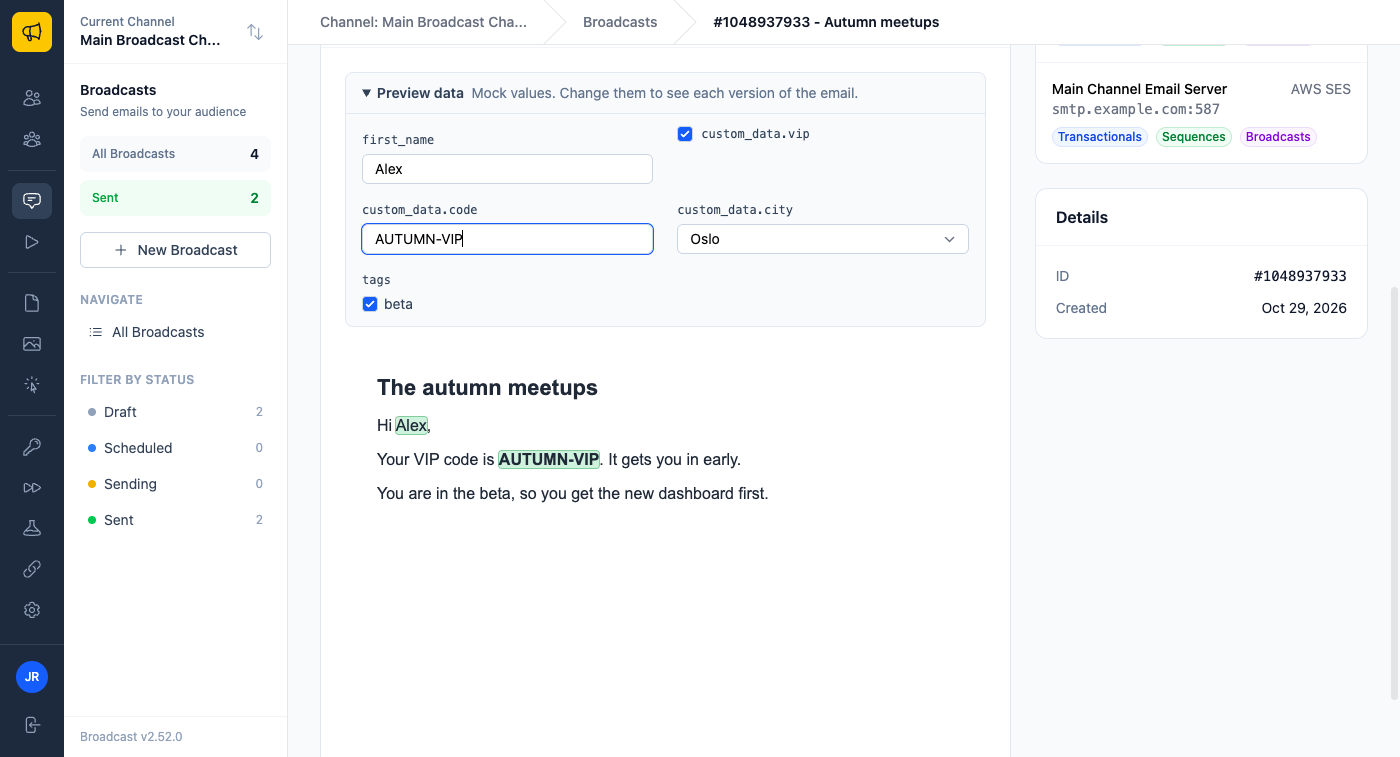
The preview highlights each value that came from mock data, so you can see what changes per subscriber. The first version wrapped the value itself in a marker, and then had to keep a list of the filters that were safe to run on a marked value. Every filter outside that list lost the highlight.
The fix is to add a filter instead. After the template is parsed and before it renders, the preview walks the parse tree again and appends a preview_mark filter to the end of every {{ }} that prints a subscriber variable:
module MarkFilter
  def preview_mark(input)
    text = input.is_a?(Array) ? input.join : input.to_s
    text.empty? ? text : "#{MARK_OPEN}#{text}#{MARK_CLOSE}"
  end
end
The template’s own filters run first, on the raw value. preview_mark runs last and wraps the final output in two private-use Unicode characters, U+E000 and U+E001. These never occur in a real email, survive any HTML, and cost nothing to find. After the render, the preview turns each marked run of text into a highlight span. A link such as unsubscribe_url is not marked, so an href is never broken.
Typed values and runaway loops
The panel is a form, so its values arrive as request parameters. A value with < in it could be HTML, and an email can print HTML from custom data, so the preview allows it. It first removes script and style elements together with their content, and then passes the result through the Rails safe-list sanitizer. The preview also runs in a sandboxed frame with scripts off.
The HTML editor posts the unsaved body to the server for its Preview tab, so a template such as {% for i in (1..100000000) %} would run in the web process. The preview renders with Liquid’s resource limits, so a runaway loop stops with an error notice instead of using the server.
A detail that came back from QA
One case came up after the first fix. With {% if first_name == "Sam" %}, first_name became a dropdown of blank and “Sam”, and it started on blank. So the default preview read “Hi , welcome.” A dropdown for a standard field now also offers its sample value and starts there. You see “Hi Alex, welcome.” first, pick “Sam” to see the other branch, and pick blank to test a subscriber with no name.
Where you will use it
A newsletter with a block per city. This is the email from the screenshot that started it. Open the broadcast, step through each city in the dropdown, and check that every block reads well before it goes to the whole list. Before 2.52, the only way to see the Oakville block was to send a test to an Oakville subscriber.
A transactional receipt with a VIP line. Your app sends the receipt through the API with custom_data. Open the transactional email, switch custom_data.vip on, and type a sample code. You see the VIP version with the footer the send adds, without calling the API.
An edit you have not saved. You change an {% if %} in the HTML editor of a sequence step. The Preview tab renders your unsaved body with the same sample data, so you see the result of the change before it reaches a subscriber who is already in the sequence.
What it does not do
The preview does not guess at data it cannot see. A custom field that the template prints but never compares shows a placeholder such as [city] until you type a value. A Liquid error shows as a notice above the email, with the body as written, so you can find the problem. And because it renders the way the send renders, the preview never promises something the send will not do.
See the broadcast emails documentation for how to use the Preview data panel, or read how Broadcast handles a sequence email that fails, the main change in 2.51.
