The upgrade that never finished
A customer wrote in with two problems that did not obviously belong together. Their server went down at weekends, and their upgrades hung. The container would start, the site would not come back, and the only way out was to sit there and wait, or reboot and hope.
I reproduced it on a throwaway VM, and it turned out to be one problem wearing two hats.
Postgres does not have a lock_timeout by default. A session holding an ACCESS EXCLUSIVE lock on a table blocks every other access to that table, including plain reads, and a blocked query waits forever rather than giving up. When the blocked query is the migration Broadcast runs as it boots, the container never finishes starting. From the outside that looks exactly like a hang, because it is one.
The session doing the blocking was theirs. They connect to their database remotely, which is an entirely reasonable thing to do, and somewhere along the way a client had been left open in a transaction: a GUI window on a desk, still holding its locks at 2am on a Sunday. Nothing about that is exotic. Any of us would have done it.
Three changes in 2.28 address it, and they are deliberately layered, because each one covers a case the others do not.
Production connections now set lock_timeout to fifteen seconds, so a migration blocked behind someone else’s lock fails quickly and loudly instead of waiting forever. A failed upgrade you can read is worth far more than a successful-looking one that never ends. Override it with DATABASE_LOCK_TIMEOUT if fifteen seconds is wrong for your database.
Postgres itself now runs with idle_in_transaction_session_timeout set to ten minutes, so an abandoned client transaction gets reaped rather than holding its locks indefinitely. And stopping the stack now closes lingering database sessions first, naming each one it closed: the address it came from, the client application, the state it was in. That naming matters more than it sounds. It turns “the upgrade hung” into “we closed a remote psql session that was idle in transaction”, which is a sentence someone can act on.
Upgrades that refuse to interrupt you
The same investigation turned up something adjacent. Stopping the service kills a job mid-batch, and a job killed mid-batch does not resume. If you upgraded while a broadcast was going out, you would find out afterwards.
Upgrades now run a preflight and refuse to start while a job is actually running or a broadcast is queueing or sending, and they name what is blocking them. Work that is queued but unclaimed never blocks anything, because it lives in the database and gets picked up after the restart.
Automated upgrades, the dashboard trigger and the nightly cron, do not fail when they hit this. They defer and retry once the queue drains, so a busy night does not turn into cron failure mail at 3am. If an upgrade has been deferred repeatedly, diagnose says so, because a permanently busy server that quietly stops upgrading is its own problem. When you need to go anyway, ./broadcast.sh upgrade --force is the override, and ./broadcast.sh preflight runs the check on its own.
While I was in there, the installation dashboard’s job queue turned out to have been lying. It queried a column that does not exist on this version of Solid Queue, and a bare rescue swallowed the error and reported an empty queue no matter what was running. That panel is exactly what an operator checks before upgrading, so it was wrong in the one place it needed to be right. It now reports the real numbers.
Keeping marketing mail off your transactional reputation
The other half of this release came from a different customer report, about Postmark.
Postmark keeps bulk and one-to-one mail on separate streams, on separate infrastructure, so that complaints about a newsletter cannot damage the reputation that carries your receipts and password resets. Broadcast’s sequences have always sent on the transactional stream. For a genuine drip, a trial-ending notice or a password-expiry reminder, that is right. For an onboarding series with an unsubscribe link at the bottom, it is a slow leak: every complaint that series earns lands on the stream you can least afford to lose.
Sequences now carry their own message stream setting, and you choose per sequence.
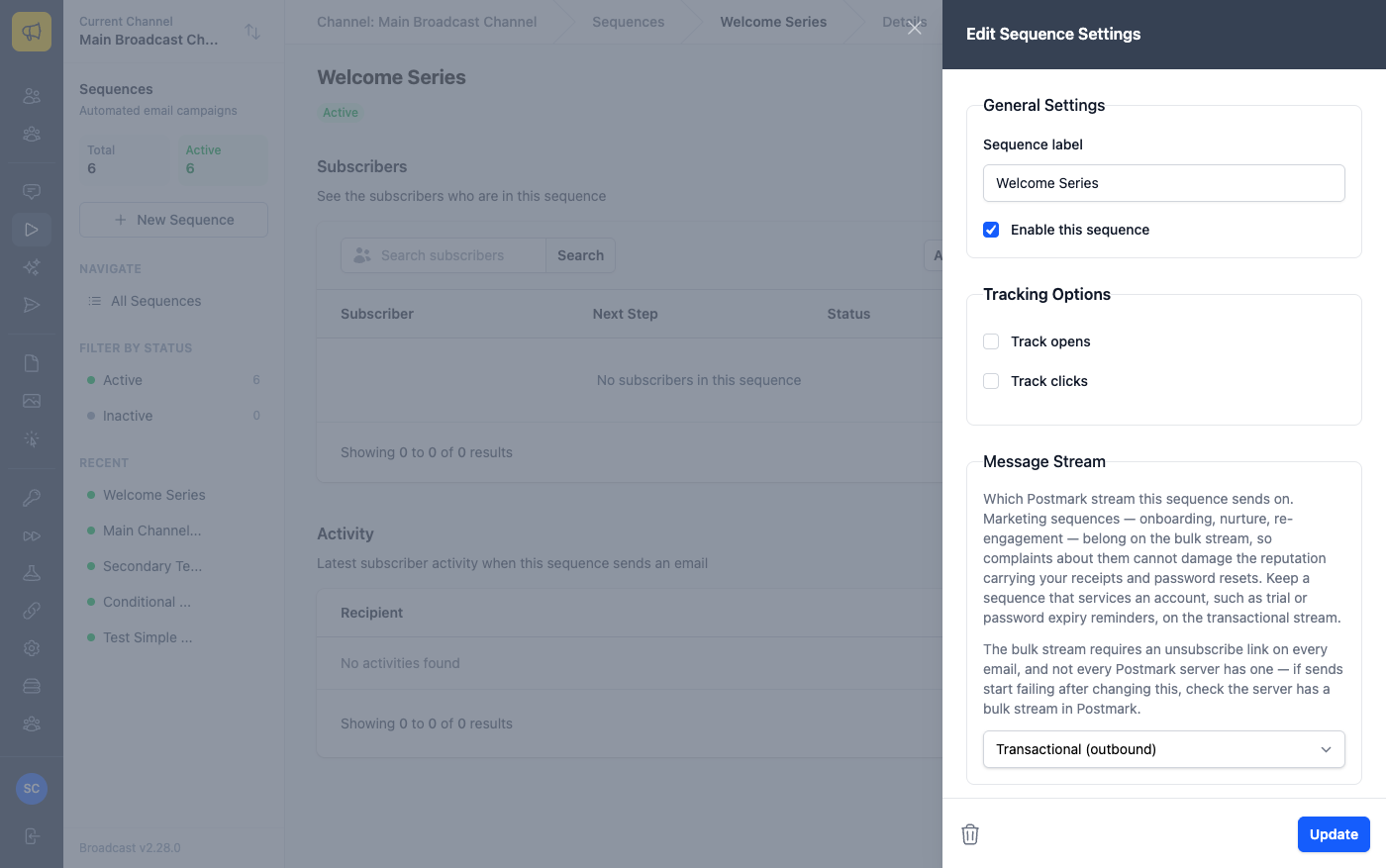
The default stays transactional, because that is where sequences have always sent and nothing should change under you on upgrade. Moving one is a deliberate decision, and the setting only appears if the channel actually sends through Postmark, since no other provider separates streams this way.
Two things to know before you move one. Postmark requires an unsubscribe link on every email sent through a bulk stream, so a sequence with unsubscribe switched off does not belong there. And not every Postmark server has a bulk stream. I surveyed a real account of thirty-seven servers while building this and found one with no bulk stream at all, and one using a custom stream name. If sends start failing after you change this, that is the first thing to check.
For a stronger separation than streams, a channel can now run more than one Postmark server.
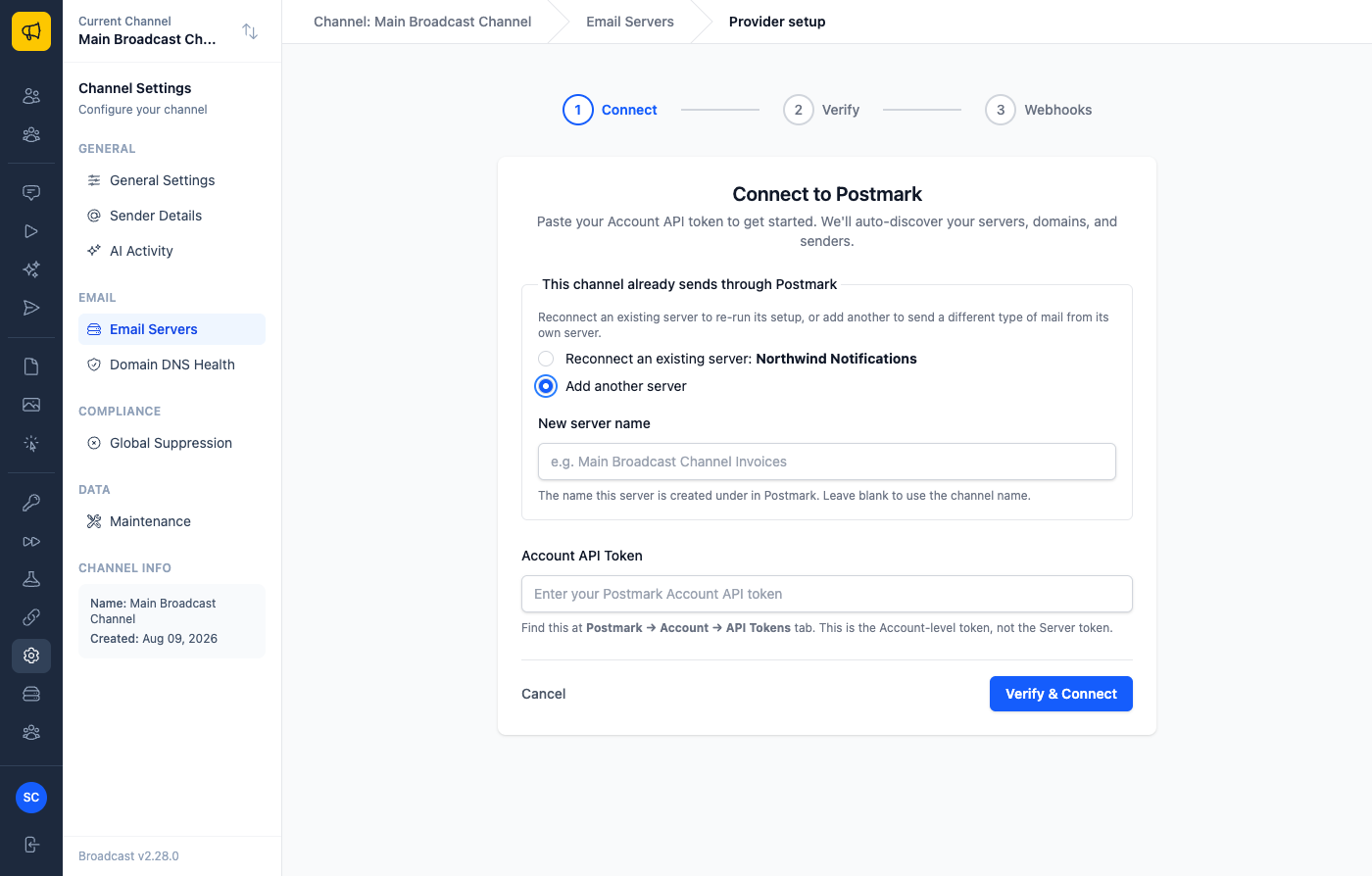
Guided setup used to reuse whatever Postmark server it found on the channel, which meant pasting a token a second time updated the first server instead of adding one, leaving the second server simply unreachable. It now asks what the run is for: reconnect a server you already have, or add another and name it. A server’s reputation is its own, so invoices on one server and the newsletter on another means a bad week for one cannot drag the other down.
That fix uncovered an embarrassing one. Every time guided setup ran, it wrote a server name with Postmark - in front of it, then pushed that name to Postmark, then read it back on the next run and added the prefix again. Servers in long-lived accounts had drifted to Postmark - Postmark - Acme and would have kept growing until they hit Postmark’s name length limit. New names are clean, and there is a task under Settings, Maintenance that renames the ones already affected.
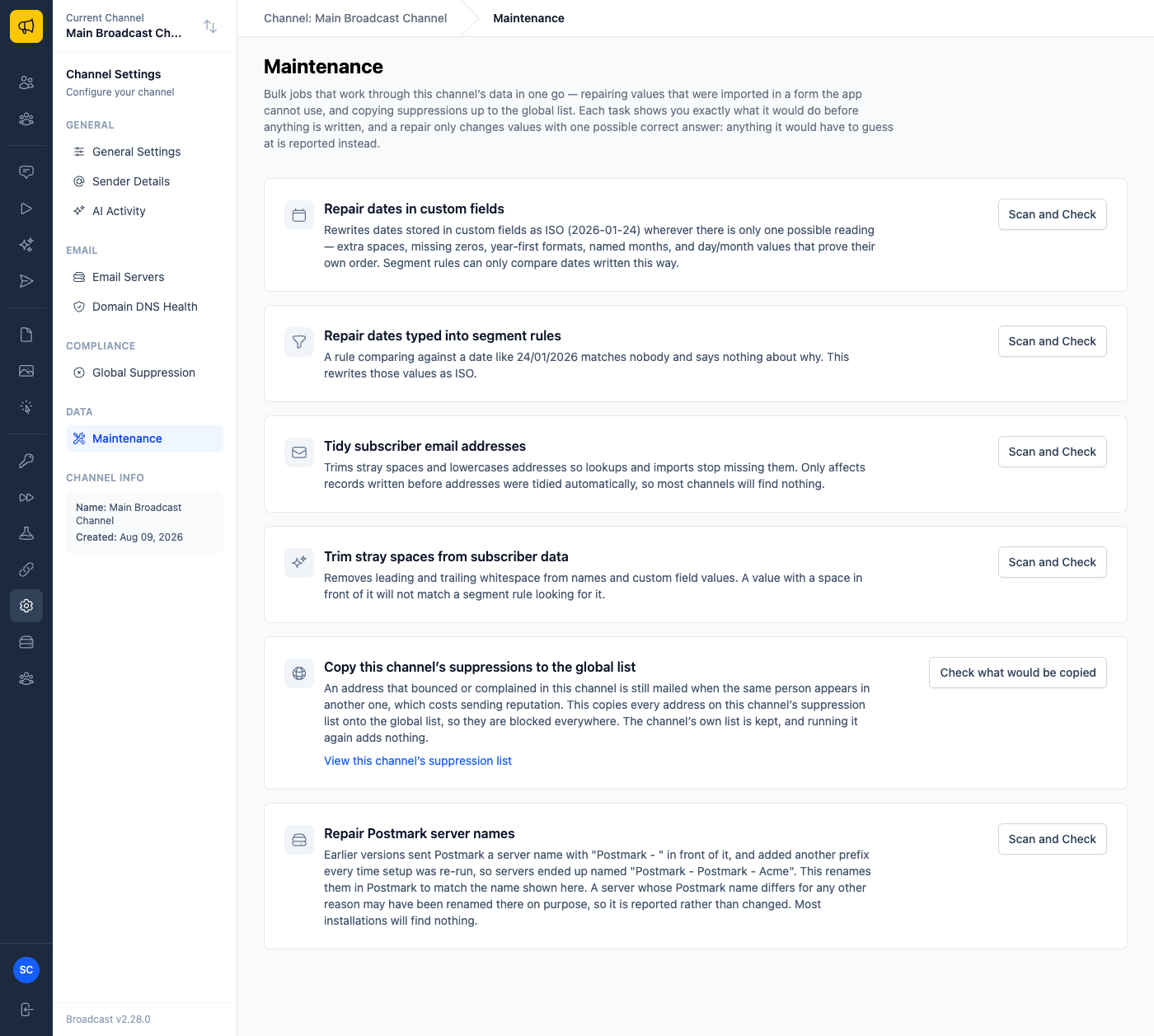
Like every task on that page, it scans first and shows you exactly what it would change before anything is written, and it only renames a server whose Postmark name is your Broadcast name wearing that old prefix. A server whose name differs for any other reason is reported and left alone, since you may have renamed it in Postmark on purpose, and that is not ours to overwrite. Most installations will find nothing.
A practical way to use both together: put your onboarding sequence on the bulk stream, add a second Postmark server named for your invoices, bind your transactional email to it, and your marketing mail and your receipts stop sharing a fate. If a campaign earns a complaint spike, your password resets never notice.
Shipped in 2.28. See the CLI reference for preflight, upgrade --force and diagnose, the Postmark integration guide for streams and multiple servers, or read how monitoring tells you when your server goes down before a customer does.
