Build a Poll
In this walkthrough you read a complete plugin. A person clicks an answer in an email, and you see the totals on a page in Broadcast.
The code is the official Polls plugin, broadcast.polls, with one change: it uses the ID local.polls. A plugin of your own must use local., because any other ID needs a signature from the plugin directory.
Read Your First Plugin and the Public Actions Hook first.
The plan
- An admin creates a poll on a plugin page.
- The page gives HTML to paste into an email.
- Each answer is a signed link, with the poll and the answer in its
value. - A click runs the
voteaction, which saves the answer. - The page shows the totals, and a segment rule finds people by their answer.
Here is where each piece of data lives:
| Key | Where | Holds |
|---|---|---|
poll:<id> |
Shared store | The question and the answers |
count:<id>:<answer> |
Shared store | A total. Changed only with increment |
vote:<id> |
forSubscriber |
This person’s answer. Deleted with the person |
The manifest
{
  "id": "local.polls",
  "name": "Polls",
  "version": "1.0.0",
  "requires": { "broadcast": ">=3.0.0 <4.0.0", "pluginApi": "1" },
  "permissions": {},
  "hooks": {
    "publicActions": [{ "name": "vote" }]
  },
  "events": {
    "poll.answered": { "properties": { "poll": "string", "answer": "string" } }
  },
  "segmentRules": {
    "answered_poll": {
      "label": "Answered a poll",
      "source": "poll.answered",
      "aggregate": "exists",
      "where": [["properties.poll", "=", "$poll"], ["properties.answer", "=", "$answer"]],
      "params": { "poll": "string", "answer": "string" }
    }
  },
  "ui": { "pages": [{ "slot": "nav", "title": "Polls", "path": "ui/index.html" }] }
}
This plugin asks for no data permissions. It uses only its own store and events. The publicActions key adds one sensitive permission, Links anyone can click in emails.
The top-level events and segmentRules keys are explained in Plugin Events and Segment Rules.
The code
Make dist/main.js:
// Polls: ask one question in an email and count the answers.
//
// An admin creates a poll on the plugin page and pastes the HTML it gives into an email. Each answer
// is a public action link: {{ plugins.local_polls.actions.vote }}?value=<poll>:<answer>.
//
// Stored per channel:
//   poll:<id>                 { id, question, answers: [{ id, label }], closed, created_at }
//   count:<id>:<answer>       a counter, changed only with store.increment
// Stored per subscriber, deleted with them:
//   vote:<id>                 the answer id
//
// A person can change their answer: the last click counts. So a mail scanner that runs scripts and
// clicks every link does not lock a person out of their real answer.

const ID = /^[a-z0-9-]{1,40}$/;
const MAX_POLLS = 100; // store.list returns at most 100 rows
const MAX_ANSWERS = 6;
const MAX_TEXT = 200;

function slug(text) {
  return String(text).toLowerCase().normalize("NFKD").replace(/[^a-z0-9]+/g, "-").replace(/^-+|-+$/g, "").slice(0, 40);
}

function cleanText(text) {
  return String(text ?? "").trim().slice(0, MAX_TEXT);
}

function parseVote(value) {
  const [poll, answer, ...rest] = String(value ?? "").split(":");
  return rest.length === 0 && ID.test(poll) && ID.test(answer ?? "") ? { poll, answer } : null;
}

async function loadPolls(ctx) {
  const rows = await ctx.store.list("poll:");
  return rows.map((row) => row.value).sort((a, b) => String(b.created_at).localeCompare(String(a.created_at)));
}

async function withCounts(ctx, poll) {
  const answers = await Promise.all(poll.answers.map(async (answer) => ({
    ...answer,
    count: (await ctx.store.get(`count:${poll.id}:${answer.id}`)) ?? 0,
  })));
  return { ...poll, answers, total: answers.reduce((sum, answer) => sum + answer.count, 0) };
}

async function createPoll(ctx, input) {
  const question = cleanText(input.question);
  const labels = (Array.isArray(input.answers) ? input.answers : []).map(cleanText).filter(Boolean);
  if (!question) return { error: "Enter a question." };
  if (labels.length < 2 || labels.length > MAX_ANSWERS) return { error: `Enter 2 to ${MAX_ANSWERS} answers.` };

  const answers = labels.map((label, index) => ({ id: slug(label) || `answer-${index + 1}`, label }));
  if (new Set(answers.map((answer) => answer.id)).size !== answers.length) return { error: "Each answer must be different." };

  const polls = await loadPolls(ctx);
  if (polls.length >= MAX_POLLS) return { error: `You can keep ${MAX_POLLS} polls. Delete an old poll first.` };

  const base = slug(question).slice(0, 30) || "poll";
  const taken = new Set(polls.map((poll) => poll.id));
  let id = base;
  for (let suffix = 2; taken.has(id); suffix++) id = `${base}-${suffix}`;

  await ctx.store.set(`poll:${id}`, { id, question, answers, closed: false, created_at: new Date().toISOString() });
  return { created: id };
}

async function setClosed(ctx, id, closed) {
  const poll = await ctx.store.get(`poll:${id}`);
  if (poll) await ctx.store.set(`poll:${id}`, { ...poll, closed });
}

async function deletePoll(ctx, id) {
  const poll = await ctx.store.get(`poll:${id}`);
  if (!poll) return;
  await Promise.all(poll.answers.map((answer) => ctx.store.delete(`count:${id}:${answer.id}`)));
  await ctx.store.delete(`poll:${id}`);
}

export default definePlugin({
  publicActions: {
    async vote({ value, subscriber_id }, ctx) {
      const vote = parseVote(value);
      const poll = vote && (await ctx.store.get(`poll:${vote.poll}`));
      if (!poll || !poll.answers.some((answer) => answer.id === vote.answer)) {
        return { title: "Poll not found", message: "This poll is no longer available." };
      }
      if (poll.closed) return { title: "This poll is closed", message: "It no longer takes answers. Thank you." };

      const person = ctx.store.forSubscriber(subscriber_id);
      const previous = await person.get(`vote:${poll.id}`);
      if (previous !== vote.answer) {
        await person.set(`vote:${poll.id}`, vote.answer);
        await ctx.store.increment(`count:${poll.id}:${vote.answer}`);
        if (previous) await ctx.store.increment(`count:${poll.id}:${previous}`, -1);
        await ctx.broadcast.events.record({
          name: "poll.answered",
          subscriber_id,
          properties: { poll: poll.id, answer: vote.answer },
        });
      }
      return { title: "Thanks for your answer", message: previous && previous !== vote.answer ? "We changed your answer." : "We saved your answer." };
    },
  },

  async pageData({ input }, ctx) {
    let notice = {};
    if (input?.action === "create") notice = await createPoll(ctx, input);
    if (input?.action === "close") await setClosed(ctx, input.id, true);
    if (input?.action === "reopen") await setClosed(ctx, input.id, false);
    if (input?.action === "delete") await deletePoll(ctx, input.id);

    const polls = await Promise.all((await loadPolls(ctx)).map((poll) => withCounts(ctx, poll)));
    return { ...notice, polls };
  },
});
Parse and check the value
The link’s value looks like launch-date:yes. It is not signed, so parseVote trusts nothing. It needs exactly two parts, and each must match ID. The vote function then loads the poll and checks that the answer exists.
A bad value gets a friendly message, and it changes nothing.
Allow a changed answer
Look at vote. The last click counts. There is a reason for this: some mail scanners run scripts and click every link. If the first click were final, a scanner could lock a person out of their real answer. If the last click counts, the person can still answer.
A repeat of the same answer changes nothing, because of the check previous !== vote.answer. So the handler is safe to repeat.
The official Polls plugin adds one more check. Its handler also saves when the person last clicked. A different answer within 10 seconds of the last click is a scanner, not a person, so Polls counts neither answer. The person’s own later click counts as usual.
Count with increment
A popular poll gets many clicks at the same moment. ctx.store.increment is atomic, so no vote is lost. A get and a set would lose votes here.
When a person changes their answer, the code adds one to the new answer and takes one from the old.
Record an event
events.record lets an admin build a segment with the rule Answered a poll. The rule matches anyone who gave that answer at any time, also a person who changed it later.
pageData does the page’s work
The page sends an action in input. The function does that action, then returns all polls with their totals. It is one function, so the page always shows fresh data after a change.
createPoll checks the input in the same way as vote does. This input comes from a browser.
store.list returns at most 100 rows, so the plugin stops at 100 polls.
The page
The page is built with Signal, so it is short. ui/index.html:
<!doctype html>
<html lang="en">
  <head>
    <meta charset="utf-8">
    <title>Polls</title>
    <link rel="stylesheet" href="/plugin-kit/v1/kit.css">
    <script type="module" src="/plugin-kit/v1/kit.js"></script>
    <script type="module" src="app.js"></script>
  </head>
  <body>
    <sg-page title="Polls" description="Ask one question in an email and count the answers.">
      <sg-button slot="actions" id="new" variant="primary" icon="plus">New poll</sg-button>
      <sg-banner id="problem" tone="danger" hidden></sg-banner>
      <sg-stack id="polls"><sg-skeleton lines="4"></sg-skeleton></sg-stack>
    </sg-page>

    <sg-dialog id="dialog" title="New poll">
      <sg-form id="create">
        <sg-input name="question" label="Question" required maxlength="200"></sg-input>
        <sg-textarea name="answers" label="Answers" help="One on each line, 2 to 6 answers." required></sg-textarea>
        <sg-stack direction="row" justify="end" gap="small">
          <sg-button id="cancel">Cancel</sg-button>
          <sg-button type="submit" variant="primary">Create poll</sg-button>
        </sg-stack>
      </sg-form>
    </sg-dialog>
  </body>
</html>
ui/app.js:
// The Polls page, built from the Signal kit (/plugin-kit/v1/). All text goes in as text. const byId = (id) => document.getElementById(id); const make = (tag, attributes = {}, text) => { const node = document.createElement(tag); for (const [name, value] of Object.entries(attributes)) node.setAttribute(name, value); if (text !== undefined) node.textContent = text; return node; }; const escapeHtml = (text) => text.replace(/[&<>"]/g, (c) => ({ "&": "&", "<": "<", ">": ">", '"': """ })[c]); function emailHtml(poll) { const links = poll.answers.map((answer) => `<p><a href="{{ plugins.local_polls.actions.vote }}?value=${poll.id}:${answer.id}">${escapeHtml(answer.label)}</a></p>`); return [`<p><strong>${escapeHtml(poll.question)}</strong></p>`, ...links].join("\n"); } function actionButton(label, onClick, variant) { const button = make("sg-button", { size: "small", ...(variant ? { variant } : {}) }, label); button.addEventListener("click", onClick); return button; } function pollCard(poll) { const card = make("sg-card", { title: poll.question, description: `${poll.total} ${poll.total === 1 ? "answer" : "answers"}` }); const status = make("sg-badge", { slot: "actions", tone: poll.closed ? "" : "success" }, poll.closed ? "Closed" : "Open"); card.append(status); for (const answer of poll.answers) { const percent = poll.total ? Math.round((answer.count / poll.total) * 100) : 0; card.append(make("sg-meter", { label: answer.label, value: percent, detail: `${answer.count} (${percent}%)` })); } card.append(make("sg-copy", { value: emailHtml(poll), label: "Copy email HTML" })); const help = make("span", { class: "sg-help" }, "Paste this into an HTML block in a broadcast or a sequence email."); const actions = make("sg-stack", { direction: "row", gap: "small" }); actions.append( actionButton(poll.closed ? "Reopen" : "Close", () => load({ action: poll.closed ? "reopen" : "close", id: poll.id })), actionButton("Delete", () => removePoll(poll), "ghost"), ); card.append(help, actions); return card; } async function removePoll(poll) { const yes = await sg.confirm({ title: "Delete this poll?", message: "The answers are deleted too.", confirmLabel: "Delete poll", danger: true }); if (!yes) return; await load({ action: "delete", id: poll.id }); sg.toast("Poll deleted"); } function showEmpty(list) { const empty = make("sg-empty", { title: "No polls yet", text: "Create a poll, then paste it into an email." }); const button = make("sg-button", { variant: "primary" }, "Create poll"); button.addEventListener("click", () => byId("dialog").open()); empty.append(button); const card = make("sg-card"); card.append(empty); list.replaceChildren(card); } async function load(input = {}) { const problem = byId("problem"); try { const data = await sg.pageData(input); problem.hidden = true; const list = byId("polls"); if (data.polls.length) list.replaceChildren(...data.polls.map(pollCard)); else showEmpty(list); return data; } catch (error) { problem.replaceChildren(make("sg-banner", { tone: "danger" }, `The page could not load: ${error.message}`)); problem.hidden = false; return null; } } byId("new").addEventListener("click", () => byId("dialog").open()); byId("cancel").addEventListener("click", () => byId("dialog").close()); byId("create").addEventListener("sg-submit", async (event) => { const form = event.currentTarget; form.busy = true; const { question, answers } = event.detail.values; const data = await load({ action: "create", question, answers: answers.split("\n") }); form.busy = false; if (!data) return; if (data.error) { form.errors = { answers: data.error }; return; } form.reset(); byId("dialog").close(); sg.toast("Poll created"); }); await load();
Here is what to notice:
pollCardbuilds a whole card, then the page puts it in place. A Signal component takes its children when it first draws. So the card gets its meters first.loadshows the three states: a skeleton in the HTML,showEmptyfor no polls and theproblembanner for a failure.- The dialog holds an
sg-form. A server error goes under the field withform.errors. sg.confirmasks before a delete.window.confirmdoes not work in the sandbox.emailHtmlbuilds the HTML for the email.escapeHtmlis needed there, because that text is HTML. Components treat text as text.- The namespace is in the link:
local_polls. If you change the plugin ID, change this line too.
Pack and install
zip -r -X ../polls-1.0.0.broadcast-plugin manifest.json dist ui
Upload it, review it, deploy it and turn it on in a channel, as in Your First Plugin.
Use it
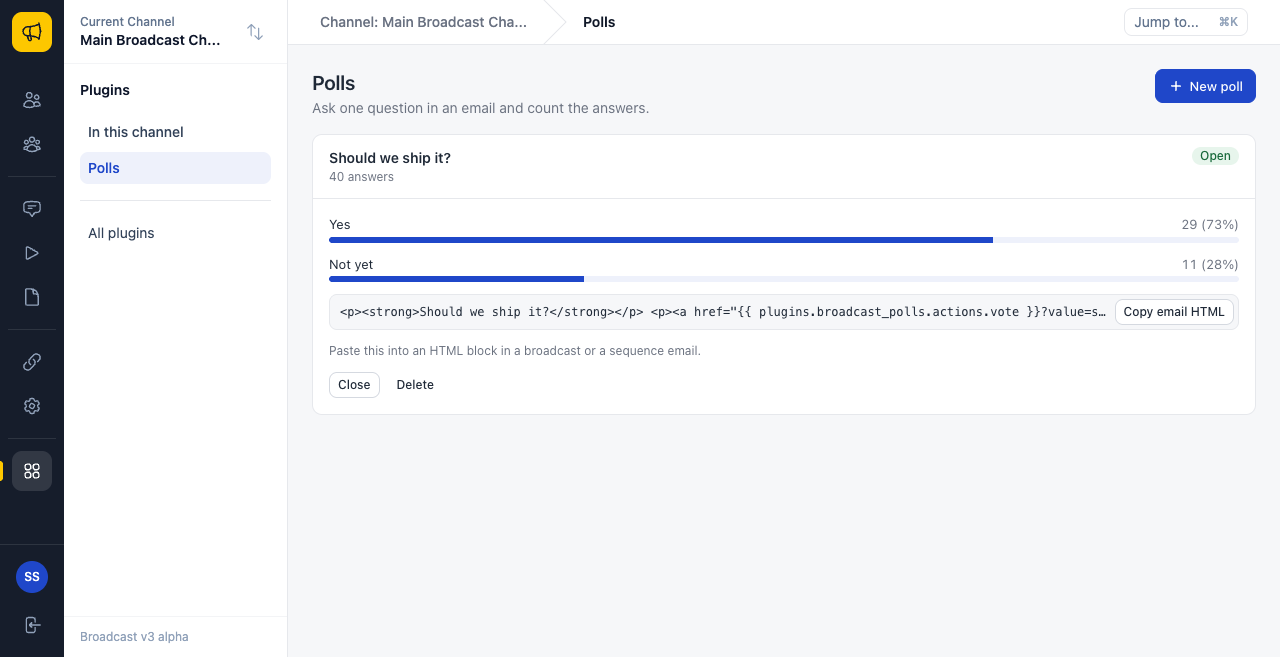
- Open Plugins in the sidebar, then Polls. It looks like this:
- Click New poll.
- Type a question, and two to six answers, one on each line.
- Click Create poll.
- Click Copy email HTML. The text looks like this:
<p><strong>Ship it?</strong></p>
<p><a href="{{ plugins.local_polls.actions.vote }}?value=ship-it:yes">Yes</a></p>
<p><a href="{{ plugins.local_polls.actions.vote }}?value=ship-it:not-yet">Not yet</a></p>
- Paste it into an HTML block in a broadcast or a sequence email.
- Send the broadcast to a small segment with your own address in it.
- Click an answer in the email.
You should see a short page that says Thanks for your answer. The total on the Polls page goes up by one.
Click the other answer. The page says We changed your answer. The first total goes down and the second goes up.
Things to know
- The links do not work in transactional emails or test sends. The tag is empty there, so the link goes nowhere.
- These links are not click tracked, so they do not appear in link stats. Use the Polls page.
- Use an HTML block for the links. Rich text links are not tested.
- A closed poll answers This poll is closed.
- A person can forward the email, and a click still counts for the first person.
- The official Polls plugin also has an API, webhooks and a Tag voters setting. See Polls API.
Try it yourself
- Add a closing date to each poll, and check it in
vote. - Add a
mergeTagshook that shows the current total in an email. - Add a tag for each answer. You need
"tags": "write", and the admin sees a new permission.
