Signal Forms
A plugin page cannot post a normal HTML form, because the sandbox forbids it. sg-form solves this. It checks the fields and hands you the values in an event.
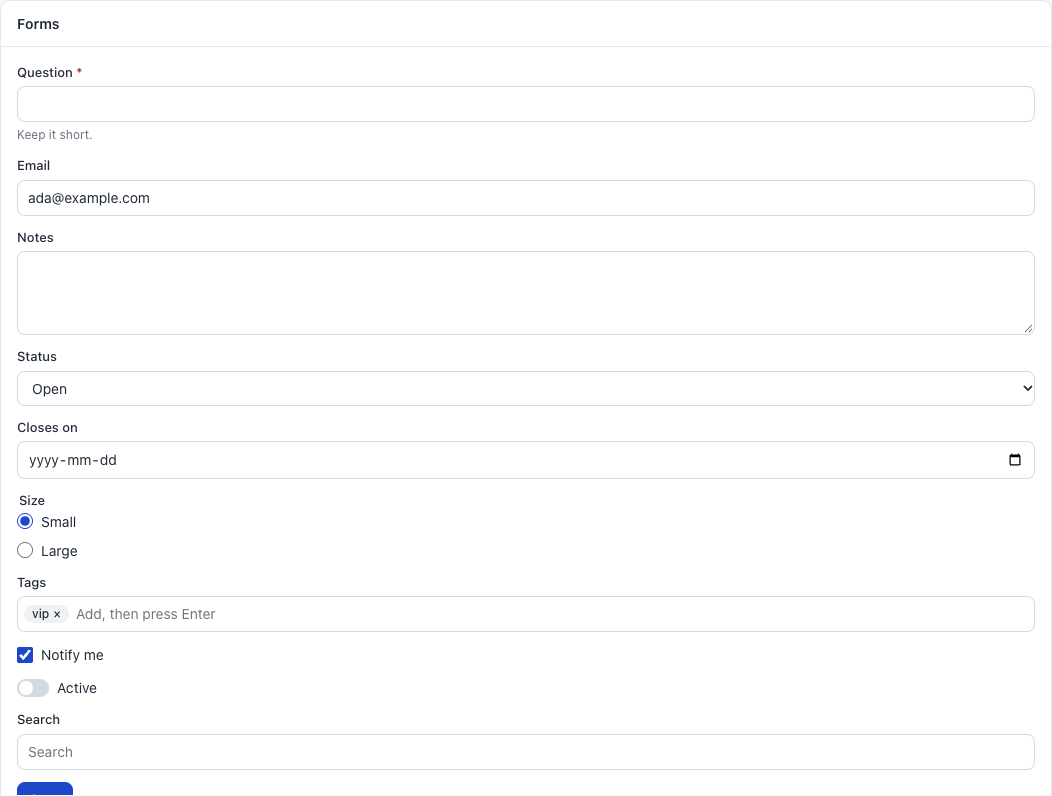
How a form works
<sg-form id="form">
  <sg-input name="question" label="Question" required help="Keep it short."></sg-input>
  <sg-switch name="active" label="Active"></sg-switch>
  <sg-button type="submit" variant="primary">Save</sg-button>
</sg-form>
const form = document.getElementById("form");

form.addEventListener("sg-submit", async (event) => {
  const { question, active } = event.detail.values;
  form.busy = true;
  await sg.pageData({ action: "save", question, active });
  form.busy = false;
  sg.toast("Saved");
});
Each field needs a name. That name is the key in values.
sg-form
| Property or method | Meaning |
|---|---|
values |
Read. An object of all named fields |
errors |
Set. { name: "message" } shows each message under its field. An empty object clears them |
busy |
Set. Turns the submit button off and on |
reset() |
Puts each field back to its starting value, and clears the errors |
| Event | detail |
When |
|---|---|---|
sg-submit |
{ values } |
A person submitted, and all checks passed |
When a check fails, the form shows a message under the field, moves the focus there and sends no event.
What every field can do
All ten field types share these:
| Attribute, property or method | Meaning |
|---|---|
name |
The key in the form’s values |
required |
Must have a value. A checkbox or switch must be on, a radio group needs a choice, and a tag input needs one tag |
value |
Live. Read or set it, also before the field is on the page |
error |
Set it to show a message under the field, also before the field is on the page. Empty text clears it |
check() |
Returns true if the field passes its checks |
problem() |
Returns the message for a failed check |
reset() |
Puts back the starting value, and clears the error |
| Field | Value type |
|---|---|
sg-input, sg-textarea, sg-select, sg-search, sg-date-input |
A string |
sg-radio-group |
A string, or "" |
sg-checkbox, sg-switch |
true or false |
sg-tag-input |
A list of strings |
Common mistakes.
- A field with no
name: it is not invalues. - Trusting browser checks alone: check again in
pageData.
Attributes of text-style fields
sg-input, sg-textarea, sg-select, sg-date-input and sg-search share these:
| Attribute | Meaning |
|---|---|
name |
The key in the form’s values |
label |
The text above the field |
help |
Small text below the field |
value |
The starting value |
placeholder |
Grey text in an empty field |
required |
Must have a value. Adds a red star |
disabled |
Turned off |
readonly |
Can be read, not changed |
maxlength, min, max, pattern, rows |
Passed to the real control |
| Property | Meaning |
|---|---|
input |
The real <input> element, after the field is on the page |
sg-input
A one-line text box.
<sg-input name="email" type="email" label="Email" required></sg-input>
| Extra attribute | Default | Meaning |
|---|---|---|
type |
text |
Any input type, such as email, number, url or password |
Common mistake. value from type="number" is still a string. Use Number().
sg-date-input
A date picker.
<sg-date-input name="closes" label="Closes on"></sg-date-input>
The value looks like 2026-11-30, or it is "".
sg-textarea
A box for several lines.
<sg-textarea name="notes" label="Notes" rows="4"></sg-textarea>
sg-select
A dropdown list.
<sg-select name="status" label="Status">
  <div value="open" selected>Open</div>
  <div value="closed">Closed</div>
</sg-select>
Each child is an option, with value and optional selected. Without value, the text is the value.
To fill it from data:
document.getElementById("status").options = [
  { value: "open", label: "Open" },
  { value: "closed", label: "Closed" },
];
sg-search
A search box that waits until a person stops typing.
<sg-search id="search" placeholder="Search by email"></sg-search>
document.getElementById("search").addEventListener("sg-search", (event) => {
  applyFilter(event.detail.value);
});
| Extra attribute | Default | Meaning |
|---|---|---|
delay |
250 |
Milliseconds to wait after the last key |
| Event | detail |
When |
|---|---|---|
sg-search |
{ value } |
Typing stopped |
Common mistake. Listening for input. Listen for sg-search, so that you do not run a search for each key.
With a label, it shows a visible label. Without one, screen readers still get the word “Search”.
sg-checkbox
One yes or no choice, saved later with a form.
<sg-checkbox name="notify" label="Notify me" checked></sg-checkbox>
| Attribute | Meaning |
|---|---|
name, label, required |
As above |
checked |
On at the start |
disabled |
Turned off |
| Property | Meaning |
|---|---|
checked, value |
Live. Read or set true or false |
| Event | detail |
When |
|---|---|---|
sg-change |
{ checked } |
A person changed it |
sg-switch
Looks like a light switch. It has the same attributes, properties and event as sg-checkbox.
<sg-switch name="active" label="Active"></sg-switch>
Use a switch for a setting that applies at once, and a checkbox in a form that has a Save button.
sg-radio-group
Pick one from a short list.
<sg-radio-group name="size" label="Size">
  <div value="s" checked>Small</div>
  <div value="l">Large</div>
</sg-radio-group>
| Attribute | Meaning |
|---|---|
name, label, required |
As above |
Each child is one choice, with value and optional checked.
| Property | Meaning |
|---|---|
value |
Live. Read or set the chosen value |
| Event | detail |
When |
|---|---|---|
sg-change |
{ value } |
A person chose |
Common mistake. Using radios for more than about five choices. Use sg-select.
sg-tag-input
Type a word and press Enter or a comma, and it becomes a tag. Backspace in an empty box removes the last tag.
<sg-tag-input name="tags" label="Tags" value='["vip"]'></sg-tag-input>
| Attribute | Default | Meaning |
|---|---|---|
name, label, help, required |
As above | |
value |
A JSON list. Use single quotes around it | |
placeholder |
Add, then press Enter |
The hint in the box |
| Property or method | Meaning |
|---|---|
value |
Live. Read or set a list of strings |
add(text) |
Adds one tag |
| Event | detail |
When |
|---|---|---|
sg-change |
{ value } |
The tags changed |
Common mistake. Text typed without Enter is not a tag, so it is not in the value.
