Build a Referral Program
In this walkthrough you read a plugin that gives each subscriber a personal link. When a friend signs up through that link and confirms, the subscriber gets a referral. At a set count, the plugin adds a tag, and the tag can start a sequence that sends the reward.
The code is the official Referrals plugin, broadcast.referrals, with the ID local.referrals. A plugin of your own must use local..
Read Your First Plugin, the Events Hook and the Merge Tags Hook first.
How a code gets to your plugin
A public form address can carry a code:
https://example.com/join?ref=r1vc5e
This works for the hosted form page, and for a form embedded on a website. Broadcast stores the code on the new subscriber as signup_ref, and it adds that field to subscriber events.
There are three rules:
- A code can use letters, digits,
_and-, up to 100 characters. Broadcast ignores any other code, and the signup still works. - The code is stored only when a new subscriber is created, not for an address that already exists.
- Subscriber events always have
confirmed_at. They havesignup_refonly when one is set.
The double opt-in trap
On a double opt-in form, subscriber.created fires before the person confirms. If you count a referral at that moment, anyone can earn rewards with fake addresses.
So this plugin counts a person only when confirmed_at is set. It listens to two events:
| Form | Event with confirmed_at set |
|---|---|
| Single opt-in | subscriber.created |
| Double opt-in | subscriber.updated, when the person confirms |
Now the plugin can see one person more than once: subscriber.updated also fires for later changes, and events can repeat. So it must count each person once.
The manifest
{
  "id": "local.referrals",
  "name": "Referrals",
  "version": "1.0.0",
  "requires": { "broadcast": ">=3.0.0 <4.0.0", "pluginApi": "1" },
  "permissions": { "subscribers": "read", "tags": "write" },
  "hooks": {
    "events": ["subscriber.created", "subscriber.updated"],
    "mergeTags": ["referral_link", "referral_code", "referral_count"],
    "onSubscriberDeleted": true
  },
  "settings": {
    "form_url": {
      "type": "url",
      "label": "Signup page address (the page with your signup form)",
      "required": true
    },
    "rewards": {
      "type": "text",
      "label": "Rewards, one on each line: a number, then a tag (3 referral-sticker)"
    }
  },
  "events": {
    "referral.made": { "properties": { "referred_id": "integer" } }
  },
  "segmentRules": {
    "referrals_made": {
      "label": "Referrals made",
      "source": "referral.made",
      "aggregate": "count",
      "having": [">=", "$referrals"],
      "params": { "referrals": "integer" }
    }
  },
  "ui": { "pages": [{ "slot": "nav", "title": "Referrals", "path": "ui/index.html" }] }
}
The plugin reads subscribers, because the Top referrers list shows the referrer’s email. It writes tags for the rewards. onSubscriberDeleted is on, because of the data in leader:<id>.
The code
Make dist/main.js:
// Referrals: each subscriber shares a personal link, and gets a reward at set counts.
//
// A code is the subscriber id in base 36 with a prefix, so an email needs no store call per person
// and a code cannot collide. It is not a secret: a guessed code still needs a real, confirmed signup.
//
// A person counts once they are confirmed. On a double opt-in form subscriber.created comes before
// the confirmation, so the plugin also listens to subscriber.updated. Events arrive at least once
// and these two can arrive together, so store.increment on "credit" lets one call win.
//
// Stored per subscriber, deleted with them:
//   credit     1 once this person was credited to their referrer
//   count      how many people this person referred (a counter)
// Stored per channel:
//   total      all confirmed referrals (a counter)
//   leader:<id>  { id, email, count } for the Top referrers list, deleted with the subscriber.
//                store.list returns 100 rows, so the page shows at most 100 referrers.

const CODE = /^r[0-9a-z]{1,12}$/;
const MAX_LEADERS = 100;

function codeFor(id) {
  return `r${Number(id).toString(36)}`;
}

function idFrom(code) {
  return CODE.test(code ?? "") ? parseInt(code.slice(1), 36) : null;
}

// "3 referral-sticker" on each line gives [{ count: 3, tag: "referral-sticker" }]
function parseRewards(text) {
  return String(text ?? "").split("\n").flatMap((line) => {
    const match = line.trim().match(/^(\d{1,6})\s+(\S.{0,99})$/);
    return match ? [{ count: Number(match[1]), tag: match[2].trim() }] : [];
  });
}

function linkFor(baseUrl, id) {
  const url = new URL(baseUrl);
  url.searchParams.set("ref", codeFor(id));
  return url.toString();
}

async function creditReferrer(data, ctx) {
  const referrerId = idFrom(data.signup_ref);
  const personId = data.subscriber_id;
  if (!referrerId || !data.confirmed_at || !personId || referrerId === personId) return;

  // The referrer must be a real, active person in this channel. A not_found answer ends here.
  let referrer;
  try {
    referrer = await ctx.broadcast.subscribers.get(referrerId);
  } catch (error) {
    if (error.code === "not_found") return;
    throw error;
  }
  if (!referrer.is_active) return;

  if ((await ctx.store.forSubscriber(personId).increment("credit")) !== 1) return;

  await ctx.store.increment("total");
  const count = await ctx.store.forSubscriber(referrerId).increment("count");
  await ctx.broadcast.events.record({
    name: "referral.made",
    subscriber_id: referrerId,
    properties: { referred_id: personId },
    idempotency_key: `referral-${personId}`,
  });
  await ctx.store.set(`leader:${String(referrerId)}`, { id: referrerId, email: referrer.email, count });
  const earned = parseRewards(ctx.settings.get("rewards")).filter((reward) => reward.count === count);
  for (const reward of earned) await giveReward(ctx, referrerId, reward.tag);
}

// The credit is already saved, and an event retry stops at the credit check, so a refused tag must
// not throw. Broadcast refuses a tag that is a topic: a topic is consent.
async function giveReward(ctx, subscriberId, tag) {
  try {
    await ctx.broadcast.tags.add({ subscriber_id: subscriberId, tags: [tag] });
  } catch (error) {
    if (error.code !== "forbidden") throw error;
    ctx.log.warn(`Reward tag "${tag}" was refused: ${error.message}`);
  }
}

export default definePlugin({
  async onEvent(event, ctx) {
    await creditReferrer(event.data ?? {}, ctx);
  },

  mergeTags: {
    async referral_code({ subscribers }) {
      return Object.fromEntries(subscribers.map((person) => [person.id, codeFor(person.id)]));
    },

    async referral_link({ subscribers }, ctx) {
      const baseUrl = ctx.settings.get("form_url");
      if (!baseUrl) return {};
      return Object.fromEntries(subscribers.map((person) => [person.id, linkFor(baseUrl, person.id)]));
    },

    async referral_count({ subscribers }, ctx) {
      const counts = await Promise.all(subscribers.map((person) => ctx.store.forSubscriber(person.id).get("count")));
      return Object.fromEntries(subscribers.map((person, index) => [person.id, String(counts[index] ?? 0)]));
    },
  },

  async onSubscriberDeleted({ subscriber_id }, ctx) {
    await ctx.store.delete(`leader:${String(subscriber_id)}`);
  },

  async pageData(_request, ctx) {
    const rows = await ctx.store.list("leader:");
    const leaders = rows.map((row) => row.value).sort((a, b) => b.count - a.count).slice(0, MAX_LEADERS);
    return {
      leaders,
      rewards: parseRewards(ctx.settings.get("rewards")),
      configured: Boolean(ctx.settings.get("form_url")),
      total: (await ctx.store.get("total")) ?? 0,
      capped: rows.length >= MAX_LEADERS,
    };
  },
});
A code needs no storage
codeFor turns the subscriber ID into text, and idFrom turns it back. So a merge tag can make a link for 100 people in one go, with no calls to Broadcast.
A code is not a secret, and it does not need to be. Someone who guesses a code still needs a real, confirmed signup to count.
Check before you count
creditReferrer stops early unless all these are true:
- The code is valid.
- The new person is confirmed.
- The person is not their own referrer.
- The referrer exists and is active.
subscribers.getthrowsnot_foundfor a code that points at nobody, and the plugin handles that.
Count each person once
This is the most important line:
if ((await ctx.store.forSubscriber(personId).increment("credit")) !== 1) return;
increment is atomic and gives you the new value. The first call for a person gets 1, and it goes on. Any other call gets 2 or more, and it stops. Two events can arrive at the same moment, and only one wins. A get followed by a set cannot promise this.
Give the reward
parseRewards reads the rewards setting, where each line is a count and a tag. The check reward.count === count means that each reward is given once, at the moment the count reaches it.
To send the reward, make a sequence that starts from that tag.
A reward cannot use a tag that is a topic, because a topic is consent. Broadcast refuses that tag with forbidden. giveReward catches the refusal and logs it, so the referral still counts.
Make the links
referral_link and referral_code use no store calls, so they are fast. referral_count makes one store call for each person. That is fine in a batch of 100, but do not copy that pattern for slow work.
Clean up
count and credit live in forSubscriber, so they are deleted with the person. The leader:<id> row is in the shared store and holds an email, so onSubscriberDeleted deletes it.
The page
The page is built with Signal. ui/index.html:
<!doctype html>
<html lang="en">
  <head>
    <meta charset="utf-8">
    <title>Referrals</title>
    <link rel="stylesheet" href="/plugin-kit/v1/kit.css">
    <script type="module" src="/plugin-kit/v1/kit.js"></script>
    <script type="module" src="app.js"></script>
  </head>
  <body>
    <sg-page title="Referrals" description="Each subscriber shares a personal link and earns rewards.">
      <sg-banner id="notice" tone="warning" title="One step left" hidden>Enter the signup page address in this plugin's settings. Referral links are empty until then.</sg-banner>
      <sg-grid columns="2">
        <sg-card><sg-stat id="total" label="Confirmed referrals" value="0"></sg-stat></sg-card>
        <sg-card><sg-stat id="people" label="People who referred someone" value="0"></sg-stat></sg-card>
      </sg-grid>
      <sg-card title="Put this in an email">
        <sg-copy value="{{ plugins.local_referrals.referral_link }}" label="Copy link tag"></sg-copy>
        <sg-copy value="{{ plugins.local_referrals.referral_count }}" label="Copy count tag"></sg-copy>
      </sg-card>
      <sg-card title="Rewards" description="Set these in this plugin's settings. A sequence can start from the tag.">
        <sg-list id="rewards"></sg-list>
      </sg-card>
      <sg-card title="Top referrers" flush>
        <sg-table id="leaders" empty-title="No referrals yet" empty-text="People appear here when a person they referred confirms."></sg-table>
      </sg-card>
      <p class="sg-help" id="capped" hidden>This list shows 100 referrers, not always the top 100.</p>
    </sg-page>
  </body>
</html>
ui/app.js:
// The Referrals page, built from the Signal kit (/plugin-kit/v1/). All text goes in as text.
const byId = (id) => document.getElementById(id);
const leaders = byId("leaders");
leaders.columns = [
  { key: "email", label: "Subscriber" },
  { key: "count", label: "Referrals", align: "right", sortable: true },
];

try {
  const data = await sg.pageData();
  byId("notice").hidden = data.configured;
  byId("capped").hidden = !data.capped;
  byId("total").value = String(data.total);
  byId("people").value = String(data.leaders.length);
  leaders.rows = data.leaders;
  byId("rewards").items = data.rewards.length
    ? data.rewards.map((reward) => ({ title: `${reward.count} referrals`, meta: reward.tag }))
    : [{ title: "No rewards set", description: "Add them in this plugin's settings, for example: 3 referral-sticker" }];
} catch (error) {
  sg.toast(`The page could not load: ${error.message}`, { tone: "danger" });
  leaders.rows = [];
}
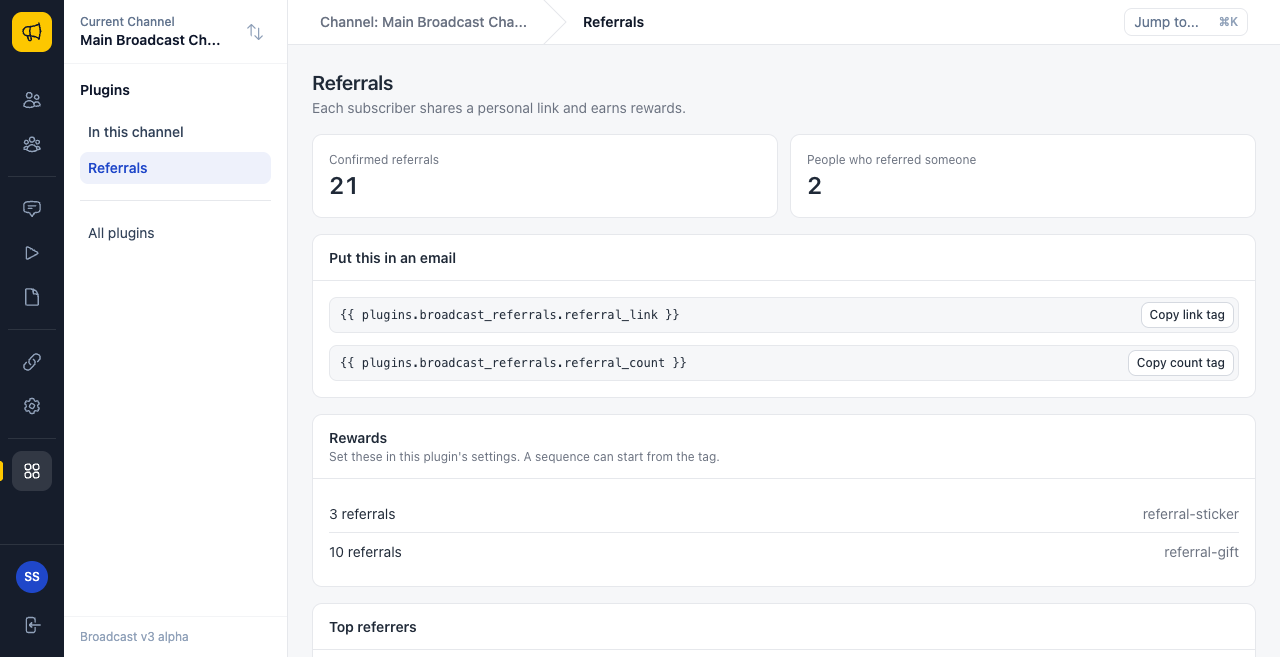
Here is what to notice:
- The stats already exist in the HTML. The script sets
value,rowsanditems, and each component redraws itself. byId("notice").hiddenshows the banner only when a setting is missing.- The
catchblock setsleaders.rows = [], so that the table does not stay in its loading state.
Pack and install
zip -r -X ../referrals-1.0.0.broadcast-plugin manifest.json dist ui
Upload it, review it and deploy it. In the channel, fill in the settings:
| Setting | Example |
|---|---|
| Signup page address | https://example.com/join |
| Rewards | 3 referral-sticker |
The address must be a page with a Broadcast form. Then turn the plugin on.
Use it
- Put the link in an email:
<a href="{{ plugins.local_referrals.referral_link }}">Share your link</a>
- Send it to a small segment with your own address in it. The link has your code in it, such as
?ref=r1vc5e. - Open the link in a private window and sign up with a second test address.
- If the form uses double opt-in, click the link in the confirmation email.
- Open Plugins in the sidebar, then Referrals.
You should see your first address in the list of top referrers, with a count of 1. When the count reaches a reward, the tag appears on that subscriber.
If the count stays at 0, check these:
- Is the second address new? An address that already exists keeps no code.
- Did the person confirm?
- Does the form page keep
?ref=in its address?
Things to know
- A code can be shared anywhere. A referral proves a confirmed signup, not a real friend. For a reward with real value, check for odd patterns before you pay out.
- The link needs a real send. Plugin hooks do not run in test sends or transactional emails.
- The page shows up to 100 referrers, because
store.listreturns at most 100 rows.
Try it yourself
- Add a
subscriberPanelpage that shows one person’s count. See the panel recipe. - Add a reward email with a sequence step.
